



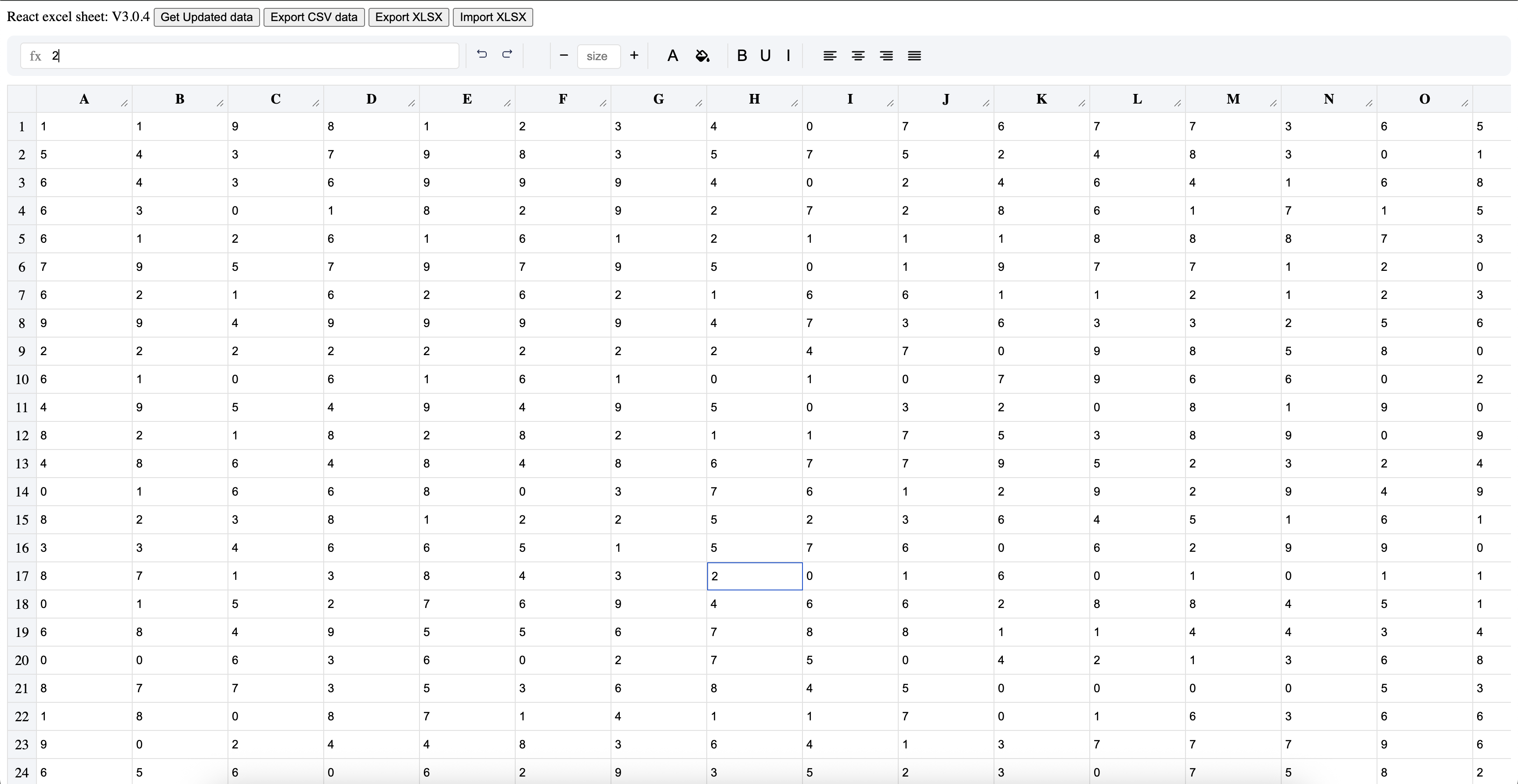
The fastest, most lightweight React spreadsheet component - Render 100,000+ cells with blazing performance. Perfect for building Excel-like applications, data grids, and complex data entry forms in React.
- ⚡ Blazing Fast - Optimized virtual scrolling renders 100,000+ cells smoothly
- 🪶 Ultra Lightweight - Only ~300KB, no heavy dependencies
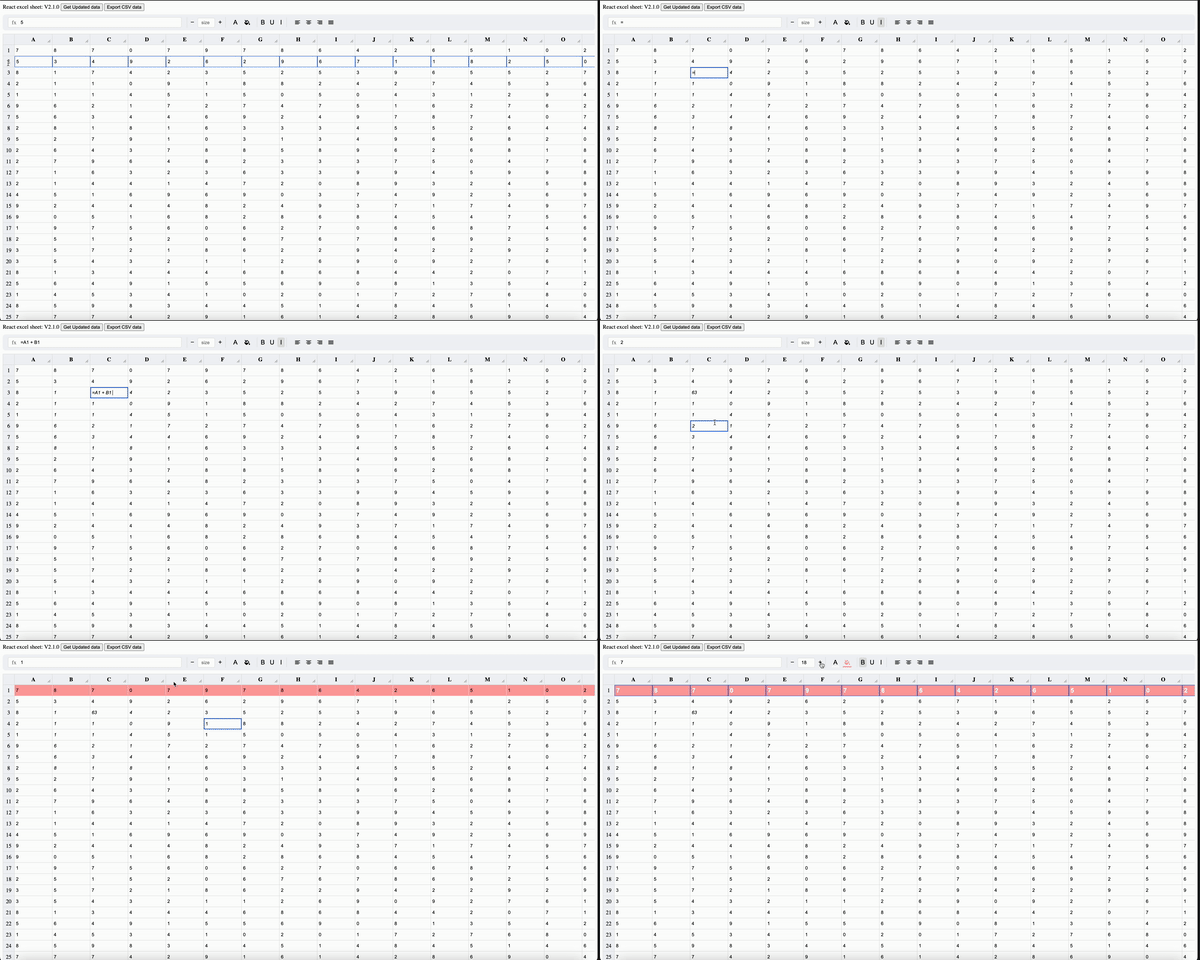
- 🧮 Excel-like Formulas - Full calculation engine: SUM, AVERAGE, COUNT, MIN, MAX, IF, CONCAT, ROUND, ABS, SQRT, POWER, expressions like - (=A1*B2+C3) and more
- 🔣 Σ Formula Toolbar - Insert range and single-cell formulas instantly with the Σ button
- 💡 fx Bar with Autocomplete - Live formula bar with function suggestions as you type
- 🎨 Rich Formatting - Bold, italic, underline, colors, alignment, and more
- 📊 Merge Cells - Combine cells like in Excel
- ↩️ Undo/Redo - Full history management
- ⌨️ Keyboard Navigation - Arrow keys, shortcuts, Excel-like experience
- 📋 Copy/Paste - Multi-cell selection and clipboard operations
- 📁 Import/Export - CSV and XLSX support
- 🔒 Read-Only Mode - Display data without editing
- 🎯 100% Test Coverage - Reliable and production-ready
- 📱 TypeScript Support - Full type definitions included
This library is highly optimized for performance. See our Performance Guide for:
- Detailed benchmarks
- Optimization techniques
- Best practices
- Memory management tips
npm install react-spread-sheet-excelyarn add react-spread-sheet-excelpnpm add react-spread-sheet-excelimport React, { useRef, useState } from "react";
import Sheet, { SheetRef } from "react-spread-sheet-excel";
function App() {
const [data] = useState([
[{ value: "Product" }, { value: "Price" }, { value: "Quantity" }, { value: "Total" }],
[{ value: "Apple" }, { value: "1.5" }, { value: "10" }, { value: "=B2*C2" }],
[{ value: "Banana" }, { value: "0.8" }, { value: "15" }, { value: "=B3*C3" }],
]);
const sheetRef = useRef<SheetRef>(null);
const handleChange = (row?: number, col?: number, value?: string) => {
console.log(`Cell [${row}, ${col}] changed to: ${value}`);
};
const getData = () => {
const updatedData = sheetRef.current?.getData();
console.log("Current data:", updatedData);
};
return (
<div>
<button onClick={getData}>Get Data</button>
<Sheet data={data} onChange={handleChange} ref={sheetRef} />
</div>
);
}
export default App;Our spreadsheet uses advanced virtual scrolling and memoization techniques to handle massive datasets:
- Virtual Rendering: Only visible cells are rendered
- Optimized Re-renders: Smart memoization prevents unnecessary updates
- Calculation Caching: Formula results are cached for instant display
- Lazy Loading: Rows load on-demand as you scroll
Benchmark: Renders 1000 rows × 100 columns in milliseconds!
Full calculation engine supporting cell references, ranges, and built-in functions:
// Basic arithmetic with cell references
=A1 + B2
=A1 * B2 + (C3 - D4) / E5
=(A1 + A2 + A3) * 0.1

// Range formulas (Σ toolbar or type directly)
=SUM(A1:A10)        // Sum a range
=AVERAGE(B1:B5)     // Mean of a range
=COUNT(C1:C10)      // Count numeric cells
=COUNTA(D1:D10)     // Count all non-empty cells
=MIN(A1:A10)        // Smallest value
=MAX(A1:A10)        // Largest value
=CONCAT(A1:A3)      // Join text in a range

// Single-cell functions
=ABS(A1)            // Absolute value
=SQRT(A1)           // Square root
=ROUND(A1, 2)       // Round to N decimal places
=POWER(A1, 3)       // Raise to a power
=IF(A1>0, A1, 0) // Conditional expressionClick the Σ button in the toolbar to insert a formula into the selected cell:
- Range formulas (SUM, AVERAGE, COUNT, COUNTA, MIN, MAX, CONCAT) — built from the current selection, result placed in the cell below
- Single-cell formulas (ABS, SQRT, ROUND, POWER, IF) — applied to the selected cell's address
Type = followed by letters in the fx bar (e.g. =SU) to get a dropdown of matching functions with descriptions. Use ↑ ↓ to navigate, Enter or Tab to apply.
While typing a formula, all referenced cells glow with a blue dashed border and the relevant column/row headers highlight in blue — so you always know what's in scope.
// Apply formatting via toolbar or keyboard shortcuts
Ctrl/Cmd + B  // Bold
Ctrl/Cmd + I  // Italic
Ctrl/Cmd + U  // Underline

// Programmatic styling
const styledData = [
  [{
    value: "Header",
    styles: {
      fontWeight: "bold",
      background: "#4CAF50",
      color: "white"
    }
  }]
];- Multi-cell selection: Click and drag or Shift+Arrow keys
- Copy: Ctrl/Cmd + C
- Cut: Ctrl/Cmd + X
- Paste: Ctrl/Cmd + V
- Select All: Ctrl/Cmd + A
import { SheetRef } from "react-spread-sheet-excel";

const sheetRef = useRef<SheetRef>(null);

// Export to CSV
const exportCSV = () => {
  sheetRef.current?.exportCsv("mydata", true); // true = include headers
};npm install @e965/xlsximport * as XLSX from "@e965/xlsx";
import { getCalculatedVal, printToLetter } from "react-spread-sheet-excel";
// Import XLSX
const importFromXlsx = (file: File, onSuccess: (data: any[][]) => void) => {
const reader = new FileReader();
reader.onload = (e) => {
const arrayBuffer = e.target?.result as ArrayBuffer;
const workbook = XLSX.read(arrayBuffer, { type: "array" });
const worksheet = workbook.Sheets[workbook.SheetNames[0]];
const jsonData = XLSX.utils.sheet_to_json(worksheet, { header: 1 }) as any[][];
const formatted = jsonData.map((row) =>
row.map((cell) => ({ value: cell }))
);
onSuccess(formatted);
};
reader.readAsArrayBuffer(file);
};
// Export XLSX
const exportToXlsx = (data: any[][], fileName = "export.xlsx") => {
const aoa = data.map((row) =>
row.map((cell) => {
if (cell.value?.toString().startsWith("=")) {
return getCalculatedVal(cell.value, data);
}
return cell.value;
})
);
const worksheet = XLSX.utils.aoa_to_sheet(aoa);
const workbook = XLSX.utils.book_new();
XLSX.utils.book_append_sheet(workbook, worksheet, "Sheet1");
XLSX.writeFile(workbook, fileName);
};| Prop | Type | Default | Description |
|---|---|---|---|
data |
any[][] |
[[]] |
Initial spreadsheet data (2D array) |
onChange |
(row?, col?, value?) => void |
- | Callback fired on cell changes |
resize |
boolean |
false |
Enable column resizing |
hideXAxisHeader |
boolean |
false |
Hide column headers (A, B, C...) |
hideYAxisHeader |
boolean |
false |
Hide row numbers (1, 2, 3...) |
headerValues |
string[] |
['A','B','C'...] |
Custom column headers |
readonly |
boolean |
false |
Make spreadsheet read-only |
hideTools |
boolean |
false |
Hide formatting toolbar |
autoAddAdditionalRows |
boolean |
true |
Auto-add rows when scrolling |
| Method | Parameters | Returns | Description |
|---|---|---|---|
getData |
- | Data[][] |
Get current spreadsheet data |
setData |
data: Data[][] |
void |
Replace all data |
exportCsv |
filename: string, includeHeaders?: boolean |
void |
Export to CSV file |
updateOneCell |
row: number, col: number, value: any |
void |
Update single cell |
getOneCell |
row: number, col: number |
Data |
Get single cell data |
interface Data {
  value: string | number;
  styles?: { [key: string]: string };
  type?: string;
  colSpan?: number;
  rowSpan?: number;
  skip?: boolean; // For merged cells
}Perfect for complex data entry with calculations, validations, and formatting.
Build budgeting tools, expense trackers, and financial calculators.
Track products, quantities, prices with automatic calculations.
Create dynamic reports with user-editable data and formulas.
Build interactive spreadsheet tutorials and exercises.
const styledData = [
  [
    {
      value: "Revenue",
      styles: {
        fontWeight: "bold",
        fontSize: "16px",
        background: "#2196F3",
        color: "white",
        textAlign: "center"
      }
    },
    { value: "=B2+B3+B4", styles: { fontWeight: "bold" } }
  ]
];const mergedData = [
[
{ value: "Merged Header", colSpan: 3, rowSpan: 1 },
{ skip: true },
{ skip: true }
]
];<Sheet
data={data}
readonly={true} // Entire sheet read-only
/><Sheet
data={data}
headerValues={["Product", "Q1", "Q2", "Q3", "Q4", "Total"]}
/>| Shortcut | Action |
|---|---|
Arrow Keys |
Navigate cells |
Shift + Arrow |
Select multiple cells |
Ctrl/Cmd + C |
Copy |
Ctrl/Cmd + X |
Cut |
Ctrl/Cmd + V |
Paste |
Ctrl/Cmd + Z |
Undo |
Ctrl/Cmd + Shift + Z |
Redo |
Ctrl/Cmd + B |
Bold |
Ctrl/Cmd + I |
Italic |
Ctrl/Cmd + U |
Underline |
Ctrl/Cmd + A |
Select all |
Delete/Backspace |
Clear selected cells (only when no input field is focused) |
Double-click / Enter |
Edit cell |
Esc |
Cancel edit |
↑ ↓ in fx bar |
Navigate formula autocomplete suggestions |
Enter / Tab in fx bar |
Apply selected formula suggestion |
100% test coverage with comprehensive unit tests:
npm test- Performance Guide - Optimization tips and benchmarks
- Live Demo
- CodeSandbox Example
- StackBlitz Example
- Medium Article: Building a Lightning-Fast Spreadsheet
- Medium Article: State Management Without Redux
Contributions are welcome! Please feel free to submit a Pull Request.
ISC License - see LICENSE file for details

If this project helped you, please give it a ⭐️!
react spreadsheet, react excel, react data grid, react table, excel component, spreadsheet component, data entry, virtual scrolling, formula calculation, cell formatting, react datagrid, editable grid, react grid, excel-like, spreadsheet editor, data table, react table editor, lightweight spreadsheet, fast spreadsheet, performance spreadsheet
Made with ❤️ for the React community