Repository navigation
Manage plugin error #20
Description
Activity
Even I am facing the similar issue.
Thanks for the report. I'm not able to reproduce the issue, though. From what @nicalbee is describing it seems to me it may be a temporary glitch while parsing the web info with the function plugin_getweb.m. Would you mind to try again today and let us know? Let's follow up from there,
Thanks,
RHello,
The problem seems to appear even now.
Below is the screen shots


Although I had tried reinstalling .I've just replicated this on a different system (Mac 10.14.5) but the same version of MATLAB ('9.2.0.556344 (R2017a)'). I can try again tomorrow with a different version of MATLAB. I could also download EEGLAB again. Any ideas for other debugging options?
Thanks for responding to this so quickly by the way - really appreciated.
Thanks, @SarasCbcs, and @nicalbee for the update and willingness to help.
@nicalbee, can you put a breakpoint in line 82 of plugin_getweb.m and launch the plugin manager.
From there we can check a couple of things.
1- if the variable 'stats' is empty or not
2- if after executing line 88 the variable 'indMatch' is empty or not
This may indicate either a problem in reading the webpage (line 55) or by extracting its information (line 56).
Please let me know of the output.
Thanks for your help and patience,
RGood morning,
I've set the breakpoint (and attached zipped version of the variables for you to have a better look) but the stats variable is not empty, lots of things in there:
stats =
1×6 cell array
{114×1 cell} [114×1 int32] {114×1 cell} {114×1 cell} [114×1 double] [114×1 int32]The script doesn't make it past line 82 loop - 'plugin' is empty.
Seems that it's actually the 'webPage' variable that's empty (created at line 46, 'type' is also empty).
Any of that make any sense?
Cheers,
NicSome further information on this. A colleague in my department is using the new version without any issues. On the off change there were some differences, I took a copy of their EEGLAB but I'm getting the same problem with the alternate version.
I've also just tried it with a later version of MATLAB - 9.3.0.713579 (R2017b) - and it works fine. So there may well be something specific about the 2017a build that's causing the issue. Hope that helps. I'm definitely interesting in helping to get to the bottom of the issue. Please let me know if I can help.
I have the same issue on matlab 64 bit r2014b

I am having this issue with R2015a.

Is there any advice beyond simply changing version of MATLAB?We are currently working on this issue. If you run into this problem while we are working on this, please install the plugin you want by downloading the plugin from this page, decompressing the zip file in the folder ../eeglab/plugins/ and the restarting EEGLAB.
Thanks,
RThis issue was troubleshot recently with help from @whoopee. This issue is related to the JAVA version used by MATLAB. Updating the JAVA version on your computer may not help since MATLAB uses its own JAVA distribution (for a windows machine see e.g.: .../MATLAB/R2015b/sys/java/jre/win64/jre)
@whoopee copied the folder /MATLAB/R2015b/sys/java/jre/win64/jre from a different machine without the issue, and was able to make it work again. So, to fix this issue, just update the JAVA version of your MATLAB.
Thanks,
RReacted by Lesha and hosseinaghaieclose your matlab
download 'jre-8u211-windows-x64.exe' ,and installed it
delete all file and folder in 'C:\Program Files\MATLAB\R2014b\sys\javal\jre\win64\jre'
copy all file of 'C:\Program Files\Java\jre1.8.0_211' in to 'C:\Program Files\MATLAB\R2014b\sys\javal\jre\win64\jre'p.s: i install matlab and jre-8u211-windows-x64.exe in default folder,

I just did this fix on a Mac High Sierra using Matlab2015b.
Eeglab2019 had previously been working but weeks after I had installed plugins abruptly gave the error.
To fix, you go to Matlab in applications, right click show package contents and go to :
sys/java/jre/maci64/ where there is a jre folder.
Now install a new version of Java. I did jre-8u221-macosx-x64 from Oracle
This will come with an installer file that installs it in:
Library/Internet Plug-Ins/JavaAppletPlugin-plugin Right click this to show package contents
Ignore any internet advice that says to go to Library/Java/VirtualMachines/ as this goes to the JDK!!!
You can also check your location by opening the Java preference pane in System Preferences.
Now inside the package go to Contents/Home
Option drag the Home folder into the maci64/ folder in Matlab alongside the old jre.
Change the name of jre to jreo in case you need the old version.
Right click Home to change it to jre.
Quit Matlab if you haven't done so already and restart Matlab.
When I did this the first time it issued a stream of red Java tracking errors but eeglab worked.
I quit again and the errors vanished this time and eeglab2019 worked correctly and opened the plugins.Reacted by Ramon Martinez-Cancino and Kishan SanganiReacted by Kishan Sangani- locked as resolved and limited conversation to collaborators
on Jul 19, 2019 - unlocked this conversation
on Jul 24, 2019 On a Mac and probably all operating systems make sure to reinstall eeglab2019 again after updating the Java version in Matlab if you have already used Eeglab before switching Java versions in Matlab. If you get the red java errors noted above, it is because you have installed Eeglab already and it has internal links to an incorrect Java address. This may cause ongoing Java errors e.g. when you try to open a dataset, or look at Matlab variables, and may appear to cause Matlab to be malfunctioning generally. The fix is (a) to return access paths to default, (b) quit and restart Matlab and (c) reinstall Eeglab and the plugins from scratch.
I'm still having trouble with this so watch out. I have ended up reverting to Eeglab13 for now with the original version of Java it had which I saved under jreo because the 2019 Eeglab version seems to be unstable under the updated Java. Still trying to make sure 13 is now stable after initial successes with 2019 only to find next time I turn the machine on it has gone back to fundamental errors causing all Matlab functions to make Java errors even to the point of being unable to clear access paths or look at a variable.
I had several users report this issue.
Perhaps the error message on trying (and failing) to run the plugin manager should point people to this??
I just resolved this error for Matlab R2016b and EEGLAB v2020.0 and here's what worked for me:
plugin_urlreadwrite() function contained several strings within double quotes (e.g., " ", lines 40, 42, 51 and 74) and my matlab script editor did not parse these as strings. I replaced these with single quotes, and the function started working fine!
(This function is called within plugin_getweb() function - when you select "Manage EEGLAB extensions" in the EEGLAB menu).Cheers,
Milan- OK, let me fix that in 8ecac9d Thank you Milan, Arno…On Sep 10, 2020, at 3:30 PM, milan-andrejevic ***@***.***> wrote: I just resolved this error for Matlab R2016b and EEGLAB v2020.0 and here's what worked for me: plugin_urlreadwrite() function contained several strings within double quotes (e.g., " ", lines 40, 42, 51 and 74) and my matlab script editor did not parse these as strings. I replaced these with single quotes, and the function started working fine! (This function is called within plugin_getweb() function - when you select "Manage EEGLAB extensions" in the EEGLAB menu). Cheers, Milan — You are receiving this because you are subscribed to this thread. Reply to this email directly, view it on GitHub, or unsubscribe.
- thanks for the expert solution!…On 11/09/2020, at 1:30 PM, milan-andrejevic ***@***.***> wrote: I just resolved this error for Matlab R2016b and EEGLAB v2020.0 and here's what worked for me: plugin_urlreadwrite() function contained several strings within double quotes (e.g., " ", lines 40, 42, 51 and 74) and my matlab script editor did not parse these as strings. I replaced these with single quotes, and the function started working fine! (This function is called within plugin_getweb() function - when you select "Manage EEGLAB extensions" in the EEGLAB menu). Cheers, Milan — You are receiving this because you commented. Reply to this email directly, view it on GitHub <#20 (comment)>, or unsubscribe <https://github.com/notifications/unsubscribe-auth/AMVEBUHVJTGHT2VRTAYCLXTSFF4T5ANCNFSM4HTGT3QA>.
I have an issue when opening the manage extension from the EEGLAB (v2019.0) dropdown menu (File > Manage EEGLAB extensions) and it's throwing an error:

I've tried updating java, disabling the firewall and I have active internet connection yet the error still shows.
I need to download the LSL plugin.
- not sure how this got to me. I only use an old version occasionally on a Mac…On 16/06/2023, at 9:57 PM, arayes2000 ***@***.***> wrote: I have an issue when opening the manage extension from the EEGLAB (v2019.0) dropdown menu (File > Manage EEGLAB extensions) and it's throwing an error: <https://user-images.githubusercontent.com/128175003/246383227-24372405-62d6-4eb5-a897-c1fad8266430.png> I've tried updating java, disabling the firewall and I have active internet connection yet the error still shows. I need to download the LSL plugin. — Reply to this email directly, view it on GitHub <#20 (comment)>, or unsubscribe <https://github.com/notifications/unsubscribe-auth/AMVEBUGZC7JLBJYY5RYNKHLXLQUY3ANCNFSM4HTGT3QA>. You are receiving this because you commented.
- Can you try updating to the latest version of EEGLAB?…On Jun 16, 2023, at 12:30 PM, dhushara ***@***.***> wrote: not sure how this got to me. I only use an old version occasionally on a Mac > On 16/06/2023, at 9:57 PM, arayes2000 ***@***.***> wrote: > > > I have an issue when opening the manage extension from the EEGLAB (v2019.0) dropdown menu (File > Manage EEGLAB extensions) and it's throwing an error: > > <https://user-images.githubusercontent.com/128175003/246383227-24372405-62d6-4eb5-a897-c1fad8266430.png> > I've tried updating java, disabling the firewall and I have active internet connection yet the error still shows. > > I need to download the LSL plugin. > > — > Reply to this email directly, view it on GitHub <#20 (comment)>, or unsubscribe <https://github.com/notifications/unsubscribe-auth/AMVEBUGZC7JLBJYY5RYNKHLXLQUY3ANCNFSM4HTGT3QA>. > You are receiving this because you commented. > — Reply to this email directly, view it on GitHub, or unsubscribe. You are receiving this because you commented.
您可以尝试更新到最新版本的EEGLAB吗?
...
On Jun 16, 2023, at 12:30 PM, dhushara @.> wrote: not sure how this got to me. I only use an old version occasionally on a Mac > On 16/06/2023, at 9:57 PM, arayes2000 @.> wrote: > > > I have an issue when opening the manage extension from the EEGLAB (v2019.0) dropdown menu (File > Manage EEGLAB extensions) and it's throwing an error: > > https://user-images.githubusercontent.com/128175003/246383227-24372405-62d6-4eb5-a897-c1fad8266430.png > I've tried updating java, disabling the firewall and I have active internet connection yet the error still shows. > > I need to download the LSL plugin. > > — > Reply to this email directly, view it on GitHub <#20 (comment)>, or unsubscribe https://github.com/notifications/unsubscribe-auth/AMVEBUGZC7JLBJYY5RYNKHLXLQUY3ANCNFSM4HTGT3QA. > You are receiving this because you commented. > — Reply to this email directly, view it on GitHub, or unsubscribe. You are receiving this because you commented.I have the same problem
您可以尝试更新到最新版本的EEGLAB吗? 2023 年 6 月 16 日下午 12:30,杜沙拉 @.>写道:不知道这是怎么回事。我只是偶尔在 Mac 上使用旧版本 > 在 16/06/2023 晚上 9:57,arayes2000 _@**。**_> 写道:> > > 从 EEGLAB (v2019.0) 下拉菜单(文件 > 管理 EEGLAB 扩展)打开管理扩展时遇到问题,并且它抛出错误:> >https://user-images.githubusercontent.com/128175003/246383227-24372405-62d6-4eb5-a897-c1fad8266430.png> 我尝试更新 java,禁用防火墙,并且我有有效的互联网连接,但错误仍然显示。> >我需要下载 LSL 插件。> > — > 直接回复此电子邮件,在 GitHub <#20 (comment)> 上查看,或取消订阅 https://github.com/notifications/unsubscribe-auth/AMVEBUGZC7JLBJYY5RYNKHLXLQUY3ANCNFSM4HTGT3QA。> 您收到此消息是因为您发表了评论。> — 直接回复此电子邮件,在 GitHub 上查看或取消订阅。您收到此消息是因为您发表了评论。
I have the same problem
I updated eeglab2023.1
We just had the same issue with a new installation on MATLAB2026b. In order to fix it for now, we just installed the following Add-on: MATLAB Support for OpenJDK (only compatible with R2026a+):

However, I think this means that MATLAB is really moving away from Java with all the GUI updates in newer versions. Additionally, the amount of Java specific code is very limited in the EEGLAB codebase, it might make sense to actually just remove it to avoid this issue altogether. The code that has Java the most is the http of the plugin manager, which could easily be replaced with
webread,websaveandwebwritewhich have been in MATLAB since ~ 2014. I don't think that there is much more Java in EEGLAB after that change. Let me know if you would like assistance with this.See also:
"Starting in R2026b, MATLAB® Runtime no longer includes the JRE™. If your deployed application uses Java® functionality, for instance, by calling Java methods from MATLAB code or by connecting to databases using JDBC, you must manually configure MATLAB Runtime to use a supported external JRE or Java Development Kit (JDK™)."
https://www.mathworks.com/help/compiler/configure-matlab-runtime-to-use-java.html


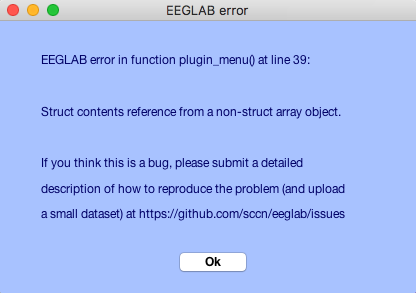
I've just attempted to open the manage extension from the EEGLAB (v2019.0) dropdown menu (File > Manage EEGLAB extensions) and it's throwing an error:
"EEGLAB error in function plugin_menu() at line 39:
Struct contents reference from a non-struct array object."
The following was printed to the MATLAB command window:
"Retreiving plugins with extensions...
Retreiving download statistics..."
Then there's the popup - attached
Having a look in the plugin_menu function, the 'plugin' structure variable created on line 36 doesn't have a '.downloads' field.
I'm running MATLAB 9.2.0.556344 (R2017a) on a Mac 10.12.6, and would like to be able to use the 'loadcurry' extension.
Happy to help if here's anything I can do.