Repository navigation
Send Android key events to the tapped view while no view has focus - #59593
YevheniiKotyrlo wants to merge 1 commit into
Conversation


With `enableKeyEvents` on, a key pressed after a tap that neither types a
character nor moves focus reached no JS handler: Android leaves no view
focused in touch mode, so it hands the key to no view and
`JSKeyDispatcher` has no target.

The root view now takes such a key from Android's unhandled-key listener
and sends it to the view a browser would hold focused: the nearest
focusable React view of the window's last tap, or of the view whose focus
entering touch mode took away. A scroll keeps that target; a tap on
nothing focusable, or any view taking Android's focus, ends it.

Fixes react#59537
 meta-cla
Bot
added
the
CLA Signed
meta-cla
Bot
added
the
CLA Signed
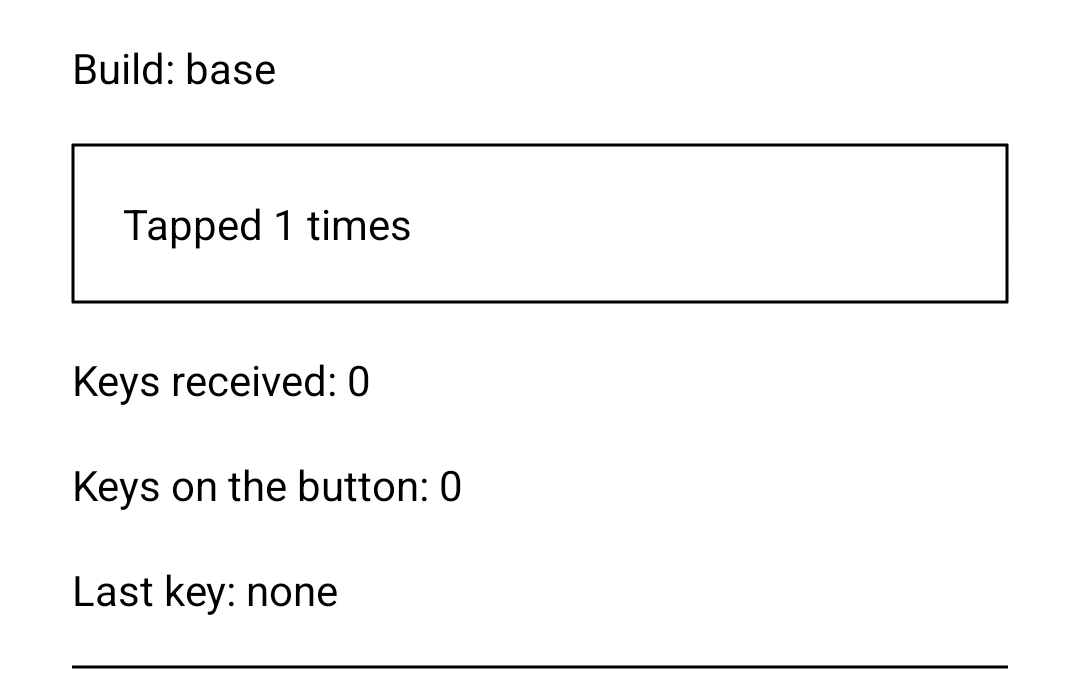
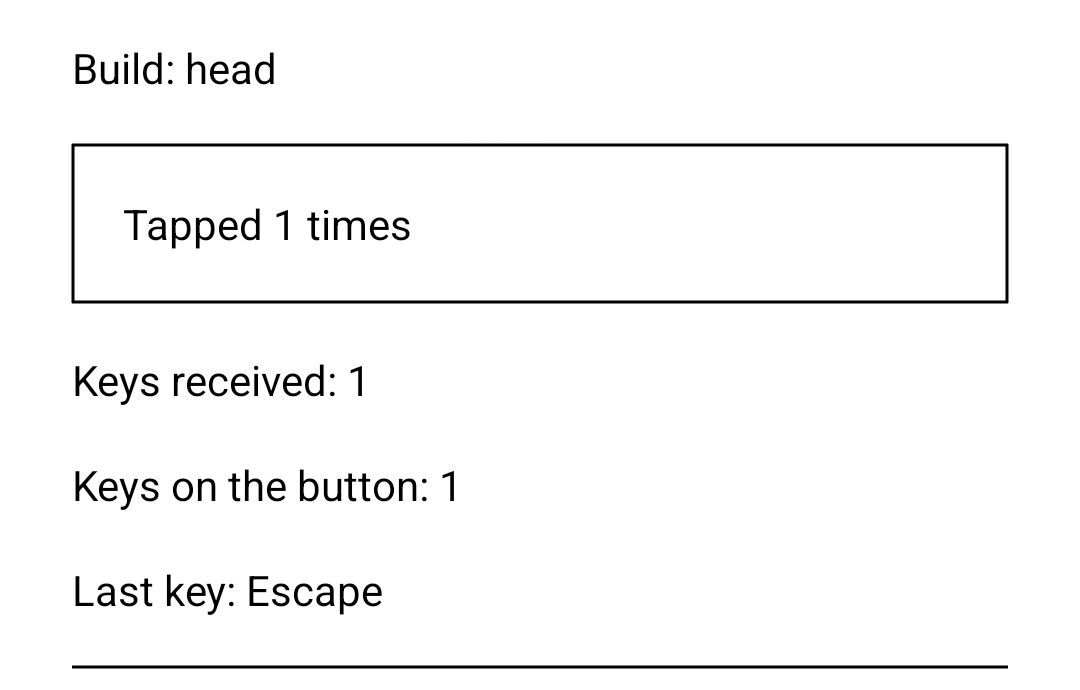
Device evidence — before / afterUNFIXED — On FIXED — With this PR, the same Escape reaches the tapped
Galaxy S23, Android 14 (API 34): RNTester release builds of
What a tap costs
|
onInterceptTouchEvent, µs, median (p25–p75) |
main |
this PR | main, again |
this PR, again |
|---|---|---|---|---|
| a tap's down | 119.8 (110.7–131.5) | 116.1 (100.5–131.3) | 118.9 (106.2–133.5) | 121.4 (103.1–138.3) |
| a tap's up | 66.8 (61.2–75.3) | 96.5 (89.5–105.8) | 65.9 (61.4–74.6) | 94.5 (88.5–105.1) |
REDMAGIC NX809J, Android 16 (API 36): RNTester release builds of main and of this PR with enableKeyEvents on, the probe below with NESTING set to '30', and trace sections around ReactSurfaceView's touch handlers in both; four runs in the order the table reads, each 150 adb shell input tap on the Pressable, read from a Perfetto trace of the app's sections; each run's samples: main · this PR · main, again · this PR, again.
Probe
The root component. Each build sets BUILD to base or head, which the frames show; the cost runs set NESTING to '30', which puts the Pressable 30 views deep, and the frames come from the same component without the nesting. The cost runs also add these trace sections to ReactSurfaceView; no tap reached its onTouchEvent:
override fun onInterceptTouchEvent(ev: MotionEvent): Boolean {
  android.os.Trace.beginSection("RootTouch.onInterceptTouchEvent")
  try {
    return super.onInterceptTouchEvent(ev)
  } finally {
    android.os.Trace.endSection()
  }
}

override fun onTouchEvent(ev: MotionEvent): Boolean {
  android.os.Trace.beginSection("RootTouch.onTouchEvent")
  try {
    return super.onTouchEvent(ev)
  } finally {
    android.os.Trace.endSection()
  }
}
import type {KeyEvent, NativeSyntheticEvent} from 'react-native';
import * as React from 'react';
import {useState} from 'react';
import {Pressable, ScrollView, StyleSheet, Text, View} from 'react-native';
const BUILD = 'unset';
const NESTING = '0';
const LINES: $ReadOnlyArray<number> = Array.from(
{length: 60},
(_, index) => index + 1,
);
function describeKey(event: NativeSyntheticEvent<KeyEvent>): string {
const {key, ctrlKey, altKey, metaKey, shiftKey} = event.nativeEvent;
const modifiers = [
ctrlKey ? 'Ctrl' : null,
altKey ? 'Alt' : null,
metaKey ? 'Meta' : null,
shiftKey ? 'Shift' : null,
].filter(Boolean);
return [...modifiers, key].join('+');
}
function Nested({children, depth}: {children: React.Node, depth: number}) {
return depth === 0 ? (
children
) : (
<View collapsable={false}>
<Nested depth={depth - 1}>{children}</Nested>
</View>
);
}
export default function KeyEventsWithoutFocusProbe(): React.Node {
const [keys, setKeys] = useState<$ReadOnlyArray<string>>([]);
const [buttonKeys, setButtonKeys] = useState(0);
const [taps, setTaps] = useState(0);
return (
<View
onKeyDown={event => setKeys(previous => [...previous, describeKey(event)])}
style={styles.screen}
testID="root">
<Text testID="build">Build: {BUILD}</Text>
<Nested depth={Number(NESTING)}>
<Pressable
onKeyDown={() => setButtonKeys(count => count + 1)}
onPress={() => setTaps(count => count + 1)}
style={styles.button}
testID="tap-target">
<Text>Tapped {taps} times</Text>
</Pressable>
</Nested>
<Text testID="key-count">Keys received: {keys.length}</Text>
<Text testID="button-key-count">Keys on the button: {buttonKeys}</Text>
<Text testID="last-key">
Last key: {keys.length === 0 ? 'none' : keys[keys.length - 1]}
</Text>
<ScrollView style={styles.list} testID="scroll-area">
{LINES.map(line => (
<Text key={line} style={styles.line}>
Line {line}, text to scroll
</Text>
))}
</ScrollView>
</View>
);
}
const styles = StyleSheet.create({
screen: {
backgroundColor: 'white',
flex: 1,
gap: 16,
padding: 24,
paddingTop: 96,
},
button: {
borderWidth: 1,
padding: 16,
},
list: {
borderTopWidth: 1,
flex: 1,
},
line: {
paddingVertical: 8,
},
});RNTesterApplication.onCreate, after loadReactNative(this):
ReactNativeFeatureFlags.dangerouslyForceOverride(
    object :
        ReactNativeFeatureFlagsProvider by ReactNativeFeatureFlagsOverrides_RNOSS_Stable_Android() {
      override fun enableKeyEvents(): Boolean = true
    },
)
Visual regressionNo visual differences at ios: no capture |

 facebook-github-tools
Bot
added
the
Shared with Meta
facebook-github-tools
Bot
added
the
Shared with Meta

Summary:
With
enableKeyEventson, Android sendsonKeyDownandonKeyUpto the view that holds Android focus, and to nothing while no view holds it. A touch leaves the window with no focused view:ViewRootImplenters touch mode when a touch goes down and takes focus from every view that is not focusable in touch mode, which is every React Native view but a text input. So a key pressed after a tap that neither types a character nor moves focus — Escape, a function key, a letter held with Ctrl — reaches no JS handler, and a hardware Escape cannot close a dialog opened by touch (#59537):ViewGroup.dispatchKeyEventhands the key to no view, soReactRootView.dispatchKeyEventnever runs, andJSKeyDispatcherhas no target anyway.A browser in the same place targets the element the tap focused (HTML, click focusable), keeps that focus through a scroll, and targets the body once a tap lands on nothing focusable or the focused element blurs (UI Events,
keydown). This change gives Android that target while no view holds focus:ReactRootViewregisters aView.OnUnhandledKeyEventListenerthroughViewCompat, Android's path for a key no view took, which AndroidX extends below API 28 under aComponentActivity. With no view focused in the window, it sends the key to JS; it returnsfalse, so Back and the Activity's own keys run as before.TapFocusTrackerkeeps, for the whole window, the nearest focusable React view of the last tap — one pointer that never moves past the touch slop — or of the view whose focus entering touch mode took away, as the first touch after keyboard navigation does. A scroll, a cancelled touch or a second pointer leaves it; a tap on nothing focusable ends it, and so does any view taking Android's focus, so after a blur a key reaches no view, as a key aimed at the web's body reaches no handler below it.JSKeyDispatchersends the key to that view while it is still in its root, shown and focusable, and never readsfocusedViewTagon this path, which stays stale after a descendant loses focus.The focused path is unchanged. The root starts the listener and the tracker where it starts its layout listener, once it is attached to a window and a React instance, so making a root reads no flag, and with the flag off nothing is registered. Targeting the root element, which UI Events names when a page has no body, would reach no handler here: the Android root has no event emitter under Fabric.
A key that leaves touch mode — a typed character, Tab, an arrow, Enter or Space — is outside this change: Android focuses its default view for it, as before.
Fixes #59537.
Changelog:
[ANDROID] [FIXED] - With
enableKeyEventson, a key that neither types nor moves focus, pressed while no view has focus, reaches the focusable view the last tap landed onTest Plan:
ReactSurfaceViewKeyEventTest(new; Robolectric, every touch and key dispatched through the window's own input stages): onmainthe cases that expect a key with no view focused get no event; with this change all 22 pass../gradlew :packages:react-native:ReactAndroid:testDebugUnitTest --tests com.facebook.react.runtime.ReactSurfaceViewKeyEventTest -PenableWarningsAsErrors=truemainand this change on a Galaxy S23 (Android 14), withenableKeyEventsturned on inRNTesterApplicationand a root component of a focusablePressable, aScrollViewof text and a rootonKeyDown: after a tap, Escape, Ctrl+A and F2 reach the root's handler through thePressablewith this change and nothing onmain, as does Escape after a scroll and after a mouse click; a typed letter, and Tab then Escape, reach it once on both. The frames are in the evidence comment.ReactSurfaceView.onInterceptTouchEventtakes about 29 µs more on a tap's up, where it hit-tests the tap, and nothing measurable on its down, with the tapped view 30 views deep on a REDMAGIC NX809J (Android 16); a move adds a distance check. The numbers are in the evidence comment.ios, which could not run here as the Mac I have could not sign for a device; this change touches Android sources only.