







The options trading journal that keeps the whole story of every trade.
Options trades rarely stay simple. A spread gets adjusted, a straddle gets legged out of, a put gets assigned and turns into a covered call, a losing position gets rolled out three months. Your broker shows all of that as a pile of unrelated fills, and a spreadsheet only knows what you remembered to type in. GammaLedger keeps each trade together from the first leg to the last, so the P&L, the break-even and the win rate are the real ones.
It runs entirely in your browser. There's no account to create, no subscription, and no server holding your trades.
Open GammaLedger → · Website · Download for offline use
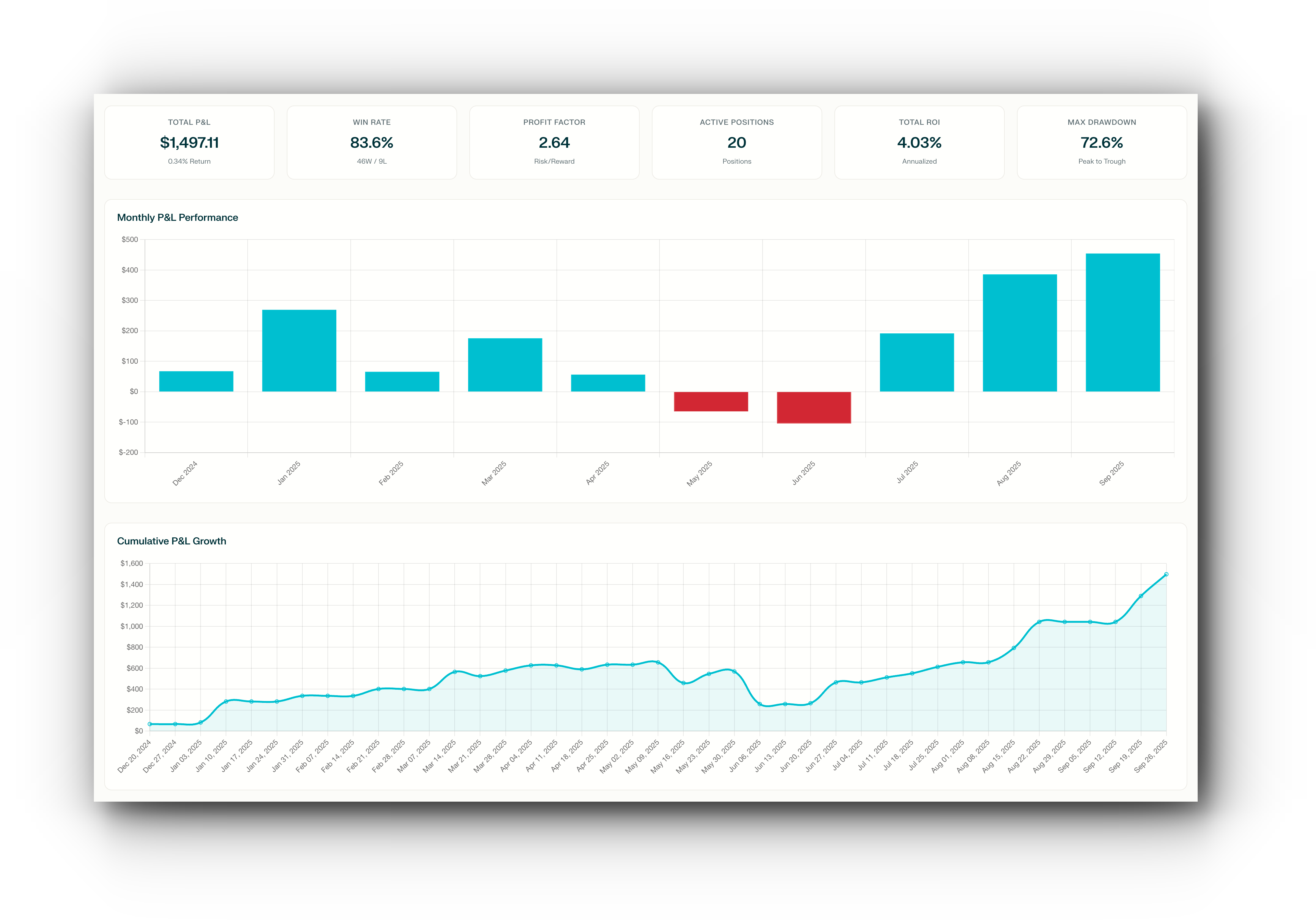
The app opens with sample data, so you can click around before importing anything of your own.
- Your trades stay on your machine. Data lives in your browser and in a JSON file you control. Nothing is uploaded unless you turn on an optional service (AI or market quotes), and then only that request goes out.
- The numbers follow the whole trade. Rolls, adjustments and assignments stay attached to the trade they belong to. Realized P&L is counted leg by leg, so a premium you haven't closed yet doesn't show up as profit early.
- Any strategy, not just one style. Single legs, verticals, calendars, diagonals, butterflies, condors, ratio spreads, straddles, collars, wheels. More than 60 strategy types, plus custom multi-leg trades.
- It tells you what needs a look. Contracts about to expire, short strikes in the money, earnings landing before expiration, wide bid/ask spreads, shares with nothing written against them.
- An AI Coach that has read your journal. Ask about your own positions, not options in general. Bring your own Gemini or OpenRouter key; nothing is sent until you agree.
- Free and open source. AGPLv3. No paywalled tier.
You trade spreads, condors, butterflies, calendars or straight calls and puts, and you adjust as you go. GammaLedger keeps every leg and every adjustment under one trade, shows win rate and P&L by strategy and by ticker, and lets you click from any chart straight into the trades behind it.
You run cash-secured puts, covered calls, the Wheel, PMCCs or credit spreads. The Wheel / PMCC tracker follows each position through assignment and every roll, separates premium collected from premium actually earned, and shows the break-even after all of it. The Credit Playbook lays out realized option P&L, realized stock P&L and unrealized P&L on shares you still hold.
Collars, protective puts, covered calls on long-term holdings, LEAPS. Cost basis includes the premiums, and capital at risk uses what you actually paid for the shares.
Your whole journal is one readable JSON file. Export trades to CSV, point the MCP server at your database so Claude Desktop or another agent can query it, or fork the app. It's TypeScript, has no backend, and is AGPL.
- More than 60 strategy types in a searchable picker, from single calls and puts to iron condors, jade lizards, ratio backspreads, calendars and double diagonals. Favorites and recently used strategies sit at the top and pre-fill the legs for you.
- Multi-leg entry in one form, or paste the fill from your broker. Robinhood and IBKR confirmations and OCC option symbols are recognized and turned into legs.
- Screenshot import: attach a picture of your broker's trade history and the AI Coach drafts the legs for you to review.
- Notes on every trade, chip filters by ticker, strategy, status and date, and a ⌘K command palette plus keyboard shortcuts for getting around.
- Roll detection. Rolled positions are grouped, with cumulative credits and debits and a break-even across the whole chain.
- Wheel / PMCC tracker. Each position moves through open, rolled, assigned and closed, with premium collected shown next to premium earned.
- Leg-level realized P&L. Premium on open legs is shown as "pending" until expiration or close, and upcoming expirations show up on the trend chart as future bars.
- Cost basis that follows reality. Covered calls and wheels use your actual share cost, averaged across purchases.
- Data checks. Orphan closing legs and closes dated after expiration are flagged so you can fix them.
- Active Positions with DTE, live P&L and a status dot. Hover it to see why a position needs attention and a suggested next step.
- Portfolio Greeks (rough Black-Scholes estimates), daily theta, collateral at risk and concentration by ticker.
- Performance Trend by day, week or month, with a per-ticker breakdown in the tooltip.
- Analytics tabs: Ticker P&L (realized and unrealized), strategy performance, win rate, fees, time in trade and a 60-day Monte Carlo projection.
- Info popovers that explain each metric, and a marker showing how many open positions have a fresh quote.
- Portfolio snapshot: a shareable PNG of your results with no account details on it.
- Light, dark or automatic theme.
An accounting view of every credit position, filterable by strategy and ticker. It shows realized option P&L, realized stock P&L and unrealized P&L on assigned shares, and refreshes stock and option quotes on demand.
Keep a list of tickers you're watching. Rate them, write a thesis, set a watch price with an alert for the day the price crosses it, and open a detail panel with fundamentals, signals, news, insider activity and earnings. Risk, Own?, Balance Sheet and Cheap? scores give you a quick read on each name, and thesis-drift markers flag tickers whose numbers no longer match what you wrote.
- Ask Coach from any row in Active Positions, All Trades or the Watchlist. The question arrives with the position's data already attached.
- Quick reviews: Portfolio health, Risk check, Strategy ideas and a Watchlist scan that ranks your whole list in a table.
- Answers you can check. Numbers in the canned reviews are matched against your real data ("Numbers checked: 14/14"). Replies can include tables and charts.
- AI verdict: each position gets a calibrated Favorable / Neutral / Unfavorable call next to its scores.
- Your choice of model. Google Gemini, or hundreds of models (Claude, GPT, Gemini and more) through one OpenRouter key. Replies stream in, and each one shows its token count and cost. Keys are encrypted in the browser, and an option to avoid providers that train on your data is on by default.
- MCP server. Prefer your own AI client? The GammaLedger MCP server gives Claude Desktop and other MCP clients read-only, local access to your saved database.
- Import OFX/QFX from most brokers, Robinhood and Charles Schwab CSVs, or any other CSV through a column mapper. Imports merge into your database and skip duplicates.
- Save to a JSON database file you own. Before saving, GammaLedger checks that the file hasn't changed on disk since you opened it.
- Export trades to CSV whenever you like.
- Optional startup setting to always open blank instead of loading the last database.
Add a free Finnhub key for stock quotes, earnings dates, fundamentals and news. Connect a Schwab account for live option quotes. Ticker links can open the research site of your choice. Everything else works without any of these.
1. Open the app. Go to gammaledger.com/app. It starts with sample data so you can explore first.
2. Bring in your trades. Pick one:
- Import your broker history on the Import page (see the table below).
- Add Trade by hand, or paste fills from your broker into the trade form.
- Attach a screenshot of your trade history in the AI Coach and let it draft the legs.
3. Save your database. Click Save Database and choose where the .json file lives. That file is your journal and your backup.
4. Optional extras. In Settings, add a Finnhub key for live quotes and earnings, an AI key for the Coach, and your account size if you'd like risk shown as a percentage.
Chrome and Edge give you the smoothest experience, since they can save straight back to the same file. Other browsers download a copy instead.
Prefer offline? Download gammaledger-<version>.zip from Releases, unzip it, and open index.html. It's the same app as a single file.
| Where your trades are | How to import |
|---|---|
| Most brokers (IBKR, Fidelity, E*TRADE, …) | OFX / QFX activity export |
| Robinhood | CSV export, or paste fills |
| Charles Schwab | Transaction history CSV |
| Anything else | CSV with the column mapper |
| A screenshot | AI Coach → Trade Screenshot |
| A GammaLedger backup | Load the JSON database |
Is my data really private? Yes. Trades are stored in your browser's local storage and in the JSON file you save. There is no GammaLedger server. The only outbound requests are the ones you switch on: AI Coach calls to Gemini or OpenRouter, and quote lookups to Finnhub or Schwab.
How do I back up or move to another computer?
Save the database to a .json file and keep a copy in your cloud drive or on a USB stick. On another machine, load that file. There's no automatic sync, on purpose.
Do I need an API key to use it? No. Journaling, imports, lifecycle tracking and analytics all work without one. Keys are only needed for the AI Coach and live market data.
Is the AI Coach financial advice? No. It analyzes your positions and explains what it sees. Decisions are yours.
Does it handle stocks, futures or crypto options? It's built for equity, ETF and index options. Shares are tracked when they come from assignment or as part of a strategy like a covered call or collar. Stand-alone stock trading, futures and crypto options aren't supported right now.
Is there a paid version? No. GammaLedger is free under AGPLv3. If you need to embed it in a proprietary product without the AGPL obligations, a commercial license is available (see License).
Tried it? I'd like to hear what worked and what didn't. Every issue gets read.








Bug fixes, new strategies, broker importers, analytics ideas and documentation are all welcome. GammaLedger is TypeScript and Vite with no UI framework and no backend.
git clone https://github.com/r-brown/GammaLedger.git
cd GammaLedger
npm install
npm run dev          # http://localhost:5173
npm run typecheck    # run this before opening a PR
DEVELOPERS.md covers the architecture and conventions, and CONTRIBUTING.md covers the PR process. A lot of this codebase was written with AI assistants, so reviewing and simplifying existing code counts as a real contribution too.
GammaLedger is free and open source under the AGPLv3. You can use, modify and share it, as long as modified versions, including ones you run as a network service, are released under the same license.
If you want to build it into a proprietary or commercial product without those obligations, a commercial license is available. It comes without copyleft requirements and can include priority support or custom work. Open an issue to get in touch.
GammaLedger is for record-keeping, education and analysis. It is not financial advice, and neither is anything the AI Coach says. Options involve substantial risk and are not suitable for every investor; you can lose more than you put in. Past performance does not guarantee future results. Read Characteristics and Risks of Standardized Options before trading, and talk to a qualified advisor before making investment decisions.
If GammaLedger saves you a spreadsheet, a star helps other traders find it.