

















Simple JWT Login is a FREE WordPress plugin that allows you to use a JWT on WordPress REST endpoints.
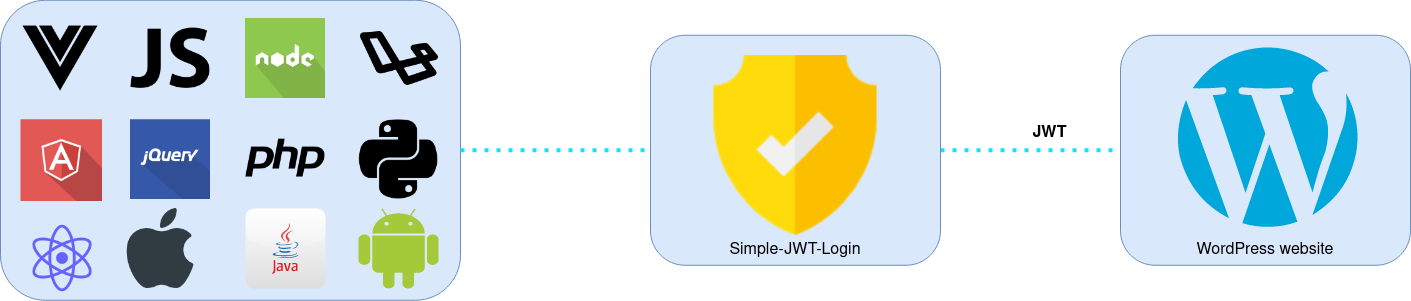
The main purpose of this plugin is to allow Mobile apps, or other websites to access the content from a WordPress website via REST endpoints in a secure way.

Spin up a real WordPress site with Simple JWT Login right in your browser, in about 15 seconds.
It runs entirely on your machine with WordPress Playground, and disappears when you close the tab.
| 🔐 Ready to use | A signing key is generated, and the /auth, refresh, validate and revoke endpoints are enabled |
| 👤 Logged in | You land on the plugin dashboard as admin / password |
| 🧪 Try every endpoint | Endpoint tabs have a Try button that sends a real request and shows the response |
| 🛡️ Explore it all | OAuth, API keys, protected endpoints, webhooks and audit logs - change anything, nothing can break |
- Installation
- Features
- Comparison
- Integrations
- Integrate
- Documentation
- Roadmap
- Version Support Policy
- Contribute
- Contributors
- Copyright
If you want to make sure you have a stable version, please download this plugin from WordPress.org.
If you want to upload the simple-jwt-login plugin to your website:
- Download downloads/simple-jwt-login.zip
- Upload the zip file into your WordPress website
- Activate the plugin
Tip
For production environments we recommend installing the plugin from WordPress.org
In order to install the latest stable version, from your WordPress admin:
- Go to the ‘Plugins’ menu in WordPress and click ‘Add New’
- Search for ‘Simple JWT Login’ and select ‘Install Now’
- Activate the plugin when prompted
After activating the plugin, navigate to Settings > Simple JWT Login in your WordPress admin.
- Route Namespace - base URL prefix for all plugin REST endpoints. Default:
simple-jwt-login/v1/. Change only if another plugin conflicts. - JWT Verification Rules - define how incoming JWTs are verified:
- For symmetric algorithms (HS256, HS384, HS512): enter a Decryption Key (any strong secret string).
- For asymmetric algorithms (RS256, RS384, RS512): enter a Public Key and a Private Key (PEM format).
- The ELSE row is the required fallback rule applied when no conditional rule matches.
- JWT Input Sources - choose where the plugin looks for the JWT in each request. At least one source must be enabled:
- Request (URL param) - e.g.
?JWT=<token>(parameter name is configurable, default:JWT) - Header - e.g.
Authorization: Bearer <token>(default header name:Authorization) - Cookie - reads the JWT from a cookie (default cookie name:
simple-jwt-login-token) - Session - reads the JWT from a PHP session variable
- Request (URL param) - e.g.
Click Save Changes before moving to the next section.
Go to the Authentication tab to enable the /auth endpoint that issues JWTs:
- Toggle Allow Authentication to enable the endpoint.
- Select the JWT Payload fields you want included in the token (e.g.
email,id,username). - Set JWT TTL (token lifetime in minutes, default: 60) and JWT Refresh TTL (refresh window, default: 20160).
- Optionally enable Refresh Token, Validate Token, and Revoke Token sub-endpoints.
Go to the Login tab to enable browser-based autologin using a JWT:
- Toggle Allow Autologin to enable the
/autologinendpoint. - Set Login By to the user attribute the plugin should match (
email,WordPress User ID, orUser Login). - Set JWT Parameter Key to the JWT payload claim that holds the matching value (e.g.
email). - Choose a Redirect destination after a successful login (Dashboard, Homepage, or a custom URL).
Go to the Auth Codes tab to add shared secrets that callers must supply alongside the JWT:
- Enter one or more codes, each with an optional Role (limits which WordPress role the code grants access to) and an optional Expiration Date.
- Back in the Login, Authentication, Register, or Delete User tabs, enable Require Auth Code to enforce it for that operation.
For a headless or mobile app that needs to authenticate users and receive JWTs:
- General: set a Decryption Key and ensure at least one JWT Input Source is enabled.
- Authentication: enable Allow Authentication and select the payload fields you need.
- Click Save Changes.
Your JWT endpoint will be available at:
POST /wp-json/simple-jwt-login/v1/auth
- 100% Free and open-source under GPL 3.0 License
- JWT Authentication - REST endpoint that generates, validates, and revokes JWTs
- Refresh Tokens - Issue and rotate JWT refresh tokens without re-authentication
- Autologin - Autologin to a WordPress website using a JWT
- Register user - Register new WordPress users via a REST endpoint, with optional auto-create on first login
- Delete user - Delete a WordPress user by embedding details in the JWT payload
- Reset password - REST endpoint for resetting WordPress user passwords, with customisable email support
- Protect endpoints - Gate any WordPress REST endpoint behind a valid JWT so only authenticated clients can access it
- External API authentication - Attach a JWT to requests for any REST endpoint and act as an authenticated user
- Custom JWT claims - Define and read arbitrary payload claims to pass context between your app and WordPress
- API Keys - Generate per-client API keys as an alternative credential for obtaining JWTs
- Audit Logs - Detailed logs of every login, registration, and authentication event for visibility and compliance
- Webhooks - Fire outbound HTTP callbacks on login, registration, and authentication events to integrate with external services
- Google OAuth - Allow users to log in with their Google account via OAuth
- Google JWT - Accept a Google
id_tokento authenticate against WordPress endpoints - Facebook OAuth - Allow users to log in with their Facebook account via OAuth
- GitHub OAuth - Allow users to log in with their GitHub account via OAuth
- Auth0 Login - Allow users to log in via Auth0
- WPGraphQL support - Works with WPGraphQL so headless frontends using GraphQL can authenticate through the same plugin
- Two-Factor Authentication - Integrates with the Two Factor plugin:
/authreturns a short-lived interim JWT for users with 2FA enabled, which is then exchanged for a full JWT via/auth/2fatogether with the user's TOTP, email, or backup code - WooCommerce - Authenticate WooCommerce REST API requests (
/wc/v1,/wc/v2,/wc/v3) and the Store API (cart & checkout) with a JWT instead of consumer key/secret, independent of the global protect-endpoints middleware - Force Login compatibility - Lets Simple JWT Login's own REST endpoints bypass the Force Login plugin's site-wide login requirement
- AI Abilities (MCP) - Let AI agents (Claude, Codex, Cursor, Gemini CLI, GitHub Copilot, ...) read and manage the plugin's settings, API keys, webhooks and logs, and troubleshoot errors (explain error codes, inspect JWTs, diagnose the setup, security report) through the WordPress Abilities API and MCP, with read / write / read & write access control (WordPress 6.9+)
- Headless WordPress - Purpose-built for Next.js, React, React Native, Flutter, and other API-first consumers
- Mobile app support - Designed for mobile clients that need stateless, token-based authentication with refresh token rotation
- Plugin integrations - Works alongside other plugins that extend the WordPress REST API
Most WordPress JWT plugins lock advanced features behind paid plans. Simple JWT Login ships everything below for FREE.
| Feature | Simple JWT Login | Other Plugins |
|---|---|---|
| JWT Authentication | ✅ Free | ✅ Free |
| Refresh Tokens | ✅ Free | ❌ Paid or unavailable |
| API Keys | ✅ Free | ❌ Premium only |
| Audit Logs | ✅ Free | ❌ Premium only |
| Webhooks | ✅ Free | ❌ Premium only |
| Google OAuth Login | ✅ Free | ❌ Premium only |
| Facebook OAuth Login | ✅ Free | ❌ Premium only |
| GitHub OAuth Login | ✅ Free | ❌ Premium only |
| Auth0 Login | ✅ Free | ❌ Premium only |
| Generic OAuth / OIDC | ❌ Not yet | |
| WPGraphQL Support | ✅ Free | ❌ Not available |
| Two-Factor Authentication | ✅ Free | ❌ Not available |
| WooCommerce REST/Store API Auth | ✅ Free | ❌ Not available |
| AI Abilities / MCP | ✅ Free | ❌ Not available |
| User Auto-create | ✅ Free | |
| JWT Refresh Endpoint | ✅ Free | ❌ Premium only |
| Custom JWT Claims | ✅ Free | |
| Token Revocation | ✅ Free | ❌ Premium only |
| Headless WordPress Focus | ✅ Strong | |
| Mobile App Support | ✅ Excellent | |
| External API Authentication | ✅ Free | |
| Open Source Transparency | ✅ Fully open | |
| Setup Simplicity | ✅ Easy | |
| Enterprise SSO | ❌ Not yet | ✅ Premium only |
| SAML Support | ❌ Not yet | ✅ Premium only |
| Free Version Useful Without Upsell | ✅ Very strong | |
| Minimum PHP Version | ✅ PHP 5.5+ |
Third-party integrations are configured from the Integrations tab in the plugin admin. Each one is disabled by default and shows a warning if the target plugin is not installed/activated.
Integrates with the Two Factor plugin so JWT issuance also enforces any 2FA method the user has configured (TOTP, email code, or backup codes).
How it works:
- Client POSTs credentials to
/auth. If the user has 2FA configured, the plugin returns a short-lived interim JWT instead of a full JWT. - Client submits the interim JWT plus the 2FA code to
POST /auth/2fa. - On success, a full JWT (and optional refresh token) is returned, identical to a normal
/authresponse.
The interim JWT TTL is configurable (default: 5 minutes). Browser-based OAuth logins (Google, Facebook, GitHub, Auth0) that hit a 2FA-enabled account are redirected to an in-page 2FA code form before the WordPress session is created.
Read more on our website.
Authenticate WooCommerce REST API (/wc/v1, /wc/v2, /wc/v3) and Store API (/wc/store/v1, including cart & checkout) requests using a JWT instead of consumer key/secret pairs.
- Works independently of the global "Protect Endpoints" middleware - JWT authentication on WooCommerce routes is always active once the integration is enabled.
- Optional Store API cart & checkout toggle lets header (
Authorization: Bearer) JWT requests skip WooCommerce's Store API CSRF nonce check, enabling a fully headless cart and checkout flow. Cookie- and URL-based tokens always keep the nonce requirement, since only header tokens are immune to CSRF.
Lets Simple JWT Login's own REST endpoints bypass the Force Login plugin's site-wide "require login to view any page" restriction, so external clients can still reach /auth, /autologin, and other plugin routes without an existing WordPress session.
Simple JWT Login registers its actions with the WordPress Abilities API, so AI agents can manage the plugin for you. With the MCP Adapter plugin installed, the abilities are available to any MCP client (Claude, Cursor, ChatGPT, ...).
Requirements: WordPress 6.9 or newer. On older versions the feature does nothing, and the settings page shows a warning.
Setup:
-
Install and activate the MCP Adapter plugin. Skip this step if you only call the abilities through the REST API (see Without MCP below).
-
Go to Simple JWT Login > Integrations > Third Party Integrations > AI Abilities (MCP), turn on Enable (off by default, so nothing is registered) and choose the AI access level. The page shows whether the MCP Adapter is installed and active.
- Read only - AI agents can view settings, API keys, webhooks, logs, analyze the audit log and run the diagnostics.
- Write only - AI agents can change settings, revoke API keys and remove webhooks.
- Read & write - both.
Then choose the AI permissions. They cover the riskiest actions and are all off by default:
- Allow viewing secrets - secrets are returned in clear text instead of
********(audit log output stays masked). - Allow changing roles -
register.new_user_profile(role of new users),register.allowed_user_metaandauth_codes.codes.*.rolebecome writable. Even then, AI agents can never setadministratoror any role with administrator capabilities (manage_options,promote_users,edit_users, plugin management, ...) as the new user role or an auth code role.
The security settings (
general.security: safe redirects, trusted proxy IP headers) can never be changed by AI agents.- Allow changing authentication providers - the OAuth providers (
integrations.oauth.<provider>, e.g. the Auth0 domain or a client ID), the JWT rules (trusted issuers) and how a JWT is matched to a user (login.login_by,login.login_by_parameter,login.iss_whitelist) and the Two-Factor integration (integrations.3rdparty.two_factor) become writable. - Allow creating API keys - registers
create-api-key(the agent receives a working key). - Allow adding webhooks - registers
add-webhook(a webhook sends plugin events to any HTTPS URL).
Changing roles or authentication providers, creating API keys and adding webhooks also need Write access. Turning a permission off takes effect immediately; after turning one on, restart running MCP sessions (abilities are registered when the session starts).
-
Connect your MCP client. The integration page shows ready-to-copy commands for your site. There are two ways:
Option 1 - WP-CLI, locally or over SSH (recommended). The client starts WP-CLI on the server, so only someone who can already run commands there can connect. Use key-based SSH login (the client cannot answer a password prompt):
# Same machine
claude mcp add my-site -- wp mcp-adapter serve --server=mcp-adapter-default-server --user=admin --path=/path/to/wordpress
# Remote server over SSH
claude mcp add my-site -- ssh user@your-server wp mcp-adapter serve --server=mcp-adapter-default-server --user=admin --path=/path/to/wordpress
# WordPress in Docker
claude mcp add my-site -- docker exec -i wordpress wp mcp-adapter serve --server=mcp-adapter-default-server --user=admin --allow-root --path=/var/www/html
Other AI clients (same machine; for SSH or Docker, start the same command through
sshordocker exec -ias above):# Codex CLI codex mcp add my-site -- wp mcp-adapter serve --server=mcp-adapter-default-server --user=admin --path=/path/to/wordpressCursor (
.cursor/mcp.json), Claude Desktop (claude_desktop_config.json), Gemini CLI (~/.gemini/settings.json) and other clients that usemcpServers:{ "mcpServers": { "my-site": { "command": "wp", "args": ["mcp-adapter", "serve", "--server=mcp-adapter-default-server", "--user=admin", "--path=/path/to/wordpress"] } } }VS Code / GitHub Copilot (
.vscode/mcp.json):{ "servers": { "my-site": { "type": "stdio", "command": "wp", "args": ["mcp-adapter", "serve", "--server=mcp-adapter-default-server", "--user=admin", "--path=/path/to/wordpress"] } } }Option 2 - HTTP (no SSH access, e.g. shared hosting). Create an Application Password in Users > Profile > Application Passwords for the administrator the AI will act as, then connect to the MCP endpoint
https://example.com/wp-json/mcp/mcp-adapter-default-serverwith Basic authentication. Only do this over HTTPS:claude mcp add --transport http my-site https://example.com/wp-json/mcp/mcp-adapter-default-server \ --header "Authorization: Basic $(printf '%s' 'admin:APPLICATION_PASSWORD' | base64 | tr -d '\n')"Other AI clients use the same endpoint and header.
BASE64_CREDENTIALSbelow is the output ofprintf '%s' 'admin:APPLICATION_PASSWORD' | base64:# Gemini CLI gemini mcp add --transport http --header "Authorization: Basic BASE64_CREDENTIALS" my-site https://example.com/wp-json/mcp/mcp-adapter-default-server
Codex CLI (
~/.codex/config.toml):[mcp_servers.my-site] url = "https://example.com/wp-json/mcp/mcp-adapter-default-server" http_headers = { "Authorization" = "Basic BASE64_CREDENTIALS" }
Cursor (
.cursor/mcp.json) and other clients that usemcpServerswith aurl:{ "mcpServers": { "my-site": { "url": "https://example.com/wp-json/mcp/mcp-adapter-default-server", "headers": { "Authorization": "Basic BASE64_CREDENTIALS" } } } }VS Code / GitHub Copilot (
.vscode/mcp.json):{ "servers": { "my-site": { "type": "http", "url": "https://example.com/wp-json/mcp/mcp-adapter-default-server", "headers": { "Authorization": "Basic BASE64_CREDENTIALS" } } } }These config files hold a working administrator credential: keep them out of version control.
Use an Application Password, not your login password. If you get
401 Sorry, you are not allowed to do thatwith correct credentials, check that Application Passwords are available: WordPress only enables them over HTTPS or whenWP_ENVIRONMENT_TYPEislocal. Some hosts also strip theAuthorizationheader before it reaches WordPress.On a live site, start with Read only access, use a dedicated administrator account for AI agents and confirm write actions in your AI client.
Without MCP: the MCP Adapter is only needed for MCP clients. The abilities are part of the WordPress Abilities API, so they can also be called through the WordPress REST API by an administrator (explain-error: any logged-in user) (for example with an application password), and by other plugins through wp_get_ability():
curl -u admin:APPLICATION_PASSWORD \
  "https://example.com/wp-json/wp-abilities/v1/abilities/simple-jwt-login/explain-error/run?input[error_code]=48"
Read abilities are run with GET, write abilities with POST. The same access level, permission checks and secret masking apply.
Troubleshooting with AI: paste an error into your AI client, for example {"success":false,"data":{"message":"Wrong user credentials.","error_code":48}}, and ask it to fix the problem. The agent can:
- Run
simple-jwt-login/diagnoseto see endpoint URLs, what is enabled and the setup warnings. - Run
simple-jwt-login/explain-errorto map theerror_codeto its cause and the current values of the settings behind it. - Run
simple-jwt-login/inspect-jwton a token the client sent, to find out whether the format, signature, expiry, JWT rule or user lookup fails. - Fix the cause with
simple-jwt-login/update-settings, which validates the change like an admin-page save.
You can also ask "is anyone attacking my logins?" or "why do logins fail since this morning?". The agent runs simple-jwt-login/analyze-audit-log for the overview and simple-jwt-login/get-audit-log to look at single entries. Analysis needs the audit log to be enabled (Simple JWT Login > Audit Log) with the relevant events selected.
Ask "is my setup secure?" and the agent runs simple-jwt-login/security-report.
Available abilities:
| Ability | Access | Description |
|---|---|---|
simple-jwt-login/get-settings |
Read | Returns all settings, or one section, with secrets masked (unless Allow viewing secrets is on), the paths that are read-only right now and the granted AI permissions |
simple-jwt-login/diagnose |
Read | Health report: versions, endpoint URLs with enabled / auth code state, JWT input sources, valid role names and misconfiguration warnings |
simple-jwt-login/security-report |
Read | Security review with a score (0-100), a grade (A-F) and the findings, most severe first: open registration/deletion, administrator roles, weak or missing signing keys, long JWT lifetimes, unrestricted autologin, open redirects, JWTs in URLs, CORS and logging (min_severity filters the list) |
simple-jwt-login/explain-error |
Read | Explains an error_code from a REST response or a failed settings save (e.g. 2005) and returns the related settings. Any logged-in user can run it; only administrators also get the current setting values |
simple-jwt-login/inspect-jwt |
Read | Checks a JWT like the plugin endpoints do: matching JWT rule, algorithm, signature, expiry, two-factor interim tokens, WordPress user lookup and revocation |
simple-jwt-login/list-api-keys |
Read | Lists API keys (raw key values are never returned) |
simple-jwt-login/get-audit-log |
Read | Returns audit log entries, with filters |
simple-jwt-login/analyze-audit-log |
Read | Summarises the last N hours (up to 90 days): counts and failure rates per event, a timeline, the IPs / users / API keys with the most failures, the most common failure messages, and findings such as brute force, credential stuffing or failure spikes. Also reports events that are not being recorded |
simple-jwt-login/list-webhooks |
Read | Lists webhooks (header values masked) |
simple-jwt-login/get-webhook-logs |
Read | Returns recent webhook calls with their HTTP status (URL query values masked) |
simple-jwt-login/update-settings |
Write | Changes any non-secret setting in one section, validated like an admin-page save (role settings need Allow changing roles, OAuth providers, JWT rules, the JWT-to-user mapping and two-factor need Allow changing authentication providers) |
simple-jwt-login/create-api-key |
Write + Allow creating API keys | Creates an API key; the raw key is returned once |
simple-jwt-login/revoke-api-key |
Write | Revokes an API key |
simple-jwt-login/add-webhook |
Write + Allow adding webhooks | Adds an HTTPS webhook |
simple-jwt-login/remove-webhook |
Write | Removes a webhook (index and URL must match) |
Editing auth codes and JWT rules: these lists mix secret and non-secret fields, so update-settings takes operations instead of a new list. match must equal the item's current non-secret values; otherwise nothing is saved, so a stale index never changes the wrong item:
{
  "section": "auth_codes",
  "values": {
    "codes": [
      {"index": 0, "match": {"role": "subscriber"}, "set": {"role": "editor"}},
      {"index": 1, "match": {"role": "author"}, "remove": true}
    ]
  }
}
New auth codes and JWT rules always need a secret, so they can only be added from the admin page. Other lists (custom claims, protect-endpoint rules) are sent in full; lists stored side by side, such as rules_url / rules_type / rules_roles, must keep the same length.
Security:
- Only administrators (
manage_options) can run abilities, exceptexplain-error, which any logged-in user can run (without the current setting values). Logged-out visitors cannot run any ability. The access level and the user's capability are checked again on every call. - Secrets can never be written by an AI agent, and are masked unless Allow viewing secrets is on: JWT signing keys, OAuth client secrets, the refresh token key, auth code values, webhook header values and webhook URL query values. Audit log and webhook log output is always masked.
inspect-jwtonly reports whether a signature is valid. - The AI access level and AI permissions can only be changed from the admin page, and are checked again on every call. Webhooks are changed with the dedicated webhook abilities.
- Every change goes through the same validation as a save from the admin page; nothing is saved when it fails.
- Changes made by AI agents are recorded in the audit log (
AI Ability Executed/AI Ability Failedevents) when audit logging is enabled. - Audit log entries, webhook responses and JWT payloads come from outside users. An agent should treat them as data, not as instructions.
In order to easily integrate your app/site with the simple-jwt-login plugin, we have developed a composer package.
composer require nicumicle/simple-jwt-login-client-phpYou can check this GitHub repository for more details and code examples.
The Javascript SDK can be installed using npm or yarn into your App.
npm install "simple-jwt-login"or
yarn add "simple-jwt-login"You can check this GitHub repository for more details.
The Simple JWT Login CLI lets you interact with the plugin from the command line - useful for scripting, testing, and local development workflows.
You can check this GitHub repository for installation instructions and usage examples.
Plugin documentation is available at simplejwtlogin.com.
- Introduction
- Authentication
- Autologin
- Register User
- Reset Password
- Delete User
- Protect Endpoints
- Hooks
Check out the roadmap to get informed on the latest released features, current statuses, and upcoming features.
- Top Feature Requests (Add your votes using the 👍 reaction)
- Top Bugs (Add your votes using the 👍 reaction)
- Newest Bugs
| Version | Status | End of Life | Supported fixes |
|---|---|---|---|
| v4.x | Active (LTS) | - | New features, bug fixes, security patches, WordPress compatibility fixes |
| v3.x | Maintenance | 31.01.2027 | Security patches and WordPress compatibility fixes only - no new features, no bug fixes |
We recommend upgrading to v4 as soon as possible. After 31.01.2027, v3.x will no longer receive any updates, including security patches.
Simple-JWT-Login follows Semantic Versioning (SemVer) - version numbers are structured as MAJOR.MINOR.PATCH (e.g. 4.2.1):
- MAJOR (
4.x.x) - incremented for breaking/incompatible changes, such as removing a feature or changing default behavior. Upgrading a major version may require reviewing your settings or integration code. - MINOR (
x.2.x) - incremented when new functionality is added in a backwards-compatible way. - PATCH (
x.x.1) - incremented for backwards-compatible bug fixes and security patches.
For v3.x, since it's now in maintenance mode, only PATCH releases will be published (security and WordPress compatibility fixes) - no new MINOR versions will be released.
Simple-JWT-Login is an open-source project and welcomes all contributors.
As with all WordPress projects, we want to ensure a welcoming environment for everyone.
With that in mind, all contributors are expected to follow our Code of Conduct.
- Open Merge requests on existing issues: CONTRIBUTING.md
- Suggest features or report bugs: issues/bugs
- Translate the plugin: https://translate.wordpress.org
Thanks to all our contributors!
This project is supported by:


This project is distributed under the GNU General Public License v3.0.
By submitting a pull request to this project, you agree to license your contribution under the GNU General Public License v3.0 to this project.