PiClock3 is a full-screen clock for a Raspberry Pi, on a wall or on a desk. It draws the time on an analog or a digital face, the date, the current conditions from a nearby airfield or a weather service, a forecast several days out, sunrise and sunset and the phase of the moon, and animated weather radar over a base map. It steps through as many pages as you give it, and what is on them, where each thing sits and how it looks are configuration rather than code.
It is a complete rewrite of PiClock (https://github.com/n0bel/PiClock), in Python 3 and PyQt5, and much more modular and less monolithic.
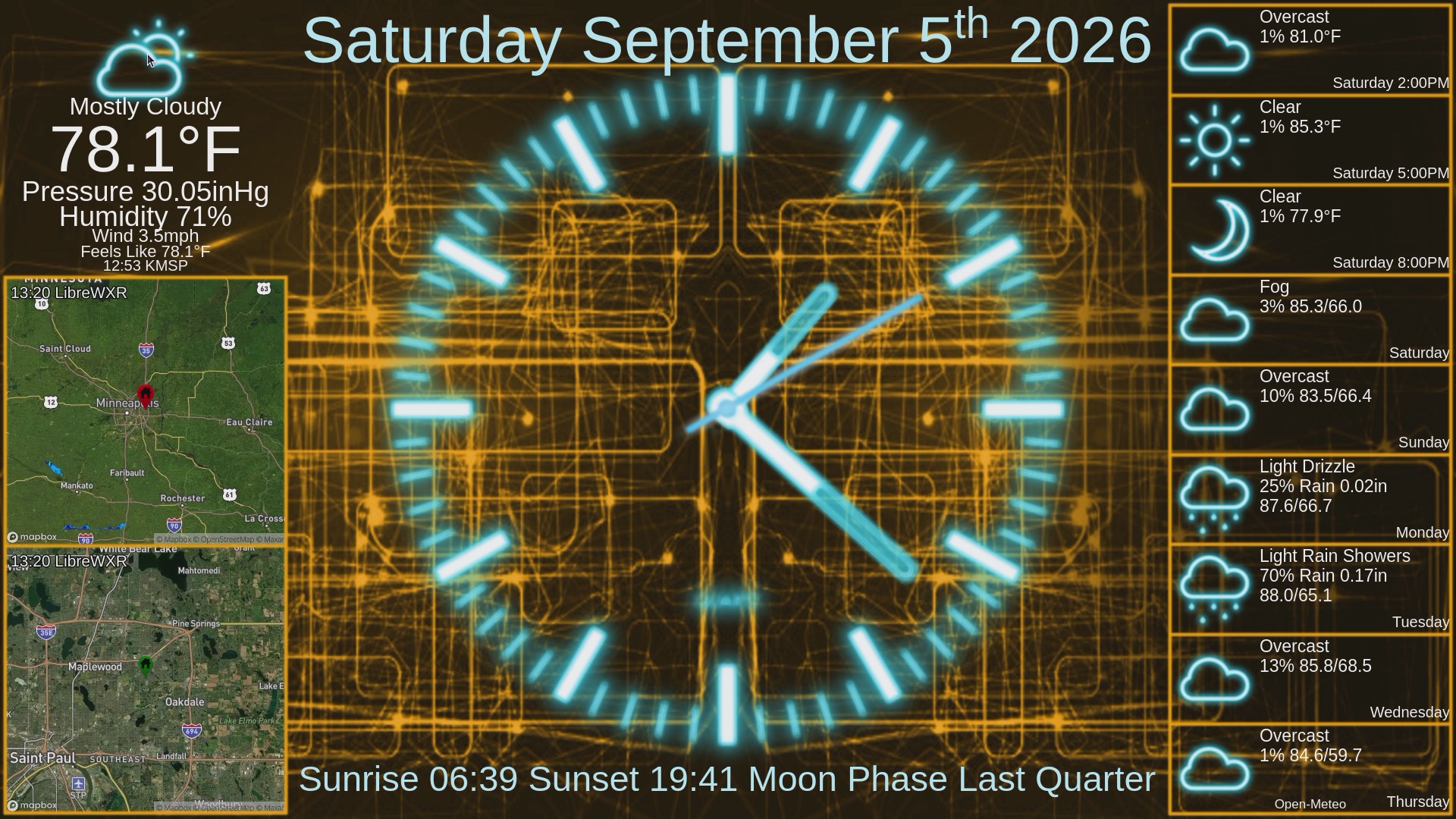
That is examples/default.yaml as it ships, on the classic layout and the
circuit theme - and on a Pi Zero W, which is the least hardware that will
run it.
August 23 and 24, 2026 - the configuration format changed and older configs will not load. Pages now name a layout and a theme instead of including a tree of blocks, and block names changed with it. PiClock3 will tell you if it sees an older config. This only affects configurations written before that date - see BREAKING-CONFIGURATION-CHANGE-2026-08-23.md.
This is being published to show the shape of the thing, not because it is finished. It does work - it has been running on real clocks throughout, and the shipped example configurations run as they are. But it is not done, and it is worth knowing what you are getting:
- There will be bugs. Whole areas have had little use outside the handful of clocks they were written on.
- Things will keep moving. Plugin, layout and theme formats are settling but are not frozen, and a change that breaks configurations is still possible - the one on August 23, 2026 was such a change.
If you want a clock to simply rely on today, use the original PiClock (https://github.com/n0bel/PiClock) or this fork of it (https://github.com/SerBrynden/PiClock), which is still being updated. Come here to see where PiClock is going, to run it, and to say what is wrong with it.
Progress, plans and half-formed ideas live in the issues: https://github.com/n0bel/PiClock3/issues. A bug or a specific request is welcome as its own.
I'll be committing many partially complete commits here as an easy means to distribute code to my PiClocks for testing.
There is no manual. What follows is enough to get it running.
Log into your Pi, on the screen or over ssh, as an ordinary user - not as root. The home directory you land in is where this should go.
git clone https://github.com/n0bel/PiClock3.git
cd PiClock3
sudo apt update
sudo apt install python3-pyqt5 python3-yaml
export PIP_BREAK_SYSTEM_PACKAGES=1
python3 -m pip install -r requirements.txt
cp examples/default.yaml Config.yaml
cp examples/ApiKeys.yaml ApiKeys.yaml
Now edit ApiKeys.yaml, because what you just copied holds the words
YOUR API KEY where a key goes:
- Mapbox - https://account.mapbox.com - goes in
mbapi - Google Static Maps - https://console.cloud.google.com - goes in
googleapi
The example points its radars at Mapbox; if you got a Google key instead,
change base-provider: mapbox to base-provider: googlemaps in
Config.yaml.
Which keys a clock wants depends on the providers its config points at, so the way to find out is to ask:
python3 PyQtPiClock3.py --check
It reads the config, says what is wrong with it and exits - no window, no screen needed. An unfilled key is one of the things it reports. The clock makes the same check when it starts: if there is a problem it puts the list on the screen and quits rather than drawing something wrong. Then:
python3 PyQtPiClock3.py
The clock, the date, the almanac, the current conditions, the forecast and
the radar all work at this point - but it thinks it is somewhere else. The
example sits at 45, -93 with KMSP for its METAR, because it has to say
something. Set your own latitude and longitude and your nearest METAR
station in Config.yaml.
The rest of this section is why those steps look the way they do.
PyQt5 comes from apt on purpose. Installing it with pip builds Qt from source, which takes hours on a Pi and usually runs out of memory first.
PIP_BREAK_SYSTEM_PACKAGES=1 is there for a similar reason. Debian 12 and
later refuse a pip install outside a venv and stop with error: externally-managed-environment. That setting says you meant it. Without
sudo, pip then installs into ~/.local and touches nothing apt owns - it is
the name that is alarming, and only sudo pip that earns it. Older pip does
not know the setting and ignores it, so the one line serves Bullseye through
Trixie.
Those requirements land in ~/.local, which belongs to the user who ran pip.
Start the clock as that same user - one started as another gets
ModuleNotFoundError for packages that are plainly installed.
Python 3.9 is the floor, which is Raspberry Pi OS Bullseye. Bullseye is
what this is developed and tested on - Python 3.9.2 with PyQt 5.15.2. Newer
Raspberry Pi OS should be fine and requirements.txt already resolves the
right package versions for it by itself, but it has had less use, so say so
if something breaks.
A Pi Zero W runs it too, on any of those releases - ARMv6, one 1 GHz core, 426 MB. The first start after installing is the slow one, because Python is compiling the tree to bytecode as it imports it, and on a Zero that is enough to time out the first few web requests and leave the forecast column and the current conditions empty. Start it again; the second run is warm and draws everything.
Everything under examples/ is there to be read and copied, never loaded
by itself. examples/default.yaml is the one to start from; most of the
rest are the same clock wearing a different theme, so you can see what a
theme changes without editing anything - run one directly rather than
copying it:
python3 PyQtPiClock3.py examples/meadow.yaml
examples/default.yaml |
two pages, two themes - circuit for the clock, stag for the maps |
examples/circuit.yaml |
orange circuitry on black, light-blue clock |
examples/stag.yaml |
a stag at sunset |
examples/archer.yaml |
an archer against an orange sky |
examples/meadow.yaml |
butterflies over a bright meadow, dark-blue clock |
examples/hairline.yaml |
the stag background with thin, hard-edged frames |
examples/london.yaml |
the Thames at night - and the same clock somewhere else: London, metric, its own timezone |
examples/berlin.yaml |
the same clock in German - language: de, metric, Berlin's timezone |
examples/digital.yaml |
a digital face instead of hands, and what a theme reaches without being asked |
examples/gallery.yaml |
the clock page works through every shipped background in turn; the maps page holds one |
examples/australia.yaml |
Sydney - the southern hemisphere, where December is midsummer |
examples/arctic.yaml |
Tromso, above the Arctic Circle: months with no sunrise to print |
examples/mcmurdo.yaml |
McMurdo, as far the other way, under a theme whose art is generated rather than photographed |
examples/ApiKeys.yaml |
the keys file to copy, with links to where to get one |
A theme is one line of a page: maps-page: {order: 1, layout: bigmaps, theme: stag}. Writing your own is
docs/WRITING-A-THEME.md.
A theme's background: can be a folder of pictures rather than one picture,
and the clock works through them - F6 and F7 step, F8 holds. Which pages do
it follows from which theme they name.
Config.yaml and ApiKeys.yaml are ignored by git, so what you write
stays yours. A plugin can ship an examples/ folder of its own, along with
themes/, layouts/, units/ and languages/, so it arrives complete
rather than as code with a list of things to fetch separately.
Any setting in a config can be given on the command line, which is how to answer "what would it look like if" without editing a file and putting it back:
python3 PyQtPiClock3.py examples/london.yaml --set units=default
python3 PyQtPiClock3.py Config.yaml --set location.timezone=Europe/Oslo
The key is dotted for anything nested, and the value is read as yaml - 4 is
a number, true is a boolean, and a word starting with # is a color rather
than a comment.
theme: and layout: are blocks of their own, laid over whichever theme or
layout each page names, so either can be tried without touching it:
--set theme.default.color=#ff8800
--set theme.borders.default.width=0.03
--set layout.regions.clock.width=0.4
A plugin is reached the same way a theme reaches one, through its kind:
--set kind-settings.radar-frames.palette=4
--set kind-settings.digital-clock.font-weight=300
--at starts the clock at another time and lets it run on from there, which
is the only way to see a polar night in August:
python3 PyQtPiClock3.py examples/mcmurdo.yaml --at 2026-06-21
python3 PyQtPiClock3.py examples/arctic.yaml  --at "2026-12-21 13:45"
It is an offset rather than a fixed moment, so the seconds still run. Only
the clock moves: the radar still shows what the frame server has, because
that is all it has. start-at: in a config does the same permanently.
--help prints all of it, and
docs/COMMAND-LINE-OPTIONS.md explains why
they are there.
A widget's settings are assembled from several places, each having the last word over the one before:
- the plugin's own
config.yaml, beside its code - the theme's
default:, for the five names Qt owns -color,background-color,font-family,font-styleandfont-weight - the theme's
kind-settings:, then itsplugin-settings: - the config's
kind-settings:, then itsplugin-settings: - the widget's own entry under
widgets:
So a theme colors everything by saying color: once, a config overrules the
theme without editing it, and one widget overrules both by naming a value
itself. --set writes into the config, which is why it beats a theme.
Those five Qt names then travel two roads, neither needing the plugin's
help. The theme's default: goes on the page, and Qt hands its colors and
fonts down to everything drawn there. Whatever resolved for one widget goes
on that widget's region, and reaches whatever it draws. Nearer wins, so a
kind-settings color beats the page's - and a widget that names one itself
beats both. background-color takes the first road only: CSS does not
inherit it, so a region background belongs in a theme's styles:.
effect: - a glow or a drop shadow - is an ordinary setting on the same
tiers, applied by core to a widget's regions. See
docs/WRITING-A-THEME.md.
A widget draws in a region a layout named. A provider supplies data to widgets and occupies no region of its own.
| widget | |
|---|---|
AnalogClock, DigitalClock |
the clock face, and any ticking line of text |
Date |
the date across the top |
Astral |
sunrise, sunset and moon phase |
CurrentConditions |
what the weather is doing now |
Forecast |
the next few hours, then the next few days |
MapLoop |
an animated radar over a base map |
| provider | |
|---|---|
Metar |
an observation from an airfield. No key, no forecast |
OpenMeteo |
conditions and forecast from a model. No key |
Mapbox, GoogleMaps |
the base map under a radar - each needs a key |
RainViewer, LibreWXR |
radar frames. Neither needs a key |
Units are core rather than a weather feature. units: metric in a config
picks a set - default, metric, SI or nautical ship - and the table
behind it lives in PiClock3/units/, found the way themes and layouts are
found, so a units/ folder of your own or a plugin's merges over it.
Languages are core in the same way. language: de picks one - en and de
ship - and a language is one file in PiClock3/languages/, found on the same
search path, so a languages/ folder of your own or a plugin's merges over
it. A file holds the codes it answers to (code: [de, deu, ger]), the words,
and a table of weather conditions.
Day and month names come from the system rather than from that table, and the
language file lists the locales that mean it, so a config needs nothing
further. On a Pi the locale has to exist first - sudo dpkg-reconfigure locales - and if none of them is installed the names stay in English and the
log says so. Setting locale: in a config overrides all of them.
CurrentConditions and Forecast do not care which source they are given.
A weather provider answers three questions - what it is doing now, the next
hours, the next days - and answers empty for what it cannot know: a station
has no forecast, so pointing Forecast at one draws nothing. Point them at
different sources if you like: a real observation from the field down the
road, beside a model's forecast.
Open-Meteo needs no key, but its data is CC-BY, so Forecast prints its
name at the bottom of the column. A station's credit is the station id, which
is what the conditions block shows beside the observation time.
RainViewer stopped serving tiles above zoom 7 and returns a "Zoom Level Not
Supported" image instead of an error, so a close radar needs librewxr.
Ten guides, each answering one question:
| docs/WRITING-A-CONFIG.md | your own Config.yaml - pages, location, providers, widgets, settings |
| docs/WRITING-A-THEME.md | what a page looks like - colors, fonts, frames, backgrounds, which art the widgets use |
| docs/WRITING-A-LAYOUT.md | where things go - regions, fractions, repeats |
| docs/WRITING-A-PLUGIN.md | a widget that draws or a provider that fetches, and what a theme can reach in it |
| docs/WRITING-A-SCHEMA.md | describing what a plugin accepts, so something other than a reader can act on it |
| docs/WRITING-A-LANGUAGE.md | a translation - one yaml file, no code |
| docs/WRITING-UNITS.md | the conversion table and the named sets that pick from it |
| docs/FRAME-ART.md | drawing the nine-slice sheets a frame is made of |
| docs/MARKER-ART.md | drawing the pins a radar puts on a map |
| docs/COMMAND-LINE-OPTIONS.md | --set and --at, and why a clock needs them |
A theme, a layout and a plugin are separate on purpose: any theme works with any layout, and neither knows what the other is called. CONTRIBUTING.md is about contributing to this repository rather than building on it.
- An OpenWeatherMap provider. The widgets are ready for one - it only has to
answer the same three questions
OpenMeteodoes, and say what the sky is doing in the same notation. See CONTRIBUTING.md. - A Tomorrow.io provider. v1 has one, and it already asks for current, hourly and daily separately - the same three questions a provider answers here - so it maps across without rethinking. Needs a key.
Not promised. These are all still up and serving; no code exists for any of them yet.
Weather
- Met.no, the Norwegian Meteorological Institute. No key, global, and
CC-BY 4.0 - it asks only that requests name the application in a
User-Agent. The closest in spirit to Open-Meteo and METAR, both of which need no account either. - Pirate Weather. Dark Sky's JSON shape served from NOAA data, which makes it the natural landing spot for anyone carrying a config from when PiClock used Dark Sky. Needs a key; there is a free tier.
- NWS
api.weather.gov. No key and official, but United States only, so it would leave the London and Berlin examples unserved.
Radar and base maps
Both base maps that ship need a key, and that is the only thing in the setup above that makes anyone stop and open an account. These do not.
- CARTO basemaps,
dark_allandlight_all. No key, and dark enough to sit under a clock without fighting it. Attribution required. - Iowa State NEXRAD. No key, and already plain XYZ tiles, which is what
MapLoopconsumes. United States only, so it would sit beside RainViewer and LibreWXR rather than replace them. - Esri World Imagery. No key, satellite rather than a drawn map. Its
tiles are addressed
{z}/{y}/{x}rather than the usual{z}/{x}/{y}. - OpenStreetMap's own tiles. No key. A clock is the case the OSMF tile
policy allows for - one small viewport, served from cache, never
pre-fetched - but it would have to send a
User-Agentnaming PiClock3, honor the cache headers, and carry the attribution.
I'll welcome any contributions.