



The sexiest way to tokenmaxx.
GridBash is a local workspace for running and coordinating CLI coding agents in parallel. Launch, authenticate, isolate, monitor, and steer Codex, Claude, and other agents side by side, each in a real PTY pane.
Website | npm | Releases | Full reference
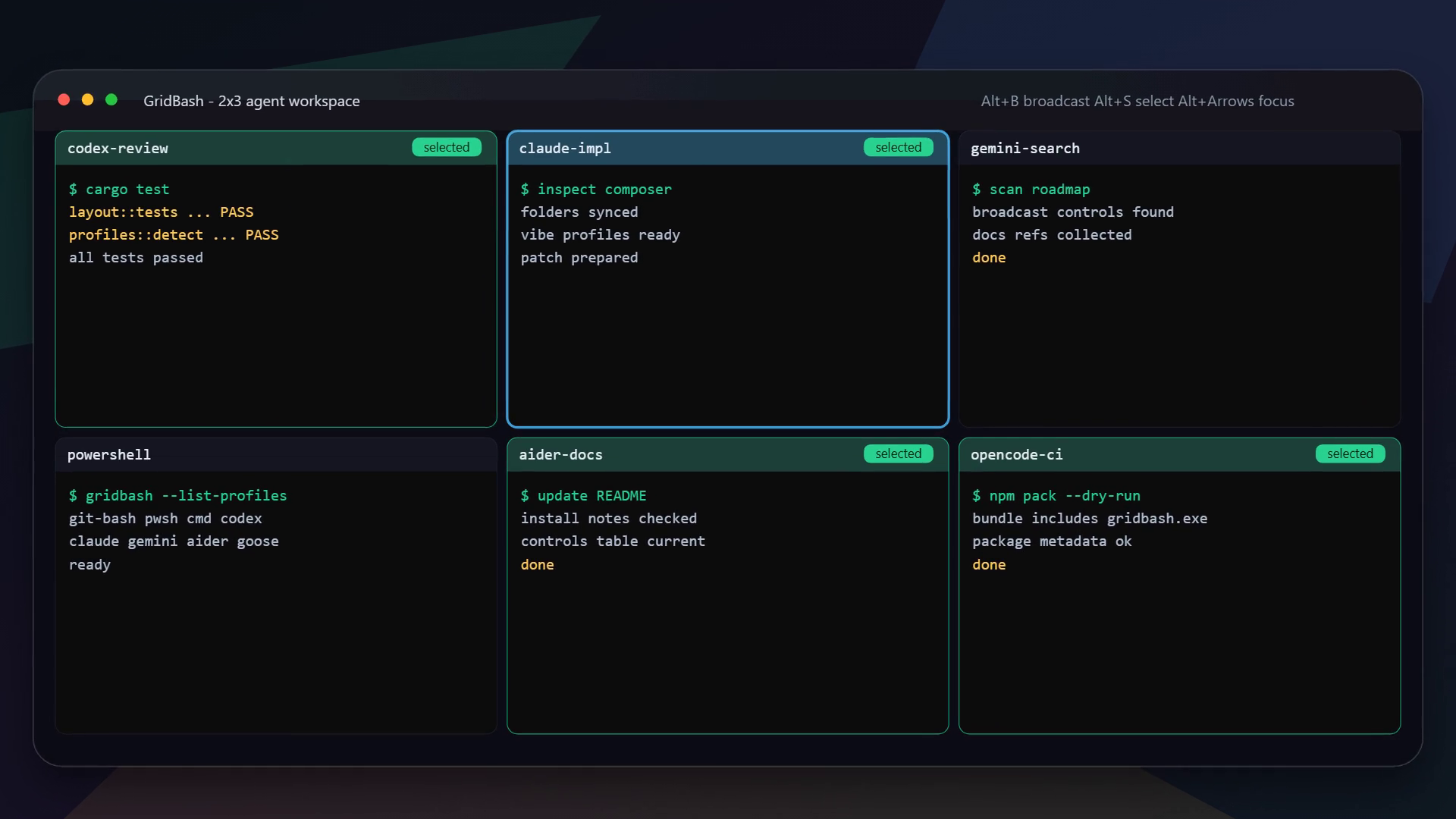
Requires Node.js 18+. GridBash releases Windows x64, glibc-based Linux x64/arm64, and macOS 13+ binaries for Apple Silicon and Intel.
npm install -g gridbash
gridbash
Or launch a six-pane Codex grid directly:
gridbash 2x3 --profile codexThe npm package installs only the native binary for your current platform. The npm badge shows the version currently available from the registry. If it temporarily trails the latest GitHub release, use that release's matching native artifact until npm publication catches up.
- Precise input routing. Type into the focused pane, a selected set, or the entire grid.
- Managed agent launch. Choose the agent, auth profile, project, layout, and worktree policy before GridBash starts any panes.
- Real terminals underneath. Run up to 100 PTY-backed panes across tabbed grids, with raw shell grids still available as a secondary path.
- Safer parallel work. Give every pane an isolated repo-local git worktree.
- Agent-first profiles. Launch Codex, Claude, Gemini, Aider, OpenCode, Goose, Amp, Cursor, Copilot, shells, or custom commands.
- Built-in workflow tools. Resize grids, restore sessions, dictate prompts, inspect stable pane activity, optionally generate concise AI work summaries, ask BashBot to brief or coordinate the workspace, and let a manager route targeted follow-ups.
- Optional background terminals. Close the UI without stopping live panes, then reconnect to the same processes from a saved session.
| Command | Result |
|---|---|
gridbash |
Create a managed agent workspace interactively |
gridbash 2x3 --profile codex |
Launch a 2-by-3 Codex grid |
gridbash --count 12 --layout auto --profile claude |
Auto-arrange 12 Claude panes |
gridbash 2x3 --profile codex --worktrees |
Isolate every pane in a git worktree |
gridbash resume |
Choose a saved session to reopen |
gridbash resume --latest |
Reopen the latest saved session |
gridbash ctl list --json |
Discover opted-in running grids |
gridbash ctl panes --session ID |
Inspect numbered and stable pane identities |
gridbash --list-profiles |
Show detected profiles and resolved commands |
gridbash --help |
Show every CLI option |
--worktrees requires a git repository with at least one commit and no tracked
modifications. See the reference for
its folder, branch, and reuse behavior.
GridBash shortcuts are modeless, so normal terminal keys continue to reach your agents and shells.
| Input | Action |
|---|---|
| Drag mouse | Select and copy text inside one pane |
| Right-click pane | Add or remove the pane from the selected set |
Alt+k |
Search and run GridBash commands |
Alt + arrow keys |
Move focus between panes |
Alt+s / Alt+a |
Toggle the focused pane / select or clear all panes |
Alt+c |
Open or close the command line |
Alt+Shift+C |
Save bounded recent output from the target panes |
Alt+Shift+L |
Start or stop continuous target-pane logging |
Alt+d |
Chat with BashBot across all open grids and panes |
Alt+n / Alt+t |
Open a new tab / switch tabs |
Alt+p |
Open focused-pane activity |
Alt+Shift+A |
Manage auth profiles and assign one to the focused pane |
Alt+f |
Zoom or restore the focused pane |
Alt+b |
Search, select, and copy focused-pane scrollback |
Alt+Shift+b / Alt+Ctrl+b |
Background selected panes / open background agents |
Alt+g / Alt+u |
Start or stop the grid manager goal |
Alt+Shift+V |
Dictate one prompt without submitting it |
Alt+o |
Open settings |
Alt+h or F1 |
Open the full in-app shortcut guide |
Alt+q |
Quit |
See the full controls reference for resizing, renaming, sleeping, restarting, scrolling, settings, and recovery actions.
To keep live terminals running after GridBash closes, open Settings with
Alt+o and enable Keep terminals running. GridBash returns control to the
launching shell when you quit; reconnect later with gridbash resume --latest
or select the session with gridbash resume.
A bare gridbash opens the agent-workspace setup. Detected agent profiles are
listed first; choose a compatible managed auth profile, project folder, grid
dimensions, and optional worktree isolation, then launch. Built-in shell
profiles remain available in the same screen as clearly labeled raw-terminal
options.
Managed auth applies to Claude or Codex processes GridBash launches. GridBash
does not install global shims, replace the normal codex or claude commands,
or intercept commands typed in an unmanaged shell.
Agent profiles are available on every platform: codex, claude, gemini,
opencode, aider, amp, goose, copilot, and cursor.
Profiles invoke CLIs already installed on your system; GridBash does not bundle
the agents themselves.
Terminal profiles are platform-specific:
Windows:      git-bash pwsh powershell cmd
macOS/Linux:  zsh bash fish sh pwsh
Run gridbash --list-profiles to see what is available on your machine. Direct
launches resolve profiles in this order: --profile, GRIDBASH_PROFILE, the
invoking Windows shell, the configured default, then the platform default.
Start from config.example.toml to define custom
profiles, UI settings, auth defaults, manager credentials, and workload policy.
The configuration reference covers file
locations and precedence.
Application shortcuts can also be remapped in [keys], for example
zoom-pane = "ctrl+shift+k". Unlisted actions keep their defaults, while F1
and Alt+q remain reliable help and quit fallbacks.
Enable GridBash's local, opt-in control API for agents inside its panes:
gridbash --agent-api 2x3 --profile codexConfigure an agent MCP server to run gridbash --mcp. It can request a
lightweight grid snapshot, read bounded recent output from specific stable pane
IDs, show local images, send commands, capture or continuously log specific
panes, and update the GridBash status bar. Awareness is pull-based so agents can
request peer context only at coordination points; returned summaries and output
are explicitly untrusted context. The API is localhost-only,
token-authenticated, and off by default.
The same typed API is available to scripts through gridbash ctl. Discovery
metadata contains runtime IDs and localhost endpoints, never bearer tokens.
ctl list and ctl panes are read-only; send, capture, status, and focus
operations require --token or GRIDBASH_CONTROL_TOKEN. Child panes receive
the session ID and token automatically:
gridbash ctl list --json
gridbash ctl panes --session <id-or-prefix> --json
gridbash ctl send --session <id> --pane 2 "cargo test"
gridbash ctl focus --session <id> pane-4-gen-2- GridBash targets modern UTF-8, ANSI/xterm-compatible terminals and works over
SSH or tmux when the remote session advertises a color-capable
TERM. - Use
--no-mousewhen a terminal or multiplexer does not forward mouse input.TERM=dumband Linux kernel consoles are not supported. - Background pane hosts are local and single-client. Closing GridBash can leave them running, but rebooting the machine or stopping a host loses the live PTY; saved history and launch metadata remain available for a fresh resume.
See CONTRIBUTING.md for setup, validation, and pull request
guidance. Use npm run install:local for a local GridBash command; it installs a
packed copy instead of linking the command to a worktree.
Release maintainers should follow docs/RELEASING.md.
- Share your current setup in the multi-agent workflow discussion.
- Start with a
good first issueor an issue markedhelp wanted. - Read CONTRIBUTING.md for setup, validation, and DCO guidance.
- Introduce yourself in the new-contributor discussion if you want help choosing a task.
- See the user and contributor growth playbook if you want to help demonstrate GridBash, welcome testers, or recruit contributors.
Created and maintained by Jason Matthew Suhari.
GridBash is available under the MIT License.