

A Python toolbox for correcting EEG artifacts using Averaged Artifact Subtraction (AAS) and other advanced methods. Built on MNE-Python.
Explore FACETpy docs »
Report bug
·
Request feature
·
Documentation
Built on MNE-Python, FACETpy provides a modular pipeline architecture that lets researchers process, evaluate, and compare correction results with minimal code.
Key features
- Load EEG from EDF, GDF, and BIDS formats
- Artifact correction: AAS, PCA, Adaptive Noise Cancellation (ANC)
- Deep-learning correction through
DeepLearningCorrection, with recorded thesis models and checkpoints - Full evaluation suite: SNR, RMS, Median Artifact, FFT-based metrics
- Batch processing across subjects/sessions with
Pipeline.map() - Generate synthetic EEG for algorithm testing
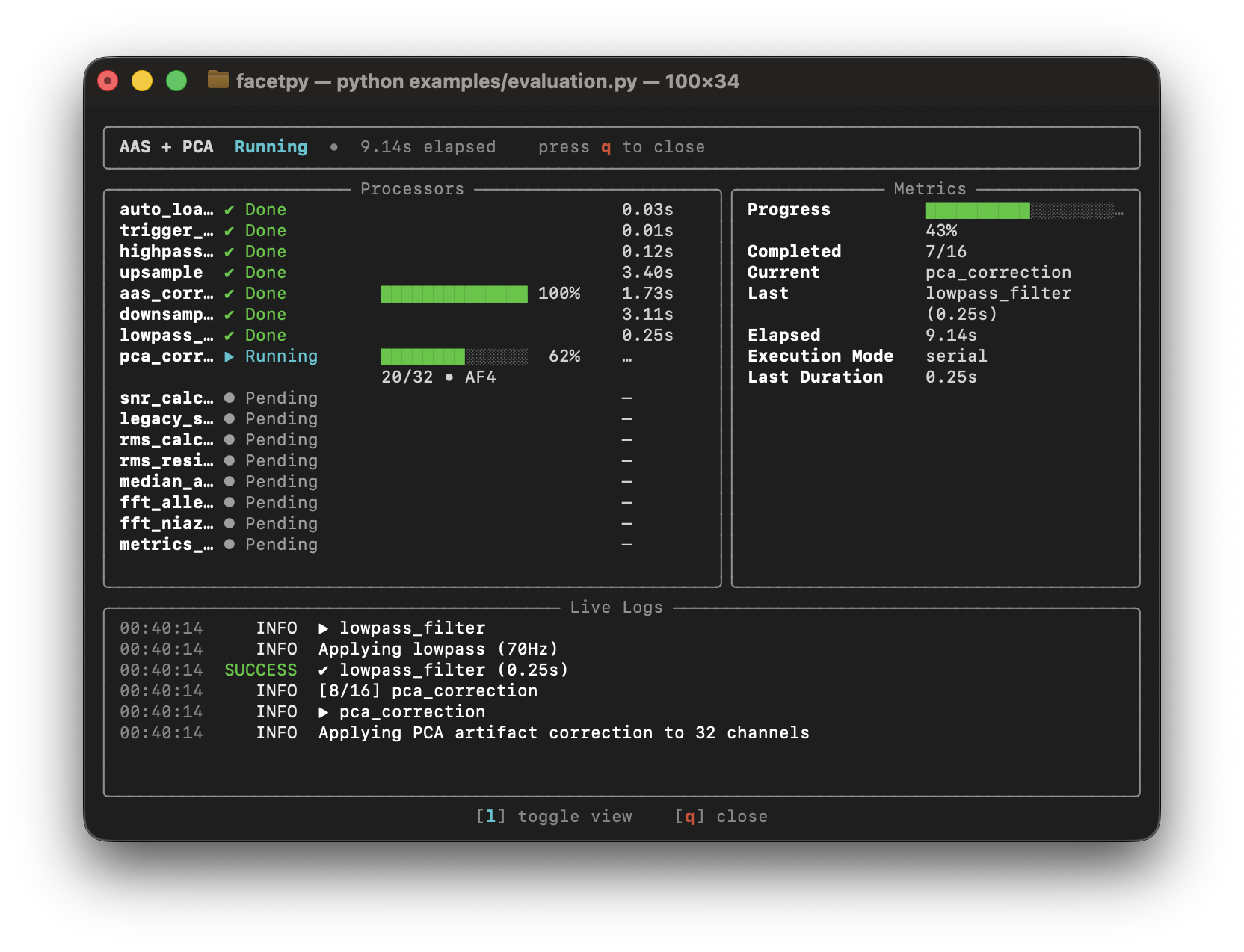
- Rich progress display in the terminal
| Artifact | Origin | Correction methods |
|---|---|---|
| Gradient artifact (GA) | MRI scanner gradient switching during simultaneous EEG-fMRI | AAS, PCA |
| Ballistocardiogram (BCG) | Cardiac-induced electrode movements in the MRI magnetic field | AAS (after BCG detection), PCA |
| Cardioballistic / pulse artifact | Pulsatile skin/vessel movement under electrodes | BCG detector + AAS |
| Motion artifact | Head movement, cable pull, electrode shift | Preprocessing filters, PCA |
| Power-line noise (50/60 Hz) | Electrical mains interference | Notch filter (via MNE preprocessing) |
| Muscle (EMG) artifact | Jaw, neck muscle activity contaminating high-frequency EEG | High-frequency filtering, PCA |
| Amplifier saturation / drift | Slow DC drift or clipping from long recordings | Baseline correction, filtering |
For a detailed description of use cases (EEG-fMRI research, batch studies, benchmarking, clinical pipelines, and more) see the Use Cases & Supported Artifacts page in the documentation.
Quick installation from PyPI (requires Python 3.11/3.12/3.13):
pip install facetpyStrongly recommended for fast ANC performance:
python -m facet.buildFor the Full Setup + Early Access to features (Repository, Examples, Contributing):
Unix (WSL/macOS/Linux) - bootstrap shortcut:
curl -fsSL https://raw.githubusercontent.com/H0mire/facetpy/main/scripts/bootstrap.sh | sh
cd facetpy
from facet import (
    Pipeline, Loader, EDFExporter,
    TriggerDetector, UpSample, DownSample, AASCorrection,
)

pipeline = Pipeline([
    Loader(path="data.edf", preload=True),
    TriggerDetector(regex=r"\b1\b"),
    UpSample(factor=10),
    AASCorrection(window_size=30),
    DownSample(factor=10),
    EDFExporter(path="corrected.edf", overwrite=True),
], name="Quickstart")

result = pipeline.run()
result.print_summary() # Done in 4.2s snr=18.3 rms_ratio=0.14Use trained models as pipeline steps with DeepLearningCorrection. The repository
includes Demucs, Nested GAN, Cascaded DAE, and other thesis model families. See the
deep-learning guide
for the model interface and the
thesis guide
for experiment configurations, checkpoint selection, and results.
The Demucs Phase 3 Weg-A example uses the selected epoch-53 checkpoint. Its repository helper resolves the experiment ID, model configuration, and local weights:
from facet import DeepLearningCorrection
from masterthesis_guide.reproduce import adapter

correction = DeepLearningCorrection(
    model=adapter("wega_demucs_lr0_0001_ic96_sisdr3_s42", device="cpu")
)
This helper belongs to the repository guide. It does not download weights or train
a model. The example checks for missing weights and reports the Git LFS command
needed to retrieve them. It runs with channel_sequential=False, as required by
the current thesis adapter.
Install Git LFS before cloning. Git LFS normally downloads the large files during checkout. To fetch only this example's checkpoint and EEG recording, skip that automatic download and request the two files explicitly:
git lfs install
GIT_LFS_SKIP_SMUDGE=1 git clone https://github.com/H0mire/FACETpy.git
cd FACETpy
git lfs pull --include="artifacts/checkpoints/masterthesis/phase_3/demucs_deployment_edition/wega_demucs_lr0_0001_ic96_sisdr3_s42/epoch0053_val_loss1.5065.pt,examples/datasets/NiazyFMRI.edf" --exclude=""
uv sync
uv run python -m examples.complete_pipeline_example_demucs_wega
For an existing checkout, run the commands from git lfs pull onward in its root
directory. Retrieval requires the LFS files to be available on the remote and
accessible to your account. A small LFS pointer file is not the checkpoint itself.
The example uses a −5 ms artifact-to-trigger offset, without trigger alignment or resampling. It prints metrics and opens a plot of Fp1 from 28 to 32 seconds. Close the plot to finish. No corrected recording or figure is saved. Edit the constants at the top of the example to choose another input path or plot interval.
Requires Python 3.11, 3.12, or 3.13.
For normal usage, uv is not required.
pip install facetpyThe package name on PyPI is facetpy; import it in Python as facet.
uv is required for contribution workflows (tests, linting, docs).
Unix (macOS/Linux) - bootstrap shortcut (installs uv):
curl -fsSL https://raw.githubusercontent.com/H0mire/facetpy/main/scripts/bootstrap.sh | sh
cd facetpy
Unix (macOS/Linux) - existing clone:
./scripts/install.shOther platforms (including Windows) with uv installed:
git clone https://github.com/H0mire/facetpy.git
cd facetpy
uv sync --locked
The Unix ./scripts/install.sh script:
- checks for Python 3.11/3.12/3.13
- checks whether uv is installed
- asks whether uv should be installed if missing
- runs
uv sync --locked
The bootstrap script:
- clones FACETpy into
./facetpy - runs
./scripts/install.shinside that clone
Manual uv setup (contributors):
# 1 — verify Python
python --version

# 2 — install uv (pick one)
curl -LsSf https://astral.sh/uv/install.sh | sh
# or: pip install --user uv

# 3 — install repository dependencies
uv sync --locked
Optional contributor extras:
uv sync --extra deeplearning     # TensorFlow and PyTorch models
uv sync --extra notebooks        # Jupyter notebook support
uv sync --extra gui              # PyQt6 GUI components
uv sync --extra docs             # Sphinx documentation toolchain
uv sync --all-extras             # everything above
Run contributor commands with uv run ... (for example, uv run pytest).
The fast Adaptive Noise Cancellation (ANC) path is significantly faster with the compiled FastRANC C extension. Build it once after installing.
Without uv:
python -m facet.buildWith uv:
uv run build-fastrancIf the extension is not compiled, ANC uses a slower Python fallback and the rest of the toolbox still works.
All examples are in the examples/ folder and use the bundled
NiazyFMRI.edf dataset.
To run repository examples, clone the repository and install FACETpy in your active Python environment (no uv required):
git clone https://github.com/H0mire/facetpy.git
cd facetpy
pip install facetpy
Then run from the project root:
# Recommended order for new users:
python examples/quickstart.py          # minimal pipeline
python examples/pipelines/evaluation.py          # metrics & comparison
python examples/pipelines/advanced_workflows.py  # conditional, parallel, factory
python examples/pipelines/batch_processing.py    # multiple files at once
python examples/pipelines/inline_steps.py        # custom steps & pipe operator
python examples/complete_pipeline_example.py  # full clinical pipeline
python examples/pipelines/eeg_generation_visualization_example.py # synthetic EEG# Run the full test suite
uv run pytest
# Only fast unit tests (skip slow integration tests)
uv run pytest -m "not slow"
# A single test file
uv run pytest tests/test_core_pipeline.py -v
# With coverage report
uv run pytest --cov=facet --cov-report=htmlOpen the coverage report:
python -m webbrowser htmlcov/index.html# Install docs dependencies
uv sync --extra docs
# Build HTML docs
uv run sphinx-build -b html docs/source docs/build
Open docs locally:
python -m webbrowser docs/build/index.htmlFull online documentation: https://facetpy.readthedocs.io/
For development instructions, see the Sphinx contributor guide. For PyPI release steps, see the release guide.
Contributing uses the source/uv workflow. See installation guide above.
Use ./scripts/install.sh on Unix, otherwise run uv sync --locked.
Follow docs/source/development/contributing.rst for the full setup and checks.
src/facet/
├── core/           Pipeline, Processor, ProcessingContext, BatchResult
├── io/             Loader, BIDSLoader, EDFExporter, BIDSExporter
├── preprocessing/  Filters, Resample, TriggerDetector, Alignment, Transforms
├── correction/     AASCorrection, PCACorrection, ANCCorrection
├── evaluation/     SNRCalculator, RMSCalculator, MetricsReport, RawPlotter
├── misc/           EEGGenerator (synthetic data)
└── pipelines.py    create_standard_pipeline() factory

examples/
├── quickstart.py                         minimal pipeline
├── evaluation.py                         metrics & comparison
├── advanced_workflows.py                 conditional, parallel, factory
├── batch_processing.py                   multiple files
├── inline_steps.py                       custom steps & pipe operator
├── complete_pipeline_example.py          full clinical pipeline
└── eeg_generation_visualization_example.py  synthetic EEG
Tasks are defined in .vscode/tasks.json and can be run via Ctrl+Shift+P → Tasks: Run Task.
| Task | Shortcut | Description |
|---|---|---|
| Test: Run All | default test task | Full test suite with coverage report |
| Test: Run Current File | Run pytest on the file open in the editor | |
| Test: Unit Only | Only tests marked @pytest.mark.unit |
|
| Test: Integration Only | Only tests marked @pytest.mark.integration |
|
| Test: Skip Slow | All tests except those marked @pytest.mark.slow |
|
| Test: Show Coverage Report | Open htmlcov/index.html in the browser |
|
| Lint: Check (Ruff) | Check src/ and tests/ for lint errors |
|
| Lint: Fix (Ruff) | Auto-fix lint errors in place | |
| Format: Check (Ruff) | Verify formatting without changing files | |
| Format: Apply (Ruff) | Apply ruff formatting to src/ and tests/ |
|
| Build: FastRANC C Extension | Compile the FastRANC C extension | |
| Build: Install Dependencies | uv sync |
|
| Build: Install All Extras | uv sync --all-extras |
|
| Build: Update Dependencies | uv lock --upgrade |
|
| Docs: Build HTML | Build Sphinx documentation | |
| Docs: Open in Browser | Open the built docs in the browser | |
| Docs: Build & Open | Build docs and open immediately | |
| Run: Current Python File | Execute the file open in the editor | |
| Review: Uncommitted Changes (Codex) | Codex AI review of all local changes | |
| Review: Against Branch (Codex) | Codex AI review against a selected base branch (prompts for branch) | |
| QA: Full Check (Lint + Format + Test) | Lint + format check + full test suite in sequence |
GPLv3 — see LICENSE for details.
Author: Janik Michael Mueller
The masterthesis guide links Phase 0–3 experiments, recorded results, configurations and selected Git LFS weights. Large datasets and prediction arrays remain external. See the deep-learning user guide for installed-package usage with explicit artifact paths.