A fast terminal calculator (TUI) with an editable history, stored variables and a few helpers engineers reach for. Built with Ratatui.
Type an expression, press Enter, keep going. The previous result is available as
ans, every line stays in an editable history (editing a line recomputes
everything below it), and results keep full f64 precision internally even when
the display is rounded.
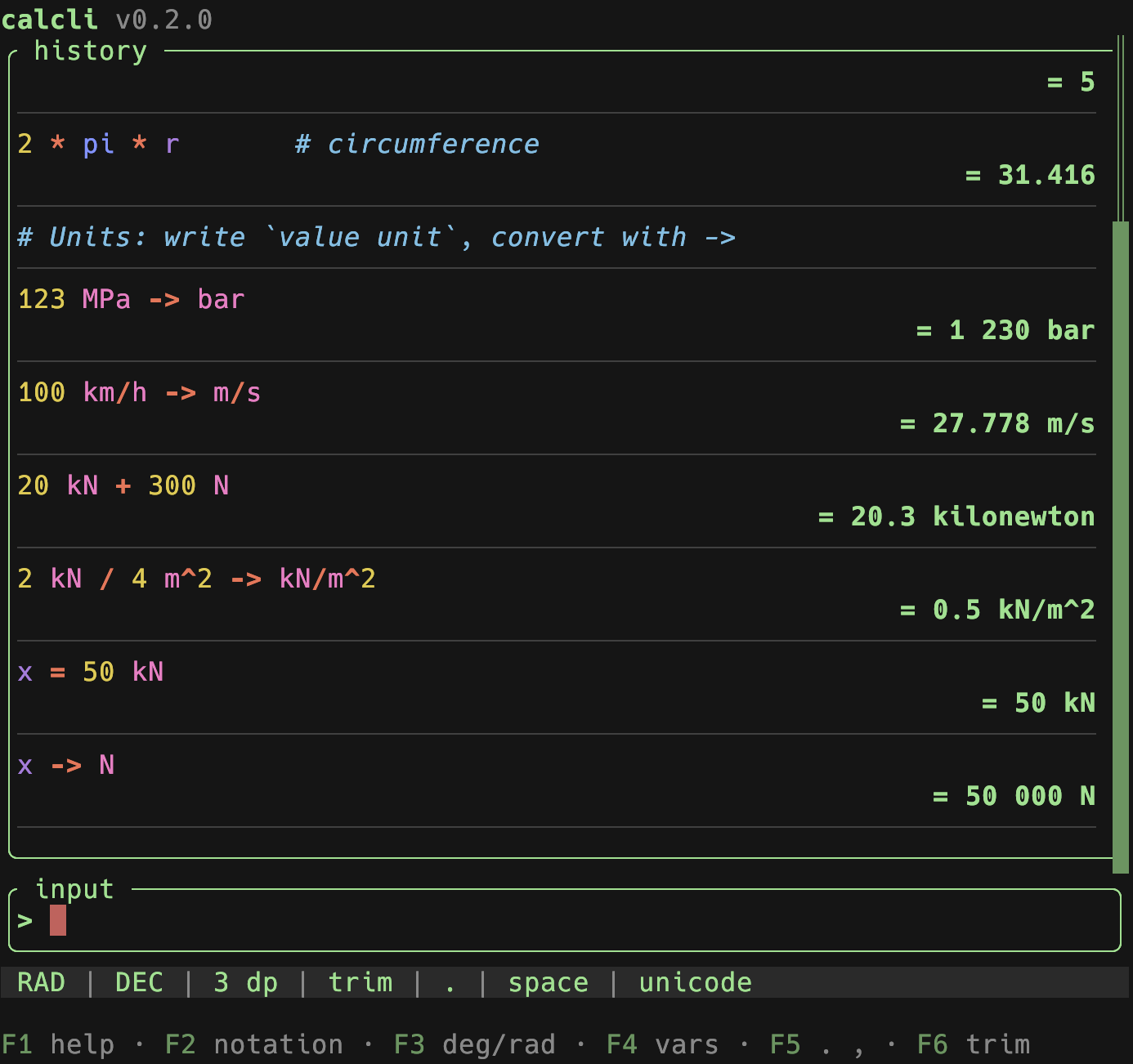
- History with recompute – each entry shows the input with its result on
the line below (both soft-wrap long content). Edit any earlier line and every
line below is re-evaluated, so
anschains stay correct. - Full precision – the rounded value you see is only for display; further math always uses the exact internal value.
- Variables – save with
=name(stores the last answer) orname = expr. Manage them in an overlay: insert, copy, delete, reset all. Persisted. - Notation – cycle decimal / scientific / SI-prefixed (
F2); trailing fractional zeros are dropped by default (12, not12.000), toggle withF6or thetrim_trailing_zerosconfig key. - Angle mode – toggle degrees / radians for trig (
F3). - Lenient input – spaces,
_and the non-decimal one of./,are accepted as thousands separators; SI prefixes like3.3k,100uare expanded. Function arguments use;(e.g.max(1;2)). - Clipboard –
ycopies the plain, full-precision value (no grouping);Ycopies it as shown (rounded, grouped). - Growing input – long expressions soft-wrap and the input field grows
(up to
input_max_lines);↑/↓move the caret across the wrapped lines,↑on the first line enters the history. - Syntax highlighting – functions, constants, operators (bold), numbers,
defined variables, parentheses and
ansare coloured in the input, the history and while editing. Colours are configurable in the[theme]table; unknown identifiers stay neutral. - Live feedback – as you type, the input border shows a dim
= valuepreview while the expression is valid and a subtle warning marker when it looks complete but won't parse (silent while still mid-typing). Toggle withlive_feedbackin the config. - Persistence – settings, variables and history are saved on exit and restored next time (settings restore is configurable).
From crates.io:
cargo install calcliOr from a local checkout:
cargo install --path .Or run without installing:
cargo run --releaseStart with --demo to fill the session with sample data (history, variables,
unit conversions) for a quick tour – demo mode never writes to your saved
session:
calcli --demo| Key | Action |
|---|---|
Enter |
evaluate the expression |
↑ |
enter the history |
Ctrl+Y |
copy the last result (plain) |
Ctrl+C / X / V |
copy / cut / paste in the input |
Esc |
clear the input |
| Key | Action |
|---|---|
↑ ↓ / PgUp PgDn / Home End |
move the selection |
Alt+↑ / Alt+↓ |
move the selected line up / down (recomputes) |
o / O |
insert a line below / above and edit it |
Enter / e |
edit the selected line (recomputes below) |
d / Del |
delete the selected line (asks first) |
Shift+D |
clear the whole history (asks first) |
y |
copy the value (plain, full precision) |
Y |
copy the value (as shown, grouped) |
Esc |
back to the input |
Reordering, inserting and deleting all re-evaluate the affected lines, so ans
and variable assignments stay consistent with the new order.
| Key | Action |
|---|---|
↑ ↓ |
select |
Enter |
insert the name into the input |
y / Y |
copy the value |
d |
delete the variable |
R |
reset all variables |
Esc |
close |
| Key | Action |
|---|---|
F1 |
toggle help |
F2 |
cycle notation (dec / sci / SI) |
F3 |
toggle angle mode (deg / rad) |
F4 |
variables overlay |
F5 |
toggle decimal separator (. / ,) |
F6 |
toggle trailing-zero trimming |
Ctrl+Q |
quit (saving the session) |
:d[n], :s[n], :si[n] set notation (and optional decimals); :deg / :rad
set the angle mode; :clear clears the history.
Backed by meval: + - * / ^ (and ** for
power), parentheses, constants pi, e, and functions such as sqrt, exp,
ln, abs, sin, cos, tan, asin, acos, atan, sinh/cosh/tanh,
floor, ceil, round, min, max, atan2. Trig respects the angle mode.
ans– the previous result. A line starting with an operator (e.g.+5) continues from it automatically.=name– save the previous answer toname.name = expr– evaluate and store.ans,piandeare reserved.- SI prefixes on numbers:
k M G T m µ u n p(e.g.4.7k→4700). - Units, conversion & arithmetic: write a quantity as
value unit(space-separated, e.g.123 MPa) and convert with->(orto):123 MPa -> bar,1 l -> dm^3,100 km/h -> m/s,ans -> psi,x = 50 kNthenx -> N. You can also calculate with units –20 kN + 300 N→20.3 kN,1 m + 50 cm→1.5 m,1 m * 2 m→2 m^2,2 kN / 4 m^2 -> kN/m^2→0.5 kN/m^2.ansand variables keep their unit. Units are powered byrink-core; a conversion is shown in the unit you typed, a derived result in a sensible symbol (pin any other unit with->). Exponents use^(cm^3,m^2). - Comments: everything after
#is ignored by the calculation but kept in the history (e.g.2*pi*r # circumference). A line that is only a comment is kept as a note (no result); notes don't break theanschain.
calcli reads config.toml from $XDG_CONFIG_HOME/calcli/ (or
~/.config/calcli/). Every key is optional. See
examples/config.toml for the full list with defaults
(notation, decimals, angle mode, separators, max history, glyph set, the
restore_last_settings and live_feedback switches, and the accent and
syntax-highlight colours).
The session (settings, variables, history) is stored in state.toml under
$XDG_STATE_HOME/calcli/ (or ~/.local/state/calcli/); see
examples/state.toml. History values are recomputed on
load so the ans chain stays consistent with the active settings.
The
glyphs = "ascii"option currently switches the warning marker to ASCII; borders and a few separators use broadly-compatible Unicode box-drawing and middle-dot glyphs.
Layered, with the composition root in main.rs:
domain/– pure core: evaluation (Evaluatortrait + meval), theunitsengine (rink), expression preprocessing, number formatting, variables, history (and its replay).service/–CalcService: orchestration (submit / edit / delete + recompute, variables, settings).storage/–StateRepositoryport + TOML implementation (state.toml).config/–Configand its loader.tui/– the Ratatui front-end.util/– paths, logging, clipboard, app metadata.
Dimensionless math runs through the Evaluator trait (meval), keeping full
f64 precision and the angle mode; anything involving units is routed to the
domain::units wrapper around rink-core, which owns conversion and unit
arithmetic.
cargo test                  # unit + integration tests
cargo clippy --all-targets  # must be warning-free
See CLAUDE.md for the coding standards this project follows.