
Like Cursor's CMD+K, but for your terminal and Neovim. Get AI-powered command and code suggestions with full context awareness.
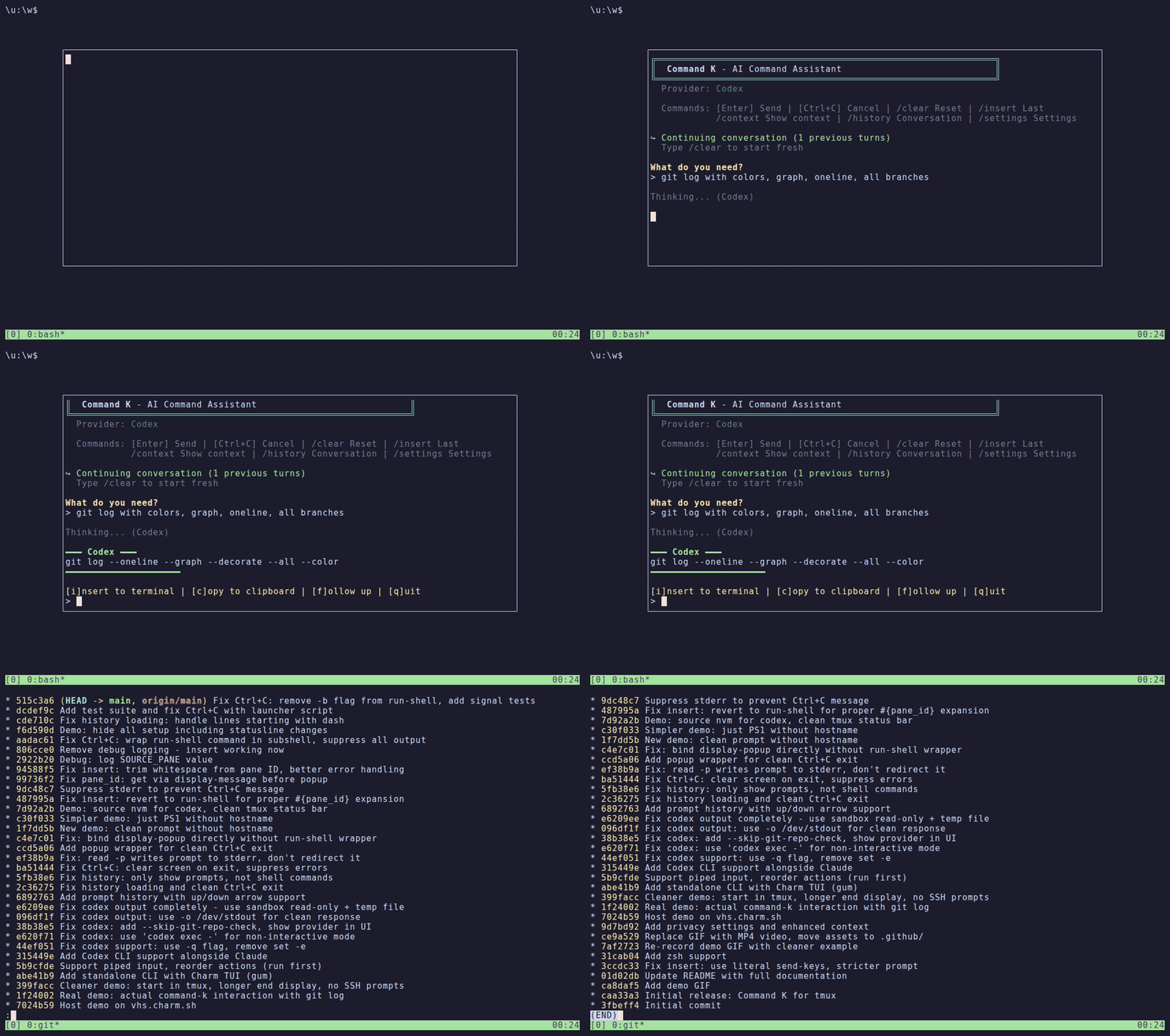
- Context-aware: Captures terminal content, working directory, git status, shell history
- Follow-ups: Continue conversations without losing context
- Preview first: See the suggestion before inserting
- Smart detection: Knows if you're in vim, a REPL, SSH session, etc.
- Works anywhere: SSH sessions, containers, any terminal — not locked to a specific app
- Use your own AI: Bring Claude Code, Codex, Oh My Pi, or a custom provider
- No account required: No sign-up, no telemetry
- Open source: MIT licensed, fully hackable
Command K comes in two flavors — choose based on your workflow:
| Variant | Best For | Dependencies |
|---|---|---|
| tmux plugin | tmux users who want ⌘K in a popup without leaving their session |
tmux 3.2+, gum |
| Standalone CLI | Anyone who wants AI command help in any terminal | gum (bash) or Rust (cmdk-rs) |
tmux plugin — Binds to prefix + Ctrl-k, opens in a tmux popup, can insert commands directly into your pane. Context is captured from the active pane.
Standalone CLI — Run cmdk (bash) or cmdk-rs (Rust) from any terminal. Same features, but you copy/paste the result yourself. The Rust version is faster and also powers the Neovim plugin.
Both share the same configuration (~/.command-k/) and conversation history.
Install TPM (Tmux Plugin Manager).
Add to ~/.tmux.conf:
set -g @plugin 'alexandernicholson/command-k'Then press prefix + I (as in, capital I) to install.
Updates are performed with prefix + U (as in, capital U), followed by typing the name of the plugin, command-k and pressing ENTER.
git clone https://github.com/alexandernicholson/command-k ~/.tmux/plugins/command-k

# Add to ~/.tmux.conf
echo "run-shell ~/.tmux/plugins/command-k/command-k.tmux" >> ~/.tmux.conf

# Reload tmux
tmux source ~/.tmux.conf- AI CLI (one of):
- Claude Code (
claude) - Codex CLI (
codex) - Oh My Pi (
omp)
- Claude Code (
- bash 4+ or zsh
- For tmux plugin: tmux 3.2+ (for
display-popup) - For standalone CLI (bash): gum
- For Rust CLI / Neovim: Rust/Cargo (to build cmdk-rs)
Bash version (requires gum):
# Add to your PATH
ln -s ~/.tmux/plugins/command-k/cmdk ~/.local/bin/cmdk

# Interactive TUI
cmdk

# Quick query (outputs command directly)
cmdk -q "find files larger than 100MB"

# View current context
cmdk -c

# Privacy settings
cmdk -s
Rust version (faster, no gum dependency):
# Build
cd cmdk-rs && cargo build --release

# Add to your PATH
ln -s ~/.tmux/plugins/command-k/cmdk-rs/target/release/cmdk-rs ~/.local/bin/cmdk-rs

# Same commands as above
cmdk-rs
cmdk-rs -q "find files larger than 100MB"See docs/NEOVIM.md for full documentation.
Quick setup with lazy.nvim:
{
  "alexandernicholson/command-k",
  build = "cd cmdk-rs && cargo build --release",
  config = function()
    require("cmdk").setup({
      keymap = "<C-k>",  -- Press Ctrl+K to open
    })
  end,
}
Features:
- Opens in floating window (like tmux popup)
- Captures buffer content, filetype, LSP diagnostics
- Insert at cursor, replace line/selection, or copy
- Visual mode support for refactoring selected code
- Press
prefix + Ctrl-k(default:C-b C-k) - Type what you need: "git command to undo last commit"
- Review the suggestion
- Press
ito insert,cto copy,fto follow up,qto quit
| Command | Action |
|---|---|
/clear |
Reset conversation history |
/context |
Show captured terminal context |
/history |
Show conversation history |
/settings |
Privacy settings menu |
/insert |
Insert last result |
/quit |
Exit |
| Key | Action |
|---|---|
i |
Insert result to terminal |
c |
Copy to clipboard |
f |
Follow up (continue conversation) |
q |
Quit |
Command K supports Claude, Codex, Oh My Pi, and custom providers. Configure via /settings or edit ~/.command-k/settings.conf:
# Options: auto, claude, codex, omp, custom
ai_provider=auto

# Optional; empty uses the provider default
ai_model=
auto prefers Claude, then Codex, then Oh My Pi. The selected model is passed
to every built-in provider; custom providers receive it as COMMAND_K_MODEL.
Add to ~/.tmux.conf before the plugin loads:
# Change keybinding (default: C-k)
set -g @command-k-key 'k'

# Popup size (default: 80% x 70%)
set -g @command-k-width '90%'
set -g @command-k-height '80%'Use /settings in the popup to control what context is sent to Claude. All settings are persistent.
| Setting | Description |
|---|---|
| Terminal content | Last 500 lines of visible output |
| Shell history | Recent command history |
| Git status | Branch and modified files |
| Working directory | Current path |
| Environment variables | Variable names only (values never sent) |
| Shell type | bash, zsh, fish, etc. |
| Terminal size | Dimensions |
| Current process | Running command |
Settings are stored in ~/.command-k/settings.conf.
-
Captures context from your current pane (based on privacy settings):
- Terminal content (last 500 lines)
- Working directory
- Current command/process
- Git status (if in repo)
- Shell type and environment variable names
- Recent shell history
-
Sends to Claude Code with conversation history for context
-
Shows response in popup with options:
- Insert directly to terminal
- Copy to clipboard
- Continue conversation (follow-up)
> git command to squash last 3 commits into one
git rebase -i HEAD~3

> [f] make it non-interactive, use the first commit message
git reset --soft HEAD~3 && git commit --reuse-message=HEAD@{3}
> kubectl command to get all pods with high memory usage
kubectl top pods --all-namespaces | sort -k4 -h | tail -20
> one-liner to find all files modified in last 24h larger than 100MB
find . -type f -mtime -1 -size +100M -ls
~/.command-k/- Conversation history and statesession-*.md- Per-pane conversation history (auto-expires after 1 hour)last-result.txt- Most recent response
- Use follow-ups to refine: "make it recursive" or "add error handling"
- Works great for:
- Complex git commands
- One-liners (awk, sed, find, etc.)
- Docker/kubectl commands
- Quick scripts
- Explaining what's on screen
- The context capture helps Claude understand what you're working on
MIT