



- Works with Firefox, Edge, Safari and Chrome.
- Native support for touch devices (phones and tablets).
- Rich documentation, examples, and slack support.
- Single canvas element, drawn in immediate mode, data size does not impact performance.
- Support for unlimited rows and columns without paging or loading.
- Rich API of events, methods and properties using the familiar W3C DOM interface.
- Extensible styling, filtering, formatting, resizing, selecting, and ordering.
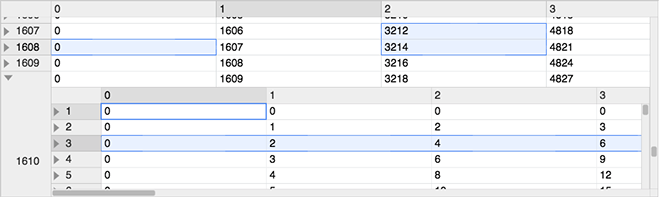
- Support for hierarchal drill in style row level inner grids as well grids in cells.
- Customizable hierarchal context menu.
- Built in and custom styles.
- W3C Web Component. Works in all frameworks.
- Per-user styles, column sizes, row sizes, view preferences and settings using localStorage.
- Small file size
Slack Support (message author for invite)
Download latest version (minified)
With npm
npm install canvas-datagridPlace the single source file ./dist/canvas-datagrid.js in your web page using a script tag that points to the source or use webpack.
<script src="dist/canvas-datagrid.js"></script>Alternatively, instead of downloading and installing, you can link directly to an NPM CDN like unpkg.com.
<script src="https://unpkg.com/canvas-datagrid"></script>A function will be added to the global scope of the web page called canvasDatagrid as well as module loader definitions.
Works with a bundler, without one or as a web component.
No matter how you load it, canvasDatagrid is declared in the global scope.
Canvas-datagrid is a Web Component when
in a compatible browser, otherwise it is a <canvas> tag.
var grid = canvasDatagrid();
document.body.appendChild(grid);
grid.data = [
  { col1: 'row 1 column 1', col2: 'row 1 column 2', col3: 'row 1 column 3' },
  { col1: 'row 2 column 1', col2: 'row 2 column 2', col3: 'row 2 column 3' },
];<canvas-datagrid class="myGridStyle" data="data can go here too"
>[ {"col1": "row 1 column 1", "col2": "row 1 column 2", "col3": "row 1 column
3"}, {"col1": "row 2 column 1", "col2": "row 2 column 2", "col3": "row 2
column 3"} ]</canvas-datagrid
>or
var grid = document.createElement('canvas-datagrid');
grid.data = [
  { col1: 'row 1 column 1', col2: 'row 1 column 2', col3: 'row 1 column 3' },
  { col1: 'row 2 column 1', col2: 'row 2 column 2', col3: 'row 2 column 3' },
];<canvas-datagrid :data.prop="[{"col1": "row 1 column 1"}]"></canvas-datagrid>See Using with Vue for a full component, and Using with React for React.
Type declarations are included. Import the factory and, when you need them, the instance and argument types:
import canvasDatagrid, {
  type canvasDatagrid as CanvasDatagrid,
  type CanvasDatagridArgs,
} from 'canvas-datagrid';
The declarations are generated from JSDoc and are not strict-clean yet, so keep skipLibCheck: true in your tsconfig.json.
- Using with React
- Using with Vue
- Using with a bundler or module loader
- Create a web component grid
- Load data on demand with fetch
- Sparkline charts in cells
- Large arrays
- Use a custom editor for a cell
- All examples
To install development dependencies. Required to build or test.
npm install
To build production and debug versions:
npm run build
To build documentation:
npm run build:docs
To build types:
npm run build:types
To run tests. Note: Headless tests will mostly fail due to lack of headless canvas pixel detection support. Use VM testing or your browser.
npm test
This is info for wsl version 1. v2 seems to be different.
CHROME_BINneeds to be set to the location of your Google Chrome exe in Windows. (e.g./mnt/c/Program Files (x86)/Google/Chrome/Application/chrome.exe) in WSL,export CHROME_BIN='path/to/chrome'- Chrome needs access to karma's temp folder.
- Create a
tmpfolder on the same Windows drive as your repo. - set
TEMPto a folder that exists on the same Windows drive as your repo. (matching capitalization probably matters) in WSL,export TEMP='/Temp/karma', if your repo is on drive C, then create folder C:\Temp\karma
- Create a
- karma.conf.js needs to be edited
- Change the browser from
ChromeHeadlesstoChrome - Modify to run ChromeHeadless without sandboxing. This is not ideal, but it seems to be necessary in WSL and Linux containers (see also)
- Add a custom launcher
customLaunchers: { ChromeHeadlessNoSandbox: { base: 'ChromeHeadless', flags: ['--no-sandbox'] } } - Change the browser from
ChromeHeadlesstoChromeHeadlessNoSandbox
- Add a custom launcher
- Change the browser from