




Synalog is a logic programming language from the Datalog family — a fork of Logica with the entire engine (parser, compiler and verifier) rewritten in Rust. It compiles to optimized SQL and ships as a Python package built on PyO3: parsing is ~86.7x faster and compilation ~13.7x faster than the original Python implementation, so validating and compiling a program is effectively instant.
Synalog was built for the AI agents era. The main idea is to give an agent a dynamic semantic layer over its data — a layer of named concepts and rules that the agent both reads from and writes to at inference time. Unlike a traditional BI semantic layer, which is modeled once by humans and frozen, Synalog's layer is authored on the fly: the agent extracts entities and relationships into knowledge graphs, derives meaning with composable logical rules, and reasons over time with temporal reasoning: accumulating all of it as structured, reusable memory.
A raw table is just rows; an agent has to re-interpret what they mean on every query. Synalog turns that meaning into a layer the agent owns:
- A shared vocabulary over raw tables: instead of re-deriving "who is an active customer" or "what counts as revenue" in every query, the agent defines it once as a named concept and reuses it everywhere. The semantic layer is the agent's interface to the data.
- Instant knowledge-graph construction from raw tables: a handful of entity and relationship concepts turn existing relational tables into a traversable knowledge graph, with no ETL pipeline, no separate graph database, and no data movement. The graph is virtual: it compiles to SQL that runs directly on the source tables.
- Knowledge graphs the agent can traverse: model entities and relationships as concepts, then follow connections (composition, inverse, symmetric, recursive chains) without writing fragile join logic. See Knowledge graphs.
- Recursion and transitive reasoning: transitive closures and graph traversals (org charts, taxonomies, bills of materials, referral chains, shortest paths) that are impossible to write correctly in raw SQL come out as a base case plus a recursive case, with the verifier guaranteeing termination.
- Logical rules that compose: rules build on other rules, so knowledge accumulates instead of being re-derived. Complex questions decompose into small named predicates the agent can inspect, reuse, and combine.
- Temporal reasoning: time-aware rules and edges (validity windows, "active today", overlap, point-in-time joins) let the agent answer when, not just what — reasoning that is notoriously error-prone to express directly in SQL.
- Dynamic, not static: the layer evolves as the agent learns. New rules extend the vocabulary at runtime; the rule base itself becomes the agent's long-term memory over structured data.
- Auditable reasoning: every derived fact traces back through named rules, giving full lineage from answer to source tables.
- Compile-time verification: a formal verifier catches structural errors before any SQL touches a database, so a self-authored rule that parses but is unsound is rejected up front. See Verification.
- A fast Rust engine: check and compile sit inside the agent's inner loop (every generated rule is validated, every query compiled, often several times per step). The Rust core makes that loop cost milliseconds instead of seconds. See Benchmark.
Because SQL engines are better optimized than logic programming engines, Synalog compiles into optimized SQL that runs on SQLite, DuckDB, BigQuery, PostgreSQL, Presto, Trino and Databricks: efficiently scaling to petabytes of data. See Supported engines.
Full documentation: https://synalinks.github.io/synalog/
import duckdb
import synalog

source = """
@Engine("duckdb");

Employee(name: "Alice", department: "Engineering", salary: 75000);
Employee(name: "Bob", department: "Marketing", salary: 65000);
Employee(name: "Charlie", department: "Engineering", salary: 80000);

@OrderBy(EngineeringTeam, "name");
EngineeringTeam(name:, salary:) :- Employee(name:, department: "Engineering", salary:);
"""

errors = synalog.check(source)
assert errors == []

sql = synalog.compile(source, "EngineeringTeam")
rows = duckdb.sql(sql).fetchall()
# [('Alice', 75000), ('Charlie', 80000)]pip install synalogOr with uv: uv add synalog (or uv pip install synalog). The CLI also runs without installing via uvx synalog, or uvx --from 'synalog[run]' synalog to include the duckdb and psycopg drivers.
Requires Python 3.10+. Wheels are published for Linux (x86_64, aarch64, armv7, s390x, ppc64le; glibc and musl), Windows (x64, x86, aarch64) and macOS (x86_64, aarch64).
Synalog ships an Agent Skill — a SKILL.md that teaches a coding agent the language, the CLI and the conventions, so it writes and runs programs correctly. It follows the open Agent Skills standard, so it works with Claude Code, Cursor, Codex, OpenCode, Cline, Windsurf and 70+ other agents. Install it with the skills CLI — GitHub is the registry, so there is nothing to publish or install first:
npx skills add SynaLinks/synalog              # this project (./.claude/skills, ./.agents/skills, …)
npx skills add SynaLinks/synalog -g           # user-wide (~/.claude/skills, …)
npx skills add SynaLinks/synalog -a cursor codex   # only specific agents
The skill is maintained in this repo at skills/synalog/SKILL.md; npx skills add copies it into the right place for each agent.
Installing the package also installs a synalog command (also available as python -m synalog):
synalog program.l print Predicate      # print compiled SQL
synalog program.l run Predicate        # execute and print a table
synalog program.l run Predicate --csv  # execute and print CSV
Both print and run validate the whole program first and exit 1 with the verifier's errors if it is invalid, so verification always happens before any SQL is produced or executed.
$ synalog program.l run EngineeringTeam
+---------+--------+
| name    | salary |
+---------+--------+
| Alice   | 75000  |
| Charlie | 80000  |
+---------+--------+
2 rows
-as the file reads the program from stdin;-c PROGRAMpasses the program text inline, likepython -c.--engineoverrides the program's@Engineannotation (defaultduckdb).--limit/--offsetpaginate the result.--csv(withrun) prints results as CSV instead of the rendered table.--search REGEX(withprint/run) keeps only rows where some column matches the regular expressionREGEX, e.g.synalog program.l run Customers --search "(?i)acme". In the interactive session the same is.search Customers (?i)acme.runexecutes locally onduckdb(needspip install duckdb),sqlite(stdlib), orpsql(needspip install psycopgand--dsnorSYNALOG_PSQL_DSN). For other engines, useprintand run the SQL with your own client.pip install 'synalog[run]'pulls in the duckdb and psycopg drivers.import path.to.file.Pred;statements resolvepath/to/file.lagainst the program file's directory, then the current directory; pass--import-root DIR(repeatable) to search elsewhere.--load TABLE=PATH(repeatable) loads a csv/tsv/json/jsonl/parquet file as a table before running, e.g.synalog senior.l run Senior --load employees=employees.csv.
Running synalog with no arguments starts an interactive session, in the spirit of python (the options above, e.g. --engine or --load, apply to it too):
$ synalog
Synalog 0.1.0 on duckdb — type .help for help
>>> Employee(name: "Alice", salary: 75000);
>>> Employee(name: "Bob", salary: 65000);
>>> Total(t? += salary) distinct :- Employee(salary:);
>>> Total
+--------+
| t      |
+--------+
| 140000 |
+--------+
1 row
Type a rule ending in ; to add it to the session program (it is validated first, and rejected with an error if invalid), or a predicate name to compile and run it. .help lists the session commands (.show, .sql <Pred>, .engine <name>, .load <table> <path>, .clear, .exit).
import synalog

source = """
@Engine("duckdb");

Employee(name: "Alice", department: "Engineering", salary: 75000);
Employee(name: "Bob", department: "Marketing", salary: 65000);
Employee(name: "Charlie", department: "Engineering", salary: 80000);

@OrderBy(EngineeringTeam, "name");
EngineeringTeam(name:, salary:) :- Employee(name:, department: "Engineering", salary:);
"""

errors = synalog.check(source)
assert errors == []

sql = synalog.compile(source, "EngineeringTeam")
print(sql)
You can then execute the SQL with any database driver (sqlite3, duckdb, psycopg, google-cloud-bigquery, etc.).
Parse source and return the AST as a JSON string.
ast = synalog.parse(source)Compile a single predicate to SQL. limit is combined with the @Limit directive: actual = min(limit, @Limit).
sql = synalog.compile(source, "TopCustomers", limit=20, offset=40)Compile a predicate to SQL that keeps only rows where some column matches the regular expression pattern (the per-column conditions are OR-ed, each column cast to text). The regex is evaluated by the target engine's native operator (~ on PostgreSQL, REGEXP on SQLite, regexp_matches on DuckDB, REGEXP_LIKE elsewhere) — it is not a SQL LIKE pattern. limit/offset apply to the filtered rows.
sql = synalog.search(source, "Customers", "(?i)acme", limit=20)Compile every defined predicate in the program. Returns a mapping predicate_name -> sql.
sqls = synalog.compile_all(source)
for name, sql in sqls.items():
print(name, sql)Run structural validation. Returns a list of error messages; empty if the program is valid.
errors = synalog.check(source)
if errors:
    for e in errors:
        print(e)
All of these functions accept an optional engine keyword that overrides the program's @Engine annotation (one of sqlite, duckdb, bigquery, psql, presto, trino, databricks; default duckdb) and an optional import_root keyword listing directories where import statements look up .l files (default: the current directory). They raise ValueError on syntax or compilation errors.
By convention, a Synalog program is organized into three sections: tables, concepts and rules. Tables map external data sources (a database table is referenced by its lowercase database name and mapped once to a PascalCase predicate). Concepts extract entities and relationships from tables. Rules derive new data from concepts. The section headers are plain comments — the structure is a convention, not syntax.
# Tables — read-only mappings of database tables
Orders(customer_id:, product_id:, amount:, status:) :-
  orders(customer_id:, product_id:, amount:, status:);

# Concepts — extract entities and relationships

@OrderBy(Customer, "customer_id");
Customer(customer_id:) distinct :- Orders(customer_id:);

@OrderBy(Purchased, "customer_id");
Purchased(customer_id:, product_id:) distinct :- Orders(customer_id:, product_id:);

# Rules — derive insights from concepts

@OrderBy(CustomerSpend, "total", "DESC");
CustomerSpend(customer_id:, total? += amount) distinct :- Orders(customer_id:, amount:);
Synalog uses named arguments only (no positional arguments). The left side of : is the column name, the right side is the variable:
# column "amount" bound to variable "total"
Orders(amount: total)

# shorthand: column and variable share the same name
Orders(amount:)
Variables are defined with ==. Arithmetic, string and comparison operators are supported:
OrderWithTax(order_id:, total:) :-
  Orders(order_id:, amount:),
  total == amount * 1.10;
Operators: +, -, *, /, ^ (power), % (modulo), ++ (string concat), ==, !=, <, >, <=, >=, &&, ||, !, in, is null, is not null.
Aggregation uses the distinct keyword and special operators in the rule head:
# Sum
Revenue(total? += amount) distinct :- Orders(amount:);

# Count
OrderCount(n? += 1) distinct :- Orders(order_id:);

# Min / Max
Cheapest(min_price? Min= price) distinct :- Products(price:);
Priciest(max_price? Max= price) distinct :- Products(price:);

# Average
AvgOrder(avg? Avg= amount) distinct :- Orders(amount:);

# Collect into list / set
AllNames(names? List= name) distinct :- Users(name:);
UniqueNames(names? Set= name) distinct :- Users(name:);

# Value with max/min key
TopSeller(name? ArgMax= name -> revenue) distinct :- Sales(name:, revenue:);
# Conjunction (AND) — comma
Result(x:, y:) :- TableA(x:), TableB(x:, y:);

# Disjunction (OR) — pipe
Combined(x:) distinct :- SourceA(x:) | SourceB(x:);

# Negation (NOT) — tilde
Inactive(user_id:) :- Users(user_id:), ~Logins(user_id:);
Multiple rule definitions for the same predicate combine results (union):
HighValue(user_id:) :- Orders(user_id:, amount:), amount > 10000;
HighValue(user_id:) :- Referrals(user_id:, tier: "vip");
OrderSize(order_id:, size:) :-
  Orders(order_id:, amount:),
  size == (if amount > 1000 then "large"
           else if amount > 100 then "medium"
           else "small");
Directives control predicate behavior and must be placed before the rule definition:
@OrderBy(TopCustomers, "total", "DESC");
@Limit(TopCustomers, 10);
TopCustomers(customer_id:, total? += amount) distinct :- Orders(customer_id:, amount:);
| Directive | Purpose |
|---|---|
@OrderBy(Pred, col1, ...) |
Sort order. Append "DESC" for descending |
@Limit(Pred, n) |
Maximum number of rows |
@Recursive(Pred, n) |
Allow recursion with iteration limit |
@Ground(Pred) |
Force materialization before dependents |
@Engine(name) |
Target SQL engine |
Functors let you reuse predicate logic by parameterizing input predicates:
# Define a reusable pattern
@OrderBy(SegmentRevenue, "segment_id");
SegmentRevenue(segment_id:, total? += amount) distinct :-
  Segment(segment_id:, user_id:),
  Orders(user_id:, amount:);

# Apply to different segments
EnterpriseRevenue := SegmentRevenue(Segment: EnterpriseCustomers);
SMBRevenue := SegmentRevenue(Segment: SMBCustomers);
Recursive predicates compute transitive closures — for example, finding all managers above an employee:
@Recursive(AllManagers, 20);

# Base case: direct manager
AllManagers(employee_id:, manager_id:) :- Employees(employee_id:, manager_id:);

# Recursive case: manager's managers
AllManagers(employee_id:, manager_id:) :-
  AllManagers(employee_id:, intermediate:),
  Employees(employee_id: intermediate, manager_id:);
Useful for: referral chains, org charts, product taxonomies, bill of materials.
Find shortest paths in weighted graphs using Min= aggregation:
ShippingCost("warehouse_main") = 0;

ShippingCost(destination) Min= cost :-
  ShippingRoutes(origin: "warehouse_main", destination:, cost:);

ShippingCost(destination) Min= ShippingCost(hub) + cost :-
  ShippingCost(hub),
  ShippingRoutes(origin: hub, destination:, cost:);
When working with timestamps or dates, always convert to string first:
@OrderBy(MonthlyOrders, "month");
MonthlyOrders(month:, count? += 1) distinct :-
  Orders(created_at:),
  month == Substr(ToString(created_at), 1, 7);

# Filter by date range
RecentOrders(order_id:) :-
  Orders(order_id:, created_at:),
  ToString(created_at) >= "2024-01-01";
Today(date:) (today's date as "YYYY-MM-DD") and Now(timestamp:) (the current instant as the engine's native timestamp) are built-in concepts. They are inlined per dialect by the compiler — no runtime table needed, so they work on every engine. Now is the most precise value; derive coarser parts (date, time, hour) from it through the ToString → Substr pipeline. Join against Today whenever a rule needs "today":
@OrderBy(ThisMonthOrders, "order_id");
ThisMonthOrders(order_id:, created_at:) :-
  Orders(order_id:, created_at:),
  Today(date:),
  Substr(ToString(created_at), 1, 7) == Substr(date, 1, 7);
They are reserved names: you cannot redefine, extend, or update them.
String: Substr, Length, Upper, Lower, Split, Join, Like, Format
Array: Size, Element, ArrayConcat, Range
Math: Abs, Floor, Ceil, Round, Sqrt, Log, Exp, Sin, Cos
Type casting: ToInt64, ToFloat64, ToString
Other: Coalesce, IsNull
Built-in concepts: Today(date:) — today's date as "YYYY-MM-DD"; Now(timestamp:) — current instant as a native timestamp (see Temporal data above).
| Engine | @Engine value |
Notes |
|---|---|---|
| DuckDB | duckdb |
Default engine |
| SQLite | sqlite |
|
| PostgreSQL | psql |
|
| BigQuery | bigquery |
|
| Trino | trino |
|
| Presto | presto |
|
| Databricks | databricks |
Double-quoted string literals |
Each engine has its own SQL dialect for string literals, array syntax, GROUP BY style, record construction, regex matching, and standard library functions.
The Rust core is benchmarked against the original Python Logica implementation on every program of the compiler test suite (504 programs across 6 engines). Both run in-process: Synalog through the same PyO3 extension that pip install synalog ships — so the numbers measure exactly what a Python caller gets:
| Python Logica | Synalog (Rust) | Speedup | |
|---|---|---|---|
| Parse | 13.4 s | 0.15 s | 87x |
| Compile | 61.3 s | 5.2 s | 13x |
| Verify | — | 0.16 s | Rust-only |
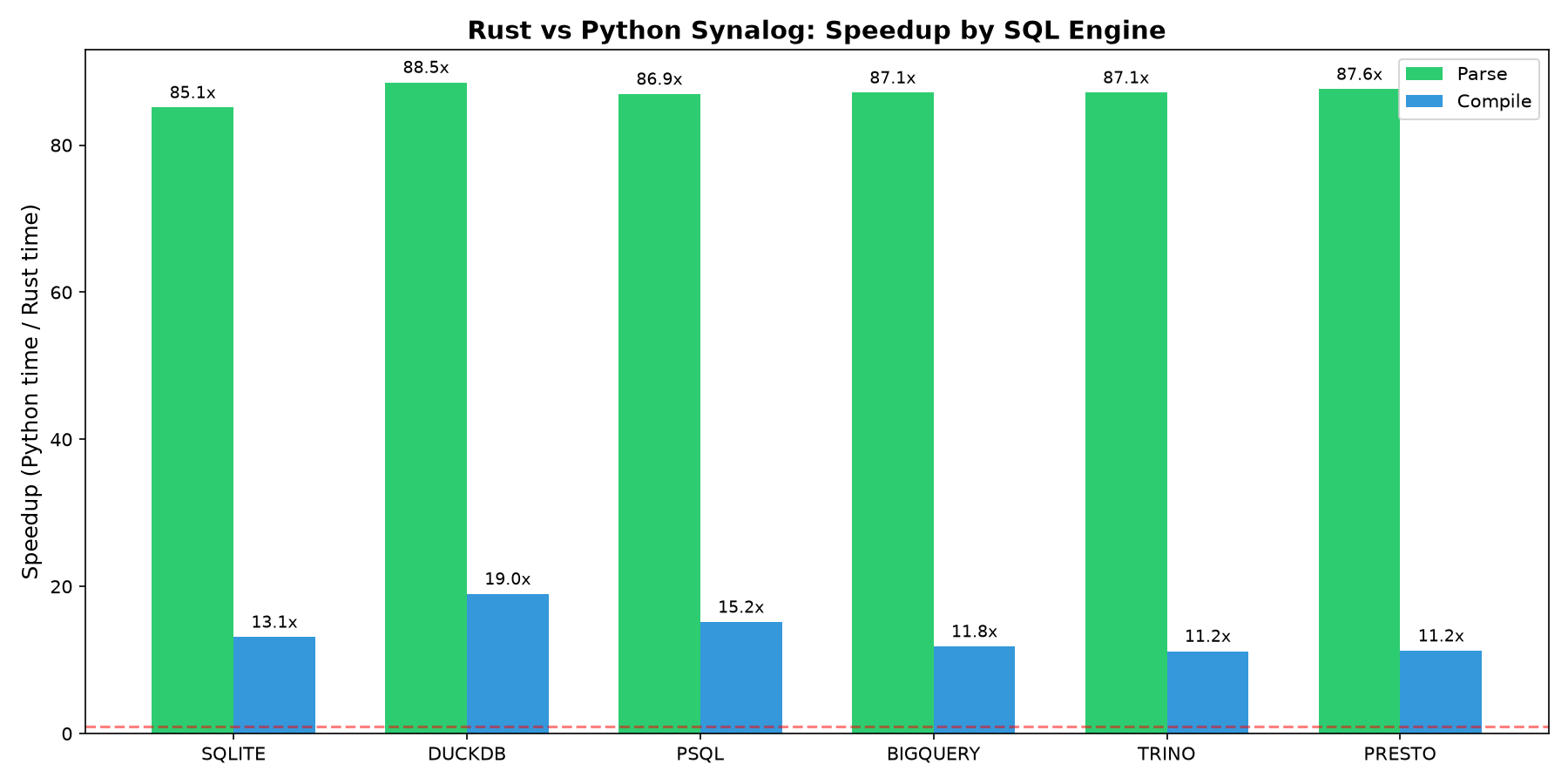
Speedup is the geometric mean of per-program speedups (every program weighted equally). Parsing is uniformly ~85–88x faster; compilation ranges from ~11x (trino, presto) to ~19x (duckdb). Verification — safety, stratification, recursion and reserved-name checks — is a Synalog-specific pass with no standalone Python equivalent. Per-engine tables and methodology are on the Benchmark page; reproduce with python3 benchmark.py.
Unlike Logica, which lets the database raise errors at execution time, Synalog embeds a formal verifier that catches issues at compile time.
| Check | What it detects |
|---|---|
| Safety | Head variables not bound in the body |
| Safe negation | Negated variables without a positive occurrence |
| Safe aggregation | Aggregated variables not bound outside the aggregate |
| Stratification | Negative recursion cycles |
| Arity | Predicates used with inconsistent argument counts |
| Recursion | Missing base cases, trivial loops, unbounded recursion without @Recursive |
| Reserved names | Rules that redefine a built-in library predicate (Num, Str, ArgMin, Today, Now, ...) |
Unsafe SqlExpr |
User rules that reach for the raw-SQL escape hatch |
errors = synalog.check(bad_source)
for e in errors:
    print(e)
# Unbound variable 'y' in head of rule: Test(x:, y:) :- Numbers(x:)Synalog doesn't support positional attributes like Logica or Datalog — it only uses named attributes, which reduce agent mistakes. This feature is optional in Logica; we made it mandatory.
In Synalog, the compiled SQL uses actual column names, not col{i} format, making it compatible with existing database schemas.
Pagination is critical for AI agents with limited context windows. It also avoids loading large amounts of data into memory, enabling use on memory-constrained cloud infrastructure.
Synalog applies pagination at compile time via the limit and offset arguments of compile(). The limit is combined with the @Limit directive: actual_limit = min(limit, @Limit).
Synalog embeds a formal verifier that catches structural errors before any SQL is generated. This prevents agents from producing programs that parse correctly but fail at execution time — a common failure mode when working with SQL directly.
The project uses maturin to build the Python wheel from the Rust crate.
pip install maturin
maturin develop --release    # install into the active venv
maturin build --release      # produce a wheel in target/wheels/
Run the Rust test suite:
cargo testRun specific test groups:
cargo test --lib                        # unit tests
cargo test --test compiler_tests        # compiler golden tests (all engines)
cargo test --test parser_tests          # parser golden tests (all engines)
cargo test --test verifier_tests        # verifier tests (all engines)
cargo test --test search_tests          # search feature tests (all engines)
Golden SQL files are generated by the Python Logica compiler to serve as the reference:
cd tests/compiler_tests && python3 generate_expected_sql.py
cd tests/parser_tests && python3 generate_expected_json.py
Requires pip install logica.
src/
  lib.rs                  # Public API: parser, compiler, verifier, errors
  errors.rs               # Unified error types with help messages
  python.rs               # PyO3 bindings (the _synalog extension module)
  parser/
    parse.rs              # Logica syntax -> JSON AST
    rewrite.rs            # AST rewrites (aggregation, multi-body)
    json.rs               # Custom JSON implementation
  compiler/
    universe.rs           # LogicaProgram: AST -> SQL compilation
    annotations.rs        # @OrderBy, @Limit, @Recursive, etc.
    dialects.rs           # Engine-specific SQL generation
    expr_translate.rs     # Expression -> SQL translation
    rule_translate.rs     # Rule -> SQL translation
    functors.rs           # Functor expansion (@Make)
    concertina.rs         # Multi-predicate execution orchestration
    type_inference/       # Type checking subsystem
  verifier/
    mod.rs                # Validation entry point
    safety.rs             # Variable binding checks
    stratification.rs     # Negative cycle detection
    arity.rs              # Argument count consistency
    recursion.rs          # Recursion safety checks
    reserved.rs           # Reserved predicate name check
python/
  synalog/__init__.py     # Python package wrapper
  synalog/cli.py          # The synalog command (one-shot + REPL)
  synalog/runners.py      # Local SQL runners (duckdb, sqlite, psql)
tests/
  compiler_tests/         # Golden SQL tests per engine
  parser_tests/           # Golden JSON tests per engine
  verifier_tests/         # Negative verification tests per engine
  cli/                    # CLI tests (pytest)
  search_tests.rs         # Search feature integration tests