


Your GitHub year as a neon 3D stadium.
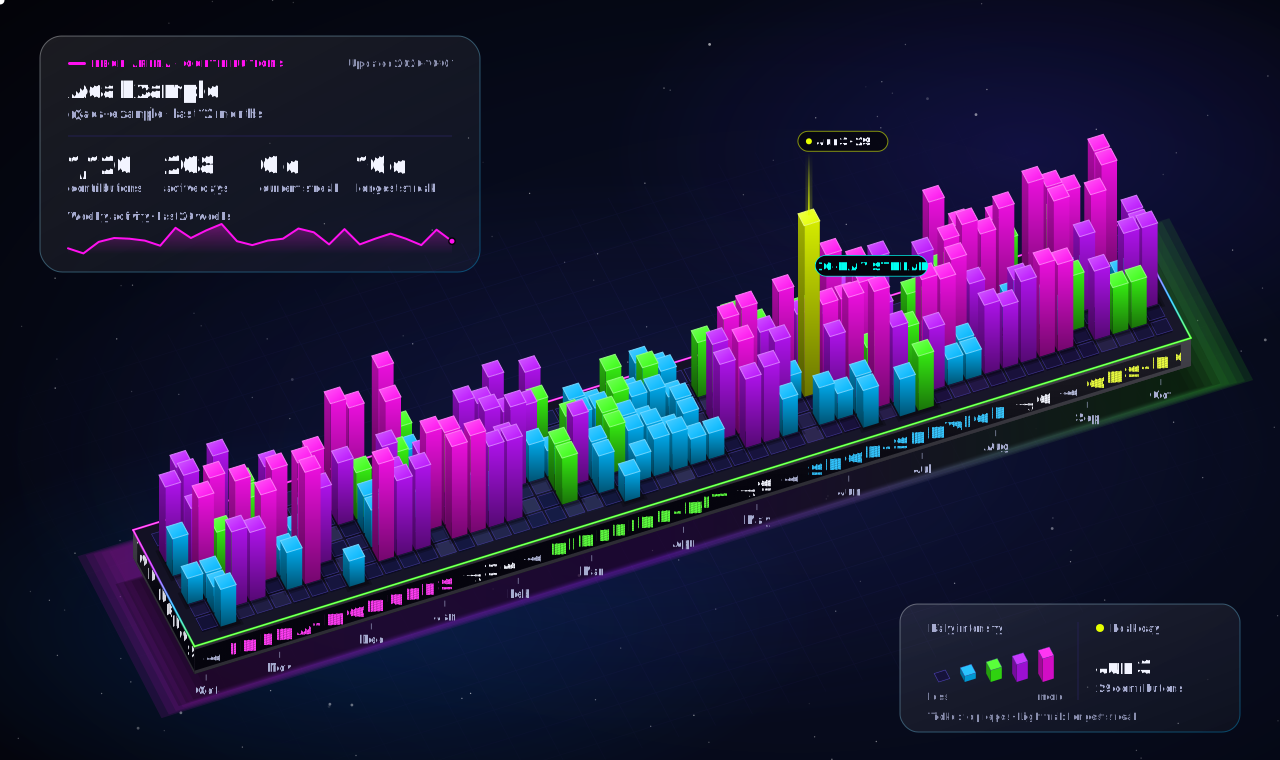
Neon Arena turns your GitHub contribution calendar into a single animated SVG for your profile README. Every day is a lit 3D bar or tile on a solid slab, drawn in a clean parallel 3D view. A single neon loop runs round the slab's top, and a soft neon glow lights the floor beneath it.
- LED ribbon: a screen wraps round the slab's front and left end and scrolls your top repositories and their stars, round the corner without a break.
- Streak light-cycle: a neon trail rides over the bar tops across your longest streak.
- Colour wave: a wave of neon light rolls across the grid.
- Night and day:
auroraon near-black anddaylighton clean white, with the same neon palette, neon loop and underglow.
It's one self-contained SVG with no runtime dependencies and no hosted service. Use it as a GitHub Action or as a Node.js CLI.
Create .github/workflows/neon-arena.yml in your profile repository (the repository named after your username):
# Copy into your profile repository as .github/workflows/neon-arena.yml
name: Neon Arena

on:
  workflow_dispatch:

  schedule:
    # Refresh once per hour.
    # Minute 17 avoids the top-of-hour schedule spike.
    - cron: "17 * * * *"

permissions:
  contents: write

concurrency:
  group: neon-arena
  cancel-in-progress: true

env:
  # Your local IANA timezone.
  #
  # Examples:
  # India: Asia/Kolkata
  # New York: America/New_York
  # London: Europe/London
  # Tokyo: Asia/Tokyo
  NEON_TIMEZONE: Asia/Kolkata

  # Daylight theme starts at 06:00 local time.
  NEON_DAY_START: "06"

  # Aurora theme starts at 18:00 local time.
  NEON_NIGHT_START: "18"

jobs:
  generate:
    name: Generate Neon Arena
    runs-on: ubuntu-latest

    steps:
      - name: Checkout profile repository
        uses: actions/checkout@f548e57e544e1ff5a4c46bf1e1b8685f8e4a348a # v7.0.1
        with:
          fetch-depth: 0

      - name: Determine local theme
        id: theme
        shell: bash
        env:
          TIMEZONE: ${{ env.NEON_TIMEZONE }}
          DAY_START: ${{ env.NEON_DAY_START }}
          NIGHT_START: ${{ env.NEON_NIGHT_START }}
        run: |
          set -euo pipefail

          echo "Timezone: ${TIMEZONE}"

          if ! TZ="${TIMEZONE}" date >/dev/null 2>&1; then
            echo "ERROR: Invalid IANA timezone: ${TIMEZONE}"
            exit 1
          fi

          HOUR=$(TZ="${TIMEZONE}" date +%H)
          LOCAL_DATE=$(TZ="${TIMEZONE}" date '+%Y-%m-%d %H:%M:%S %Z')

          echo "Local time: ${LOCAL_DATE}"
          echo "Local hour: ${HOUR}"

          if [ "${HOUR}" -ge "${DAY_START}" ] && [ "${HOUR}" -lt "${NIGHT_START}" ]; then
            THEME="daylight"
            MODE="DAY"
          else
            THEME="aurora"
            MODE="NIGHT"
          fi

          echo "Theme: ${THEME}"
          echo "Mode: ${MODE}"

          echo "theme=${THEME}" >> "$GITHUB_OUTPUT"
          echo "mode=${MODE}" >> "$GITHUB_OUTPUT"
          echo "local_time=${LOCAL_DATE}" >> "$GITHUB_OUTPUT"

      - name: Generate Neon Arena
        uses: SandeepKomal/neon-arena@v1.0.1
        with:
          username: ${{ github.repository_owner }}
          github-token: ${{ secrets.GITHUB_TOKEN }}
          theme: ${{ steps.theme.outputs.theme }}
          output: profile/neon-arena.svg

      - name: Validate Neon Arena
        shell: bash
        env:
          SVG: profile/neon-arena.svg
          EXPECTED_LOGIN: ${{ github.repository_owner }}
        run: |
          set -euo pipefail

          test -s "${SVG}"
          grep -q "<svg" "${SVG}"
          grep -q "</svg>" "${SVG}"
          grep -qi "@${EXPECTED_LOGIN}" "${SVG}"
          grep -q "contributions" "${SVG}"
          grep -q "active days" "${SVG}"
          grep -q "current streak" "${SVG}"
          grep -q "longest streak" "${SVG}"

          if grep -q "Ada Example" "${SVG}" || grep -q "ada-example" "${SVG}"; then
            echo "ERROR: Sample profile detected."
            exit 1
          fi

          SIZE=$(wc -c < "${SVG}")
          if [ "${SIZE}" -lt 5000 ]; then
            echo "ERROR: Generated SVG is unexpectedly small."
            exit 1
          fi

          echo "Neon Arena generated successfully."
          echo "SVG size: ${SIZE} bytes"
          echo "Theme: ${{ steps.theme.outputs.theme }}"
          echo "Mode: ${{ steps.theme.outputs.mode }}"

      - name: Commit Neon Arena
        shell: bash
        run: |
          set -euo pipefail

          git config user.name "github-actions[bot]"
          git config user.email "41898282+github-actions[bot]@users.noreply.github.com"

          git add profile/neon-arena.svg

          if git diff --cached --quiet; then
            echo "No Neon Arena changes detected."
            exit 0
          fi

          git commit -m "chore: update Neon Arena (${{ steps.theme.outputs.mode }})"
          git push origin main
The workflow refreshes the SVG once an hour, picks the day or night theme from your local time, checks the result and commits it. Change NEON_TIMEZONE to your own IANA time zone.
For production, pin the release tag v1.0.1 or an immutable commit SHA rather than main.
After the workflow runs once, it creates profile/neon-arena.svg. Add this to your profile README:
Keep the SVG as a file and reference it with an image. Don't paste the SVG into README.md.
| Input | Required | Default | Description |
|---|---|---|---|
username |
No | Current repository owner | GitHub username to visualize |
github-token |
Yes | — | Token used to query GitHub's GraphQL API |
theme |
No | aurora |
aurora or daylight |
output |
No | profile/neon-arena.svg |
Output SVG path |
no-motion |
No | false |
Static image: no ticker scroll, streak trail or colour wave |
Grant the least privilege your workflow needs. The example grants contents: write because it commits the generated SVG back to the profile repository.
The Action passes the token through the GITHUB_TOKEN environment variable, never on the command line. It requests data directly from https://api.github.com/graphql and does not use a hosted rendering service. It only writes the SVG file; it never edits your README.md.
Store personal tokens only as encrypted GitHub Actions secrets and never commit them.
Requires Node.js 18.3 or later.
npm test
npm run sample        # writes out/preview-dark.svg and out/preview-light.svg from sample data
Render your own profile:
GITHUB_TOKEN=<token> node src/cli.mjs --user YOUR_LOGIN --out profile/neon-arena.svgOptions:
--theme aurora|daylight
--no-motion
--sample
--help
| Path | Purpose |
|---|---|
action.yml |
GitHub Action metadata and runner wrapper |
src/cli.mjs |
Command-line entry point |
src/github.mjs |
GitHub GraphQL data retrieval |
src/stats.mjs |
Contribution statistics |
src/geometry.mjs |
3D camera, prisms and box faces and edges |
src/render.mjs |
Scene composition: terrain, materials, neon edges, cards |
src/arena.mjs |
LED ribbon and streak light-cycle |
src/neon.mjs |
Neon-tube edges and colour helpers |
src/themes.mjs |
Theme colour tokens |
src/sample.mjs |
Deterministic sample data |
test/ |
Unit and rendering tests |
All profile and repository text is escaped before it goes into SVG markup, and repository language colours are validated before use. Hostile-input tests cover the LED boards, the cards and the repository fields. There are no npm dependencies.
See SECURITY.md to report a vulnerability. Please don't disclose details in a public issue.
Report bugs and request features in the issue tracker.
Copyright (c) 2026 Sandeep Komal Pothu. Neon Arena is released under the MIT License.
Neon Arena grew out of Git3D Universe, by the same author. See ORIGINALITY-AND-LICENSING.md for provenance, THIRD-PARTY-NOTICES.md for the actions/setup-node notice, and EULA.md and PRIVACY.md for terms and privacy.
This documentation describes the project's licensing, provenance and security posture. It is not legal advice.