Repository navigation
Tray
Displays a fully interactive icon tray using the KDE libappindicator and com.canonical.dbusmenu protocols.
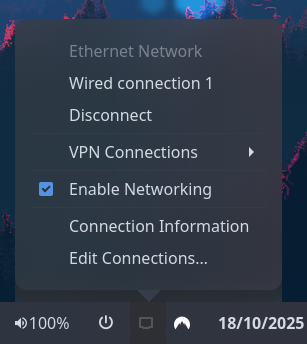
Type:
tray
| Name | Type | Default | Description |
|---|---|---|---|
direction |
'horizontal' or 'vertical' (shorthand: 'h' or 'v') |
Matches bar orientation | The direction in which to pack tray icons. |
icon_size |
integer |
16 |
Size in pixels to display tray icons as. |
prefer_theme_icons |
bool |
true |
Requests that icons from the theme be used over the item-provided item. Most items only provide one or the other so this will have no effect in most circumstances. |
icon_order |
string[] |
[] |
Order of tray icons by id. The match is case insensitive and each entry must only be contained in the id received by the bar. Any icon that does not match will be added to the left or on top depending on orientation. |
| on_click_left | string | 'default' | Action to perform on left-click. See Click Actions below. |
| on_click_right | string | 'menu' | Action to perform on right-click. See Click Actions below. |
| on_click_middle | string | 'none' | Action to perform on middle-click. See Click Actions below. |
| on_click_left_double | string | 'none' | Action to perform on double-left-click. See Click Actions below. |
| on_click_right_double | string | 'none' | Action to perform on double-right-click. See Click Actions below. |
| on_click_middle_double | string | 'none' | Action to perform on double-middle-click. See Click Actions below. |
Click actions can be one of the following built-in actions, or any custom shell command:
Built-in actions:
-
menu- Opens the tray icon's popup menu -
default- Triggers the tray icon's default (primary) action -
secondary- Triggers the tray icon's secondary action -
none- Do nothing
Custom commands:
Any other string is treated as a custom shell command. Custom commands support the following placeholders:
-
{name}- The tray item's identifier/name -
{title}- The tray item's title (if available) -
{icon}- The tray item's icon name (if available) -
{address}- The tray item's internal address
Examples:
{
  type = "tray"
  on_click_left = "menu"
  on_click_left_double = "default"
}
To run custom commands based on which tray item was clicked:
{
  type = "tray"
  on_click_left = "notify-send 'Clicked {name}'"
  on_click_middle = "if [ '{name}' = 'copyq' ]; then copyq toggle; fi"
}
To order icons with matching all the proton apps at once (this will not guarantee order within proton apps):
{
  type = "tray"
  icon_order = ["element", "proton", "keepass"]
}
JSON
{
  "end": [
    {
      "type": "tray",
      "direction": "top_to_bottom"
    }
  ]
}
TOML
[[end]]
type = "tray"
direction = "top_to_bottom"
YAML
end:
  - type: "tray"
    direction: "top_to_bottom"
Corn
{
  end = [{
    type = "tray"
    direction = "top_to_bottom"
  }]
}
Icon IDs
The icon_order option requires a list of icon IDs, which may not be immediately obvious.
These can be queried using ironbar var list tray, assuming Ironbar is running with at least one tray module added.
Some common application IDs:
- Element:
Element_status_icon_1 - OBS:
obs - Proton Mail:
Proton Mail Bridge - Proton VPN:
proton.vpn.app.gtk - Discord:
discord_status_icon_1 - Vesktop:
vesktop_status_icon_1 - Nextcloud:
Nextcloud - KeePassXC:
KeePassXC - Steam:
steam - Tidal:
tidal-hifi_status_icon_1
| Selector | Description |
|---|---|
.tray |
Tray widget box |
.tray .item |
Tray icon button |
.tray .item.urgent |
Tray icon button (needs attention) |
For more information on styling, please see the styling guide.