




Home • Web Platform • Installing • Web Application • How To Use • Trained Models • Citation
⭐ BioAutoML was selected by Prototypes for Humanity as one of the top 100 projects from nearly 3,000 applications submitted by graduates from over 100 countries. The project received funding for participation and was presented at the international festival in Dubai. More information is available at: BioAutoML on the event website.
⭐ 2025 Google PhD Fellowship in Health Research awarded to support outstanding and innovative research in computer science and related fields, providing total funding of USD 30.000 over two years — [Link]
⭐ ISME Scholar Mobility Fund awarded with funding of € 2.300 for a research period in July 2026 at the Helmholtz Centre for Environmental Research (UFZ) in Leipzig, Germany
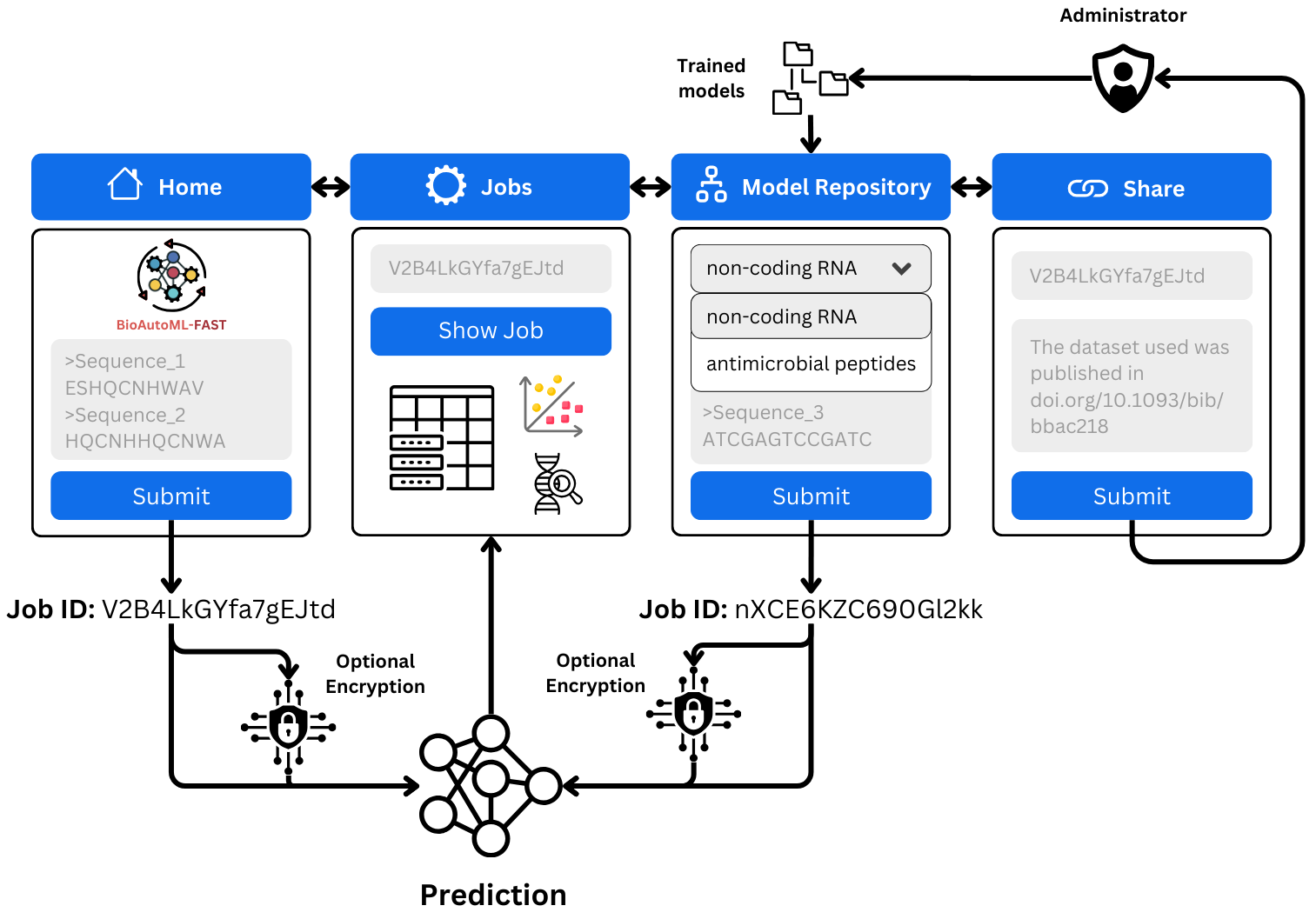
The prediction of biological sequence properties has traditionally relied on alignment-based methods that assume evolutionary homology and depend on curated reference databases. This, in turn, limits scalability and sensitivity for large or heterogeneous datasets, remote homologs, short sequences, and rapidly evolving genomic regions. Although Machine-Learning (ML) approaches offer alignment-free alternatives, their broader adoption is limited by: (i) the lack of standardized, externally validated benchmark models across diverse datasets, and (ii) the technical expertise required for feature engineering, model selection, and evaluation. Automated machine learning (AutoML) alleviates these challenges by systematically optimizing representations and models with minimal user intervention. However, most existing frameworks prioritize task-specific model construction and lack mechanisms for preserving trained models as persistent, comparable benchmarks. We introduce BioAutoML-FAST, an end-to-end web platform for automated ML analysis of nucleotide and amino acid sequences. It supports both classification and regression tasks and automates feature extraction, model training, and evaluation without requiring prior user expertise. Uniquely, it serves as a community benchmarking resource, hosting a continuously expanding repository of reusable, standardized models (currently 60) for genomic, transcriptomic, and proteomic applications. Extensive validation on independent datasets demonstrates performance comparable to or exceeding that of state-of-the-art methods, including protein language models such as ESM-2. BioAutoML-FAST is available at https://bioautoml.icmc.usp.br/. This website is free and open to all users, and there is no login requirement.
- Alignment-free machine learning for nucleotide and amino acid sequences
- Automated feature engineering — Bayesian optimization (Optuna) selects the best descriptor combination from a pool of 20 nucleotide descriptors and 23 protein descriptors
- Automated model training and hyperparameter optimization — supports LightGBM, XGBoost, and Random Forest with Optuna-driven tuning
- Classification and regression — binary, multiclass, and quantitative prediction tasks
- Structured data support —
generation.pycan be used directly with pre-computed feature matrices (CSV), without FASTA input - Pre-trained model repository — 60+ community benchmarks spanning genomics, transcriptomics, and proteomics, browsable on the web platform
- Reusable models — trained models can be saved and re-applied to new sequences for prediction
- Web platform — hosted at bioautoml.icmc.usp.br, no login required; can also be self-hosted
-
Breno L. S. de Almeida, Robson P. Bonidia, Martin Bole, Anderson P. Avila-Santos, Peter F. Stadler, Ulisses Rocha, André C. P. L. F. de Carvalho
-
Correspondence: brenoslivio@usp.br, bonidia@utfpr.edu.br or ulisses.rocha@ufz.de
Silva de Almeida, B. L., Bonidia, R., Bole, M., Avila-Santos, A., Stadler, P. F., Nunes da Rocha, U., & de Carvalho, A. C. L. F. (2026). BioAutoML-FAST: an automated machine-learning platform for reusable and benchmarked biological sequence models. bioRxiv, 2026-04. DOI
If you want to use BioAutoML-FAST locally you can clone the repository and add the necessary submodules:
git clone https://github.com/Bonidia/BioAutoML-FAST.git BioAutoML-FAST

cd BioAutoML-FAST

git submodule init

git submodule update1 - Install uv
If using Linux or Mac:
curl -LsSf https://astral.sh/uv/install.sh | shIf using Windows, use irm to download the script and execute it with iex:
powershell -ExecutionPolicy ByPass -c "irm https://astral.sh/uv/install.ps1 | iex"2 - Preparing the virtual environment
With uv installed, inside the folder use following command to synchronize the virtual environment with the necessary dependencies:
uv sync3 - Activate environment
After preparing the environment, you can activate the environment on Linux or Mac with:
source .venv/bin/activateUsing Windows:
.venv\Scripts\activate4 - Deactivate environment
You can deactivate the environment using:
deactivateThe hosted platform is freely available at https://bioautoml.icmc.usp.br/ — no login required.
If you prefer to run the web application locally or deploy it on your own server, follow the steps below.
The image installs Python dependencies from uv.lock and starts Redis, an RQ
worker, and Streamlit together. No separate host Redis is needed.
MMseqs2 and its native libraries are installed from pixi.lock in a build stage;
the runtime does not need Pixi to run the homology-aware option.
For a rebuild and background startup with local bind mounts and live UI reload:
./run-docker.shEvery invocation rebuilds the image and replaces the container created by the script, but never deletes your data. Running training jobs in that container are interrupted, so run it when idle. A failed build leaves the application stopped. The defaults are:
- Image/container:
bioautoml-fast:local/bioautoml-fast. - Web interface:
http://127.0.0.1:8501(local access only). - Jobs: local
App/jobs/↔ container/app/App/jobs/. - Database/state: local
App/task-results/↔ container/app/App/task-results/. SQLite istask_results.db; Redis persists in theredis/subdirectory. - Model repository: local
App/datasets/↔ container/app/App/datasets/(read-only). Override withDATASETS_DIR=/path/to/datasets. This folder must already exist and containreferences.biband the repository's model/metadata files. The launcher checks the directory and bibliography before stopping the existing app.
The container runs under your local user/group IDs to keep bind-mounted files accessible without recursive permission changes. Run as a non-root user with Docker access. An existing container not created by this script is not removed automatically. Previous named Docker volumes are not migrated into these local folders. Do not share the folders with another running app instance, and keep the complete database directory (including SQLite journal/WAL files) together.
Override settings if needed (use absolute paths for custom storage):
JOBS_DIR=/data/bioautoml/jobs STATE_DIR=/data/bioautoml/state HOST_PORT=8502 ./run-docker.sh
docker logs --follow bioautoml-fast
docker stop --time 40 bioautoml-fast
Set BIND_ADDRESS=0.0.0.0 only if you intend to expose the app to other machines.
No development flag is needed. If your current shell lacks Docker group permissions:
sg docker -c './run-docker.sh'After rebuilding, the container mounts
App/app.py, App/modules, and start.sh read-only from the host, and enables
Streamlit automatic reload with polling. Local UI edits become visible without
another build; jobs, database storage, and dataset mounts remain unchanged.
Recreating the container still interrupts running jobs. Modules also contain
job-processing functions: avoid editing those during jobs and restart the worker
after changing them. Other source files and dependency changes still require a
rebuild by running ./run-docker.sh again. Build options are accepted directly,
for example ./run-docker.sh --no-cache-filter mathfeature. Docker's build cache
can reuse unchanged layers; live UI edits do not require rerunning the launcher.
For image-only deployments or benchmark runs, use the manual Docker
commands below without source-code mounts.
Removing an image does not clear Docker's build cache.
Alternatively, build/run manually with Docker-managed named volumes:
docker build -t bioautoml-fast:local .
docker run --rm --name bioautoml-fast --stop-timeout 40 \
  -p 127.0.0.1:8501:8501 \
  -v bioautoml-jobs:/app/App/jobs \
  -v bioautoml-state:/app/App/task-results \
  --mount "type=bind,source=$(pwd)/App/datasets,target=/app/App/datasets,readonly" \
  bioautoml-fast:local
Open http://localhost:8501. The named volumes retain jobs, SQLite records, and
Redis state between container runs. Do not share these volumes between concurrent
instances. Model-repository datasets are mounted from the host at
/app/App/datasets; they are not included in the image.
MathFeature is cloned from its default branch during the build. Docker may reuse
the cached checkout; use docker build --no-cache-filter mathfeature -t bioautoml-fast:local . to refresh it. The resolved commit is recorded in
/opt/bioautoml/mathfeature-commit. Archive the built image for benchmarks:
an unpinned branch and APT repositories can change between fresh builds.
Run isolated checks without publishing ports or connecting to a live queue:
docker run --rm bioautoml-fast:local python -m unittest discover -s tests -v
docker run --rm bioautoml-fast:local python tests/check_runtime.py
docker run --rm --cpus 4 bioautoml-fast:local python tests/check_pipeline.py
The pipeline smoke test uses small example subsets and two trials per stage; it checks training, web prediction feature extraction, and saved-model reuse, not benchmark accuracy or exhaustive reproducibility.
The web app uses Streamlit for the interface and Redis + RQ to handle background jobs. Make sure Redis is installed and running before starting the app:
# Ubuntu/Debian
sudo apt install redis-server
sudo systemctl start redis-server

# macOS (Homebrew)
brew install redis
brew services start redisWith the virtual environment activated and Redis running, open two separate terminals from the repository root:
Terminal 1 — start the RQ worker:
cd App
rq worker bioautoml
Terminal 2 — start the Streamlit server:
cd App
streamlit run app.py
The app will be available at http://localhost:8501 by default.
For a persistent server deployment, you can use the provided systemd service files located in App/services/. Copy them to your systemd directory and enable them:
sudo cp App/services/bioautoml-web.service /etc/systemd/system/
sudo cp App/services/bioautoml-worker.service /etc/systemd/system/

sudo systemctl daemon-reload
sudo systemctl enable bioautoml-web bioautoml-worker
sudo systemctl start bioautoml-web bioautoml-workerBioAutoML-FAST uses a two-step pipeline: engineering.py handles feature extraction and descriptor selection, then automatically invokes generation.py for model training and hyperparameter optimization.
The two entry scripts remain at the repository root. Shared helpers live in the
bioautoml/ package: feature_execution.py, homology.py, and
model_artifacts.py. Run CLI commands from the repository root; the web app
continues to start from App/.
The image records its environment using python -m bioautoml.environment_report.
At build time, python -m bioautoml.web_metadata installs the public metadata from
App/index.html into Streamlit's installed HTML, preserving its versioned scripts,
styles and fonts. Do not replace Streamlit's HTML with the metadata template.
The title, description, canonical URL and sharing tags are present in the initial
HTTP response. The canonical URL targets https://bioautoml.icmc.usp.br/; change
both it and og:url in the template for a separately indexed deployment.
Rebuild the image after editing this template. Metadata does not guarantee Google
indexing or ranking, and is not an access-control mechanism for private jobs.
Development checks live in tests/; profiling and comparison utilities live in
manuscript/experiments/. Docker checks Streamlit and Redis directly, while
start.sh supervises service processes. The health check does not inspect idle
worker heartbeats.
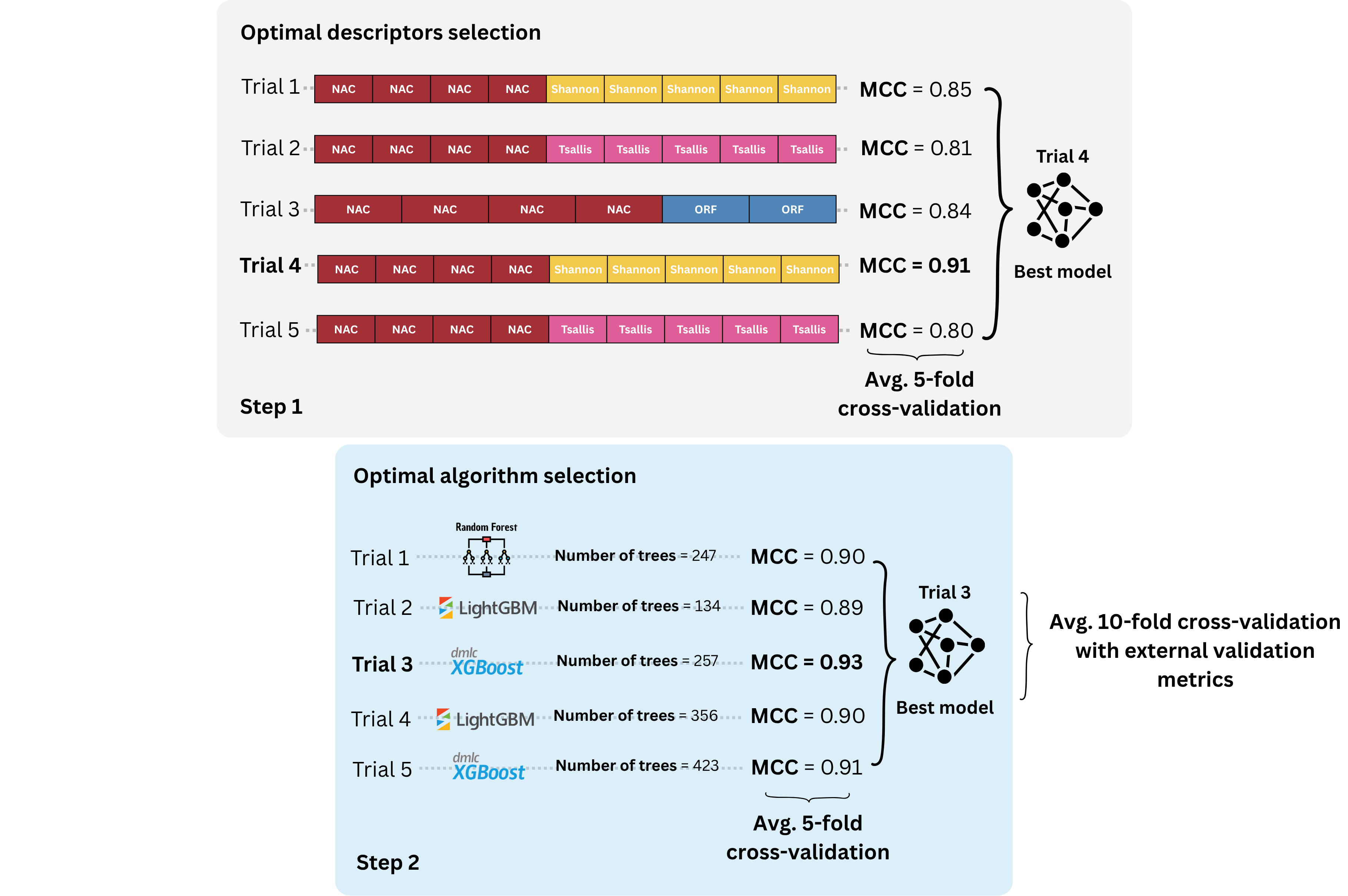
The engineering.py script performs the first step of BioAutoML-FAST. It extracts sequence descriptors from the input FASTA files, performs automated feature engineering/descriptor selection, and then automatically calls generation.py for model generation and hyperparameter optimization.
| Option | Description | Default |
|---|---|---|
-fasta_train, --fasta_train |
One or more training FASTA files. | Required |
-fasta_label_train, --fasta_label_train |
Labels associated with each training FASTA file. The order must match -fasta_train. |
Required |
-fasta_test, --fasta_test |
One or more testing FASTA files. | Optional |
-fasta_label_test, --fasta_label_test |
Labels associated with each testing FASTA file. The order must match -fasta_test. |
Optional |
-dtype, --dtype |
Type of input data. Supported values: DNA/RNA or Protein. |
DNA/RNA |
-task, --task |
Machine learning task. Use 0 for classification and 1 for regression. |
0 |
-estimations, --estimations |
Number of estimations used during automated feature engineering. | 200 |
-patience, --patience |
Number of trials without improvement before early stopping. | 80 |
-tuning, --tuning |
Number of trials used for hyperparameter optimization in generation.py. |
150 |
-difference, --difference |
Minimum improvement required before early stopping. | 0.001 |
-n_cpu, --n_cpu |
Number of CPU cores to use. Use -1 to use all available cores. |
-1 |
-output, --output |
Output directory where results will be saved. | Required |
python engineering.py \
  -fasta_train train/ncRNA.fasta train/lncRNA.fasta train/circRNA.fasta \
  -fasta_label_train ncRNA lncRNA circRNA \
  -fasta_test test/ncRNA.fasta test/lncRNA.fasta test/circRNA.fasta \
  -fasta_label_test ncRNA lncRNA circRNA \
  -dtype DNA/RNA \
  -task 0 \
-output resultspython engineering.py \
-fasta_train train/enzyme.fasta \
-fasta_label_train enzyme \
-fasta_test test/enzyme.fasta \
-fasta_label_test enzyme \
-dtype Protein \
-task 1 \
-output resultsThe generation.py script performs the second step of BioAutoML-FAST. It trains and optimizes machine learning models using the descriptors generated during the feature engineering step. The module supports both classification and regression tasks, including hyperparameter optimization and external test evaluation.
Structured data:
generation.pycan also be used as a standalone script with any pre-computed feature matrix in CSV format — no FASTA input or feature extraction required. This makes it suitable for general tabular ML tasks beyond biological sequences.
| Option | Description | Default |
|---|---|---|
-path_model, --path_model |
Path to a previously trained model to be reused for prediction or evaluation. | '' |
-task, --task |
Machine learning task. Use 0 for classification and 1 for regression. |
0 |
-tuning, --tuning |
Number of hyperparameter optimization trials. | 150 |
-train, --train |
Training feature matrix in CSV format. | Required |
-train_label, --train_label |
Training labels in CSV format. | Required |
-train_nameseq, --train_nameseq |
CSV file containing sequence names/identifiers for the training set. | Required |
-test, --test |
Test feature matrix in CSV format. | Optional |
-test_label, --test_label |
Test labels in CSV format. | Optional |
-test_nameseq, --test_nameseq |
CSV file containing sequence names/identifiers for the test set. | Optional |
-n_cpu, --n_cpu |
Number of CPU cores to use. Use -1 to use all available cores. |
-1 |
-output, --output |
Output directory where models and results will be saved. | Required |
--n_cpu bounds concurrent descriptor work as well as learner threads. Available
CPUs account for process affinity and Docker CPU quotas (--cpus); -1 uses
that available allocation, not necessarily every host core. Descriptor programs
share a bounded worker budget, including the nested repDNA and modlAMP pools.
Native numerical-library threads are limited inside these extractor processes
to avoid oversubscription. These limits do not change the Optuna search spaces,
trial budgets, CV folds, descriptor definitions, or learner selection rules.
CLI test extraction and web prediction continue to extract only the selected descriptor groups. Prediction reuses computed probabilities for metrics and does not re-encode the training frame stored in the artifact. Artifacts remain complete and uncompressed for the Jobs/model-inspection workflow.
Diagnostic timing and equivalence checks are available as:
python manuscript/experiments/profile_training.py --input datasets --output /tmp/profile-new \
  --datasets dataset2_yu_protein_0 --n_cpu 8 --estimations 10 --tuning 10
python manuscript/experiments/compare_training.py --trust-model /path/to/baseline/dataset2_yu_protein_0 \
  /tmp/profile-new/dataset2_yu_protein_0
Use the same inputs, image dependencies, CPU allocation, seeds and budgets on
both versions. The profiler reports minutes by phase and summed process RSS
(which can double-count shared memory). It adds profiling overhead; short-search
timings are not estimates of full-budget training. Optional
--max_train_per_class and --max_test_per_class create fixed first-record
subsets for engineering checks, not representative performance evaluation.
The comparison checks features, trial states/parameters, selected models,
metrics and predictions (numerical tolerance 1e-12) and loads trusted local
model artifacts only.
Both training scripts accept these options:
| Option | Description | Default |
|---|---|---|
--seed |
Seed for learners and shuffled CV folds. | 63 |
--search_seed |
Optuna sampler seed. | Same as --seed |
--search_jobs |
Concurrent Optuna trials; keep at 1 for repeatable trial ordering. |
1 |
--homology_aware |
Automatic MMseqs2 sequence grouping for CV and train–test similarity auditing. Start from FASTA inputs with engineering.py; generation.py reuses its assignments. |
Off |
--homology_identity |
Minimum identity in percent (1–100); requires --homology_aware. |
90 |
--homology_coverage |
Minimum alignment coverage of each sequence in percent (1–100); requires --homology_aware. |
80 |
Regression reports include MAE, MSE, RMSE, predictive R² (r2_score), and signed
Pearson r. Pearson measures linear association, not absolute accuracy: an
offset prediction can have r = 1 but poor R². Training and both search objectives
remain unchanged (RMSE); reporting uses the existing folds and predictions.
The CV CSV adds Pearson, std_Pearson (fold mean and population SD), and
valid/total fold counts. The adjacent *_pearson_folds.csv preserves unrounded
per-fold r, Pearson_r2, and reasons. External evaluation adds a Pearson row to
metrics_test.csv and a metrics_test_pearson.csv detail file. Pearson_r2 is
correlation squared for source-study comparisons, not predictive R²;
mean(fold r²) is not mean(fold r)². No additional model fits are performed.
Correlation is undefined (blank CSV value / N/A in Jobs) for fewer than two
observations, constant arrays, or numerically near-constant arrays (centered norm
at most float64 eps**0.75 times the absolute mean). If any CV fold is undefined,
the aggregate is N/A rather than silently averaging the remaining folds. Invalid
lengths, nonfinite values, and non-vector inputs are rejected. Older model reports
without Pearson still load and display “not recorded”; they are not backfilled.
Classification outputs are model-estimated probabilities, not guaranteed confidence estimates. Previously probability-calibrated model artifacts are no longer supported and must be retrained.
Add --homology_aware to a sequence-training command, or select Homology-aware
cross-validation in the web training form. No group file or custom split is
required. Structured tables and ordinary saved-model prediction do not support
this training-only option. Omitting it preserves the existing random-CV method.
New training defaults to ≥90% identity and ≥80% alignment coverage of both
sequences, for proteins and DNA/RNA alike. These defaults control close-sequence
redundancy, not all biological homology. Enable the option to reveal editable
percentage fields in the web form, or supply CLI percentages, for example
--homology_aware --homology_identity 90 --homology_coverage 80.
Values must be finite numbers from 1 to 100; use 90, not 0.9, for 90%.
Zero, negative, nonnumeric and nonfinite values are rejected before training;
explicit threshold options without --homology_aware are errors. Unusually low
identity (below 30% for proteins or 70% for nucleotides) or coverage (below 50%)
produces an advisory warning. Lower thresholds admit more similarity links and
generally larger groups; high thresholds can leave more distant relatives across
folds. For short peptides, low identity is weak evidence of evolutionary relatedness.
Choose thresholds before inspecting external scores, not to maximize them.
Historical reports retain their recorded thresholds (previous defaults: protein
30%, nucleotide 80%, coverage 80%). generation.py reuses those frozen assignments
when no threshold overrides are supplied, and rejects explicitly conflicting
values. To change them, rerun engineering.py into a new output directory.
Identity is the count of identical aligned residues divided by alignment length, including gaps, obtained with MMseqs2 alignment backtraces. Inputs are uppercased and nucleotide U is mapped to T for the audit; descriptor preprocessing remains unchanged. Nucleotide searches examine both strands. Exact duplicates mean equal full-length normalized sequences in the forward orientation (not reverse-complement equivalence).
Training-only similarity links, plus exact duplicates, form connected groups. All sequences are retained. One frozen five-fold assignment is shared by Stage 1, Stage 2; the reporting ten-fold CV also respects those groups. Group tie-breaking uses the training seed. Inputs, settings and environment must be fixed to repeat assignments. Highly connected datasets or classes confined to too few groups can make CV infeasible: the job stops instead of dropping sequences, relaxing thresholds or falling back to random folds.
MMseqs2 15.6f452 is pinned in Pixi/Docker. Local usage with the locked environment:
pixi install --locked
pixi run sync
pixi run uv run --locked --no-dev python engineering.py --help
The sensitive search runs once, not per Optuna trial. Queries shorter than 50
residues/bases bypass the k-mer prefilter, which may be expensive on large peptide
datasets. CPU use follows --n_cpu. Logs and wall time in minutes are retained;
native temporary databases are removed after each search. This is detection-based
similarity separation, not proof that all homologs have been separated. Local
alignment, heuristic searching of longer sequences, ambiguous symbols and the
bidirectional coverage requirement can miss relevant relationships, including
shared domains and common source proteins underlying short PTM windows.
When external test FASTAs are supplied, an exact-overlap audit runs even with the option off; near-duplicate similarity is then explicitly not assessed. With the option on, MMseqs2 also searches test sequences against training sequences. Counts refer to unique test sequences, and the similarity count includes exact matches. Label conflicts are reported for identical pairs when labels are known. Test sequences never participate in training grouping or tuning. Audits do not remove samples or modify original test membership. Loaded-model prediction does not rerun the audit or display an old training job's audit as a new result.
Outputs in homology/:
homology_report.json: policy, version, fold/group counts and grouping time.fold_assignments.csv: source-qualified sequence IDs, groups, hashes and both CV assignments (enabled mode).overlap_report.json: exact/similarity counts, percentages, conflicts and audit time.overlap_matches.csv: matched IDs, identity, coverage and exact-label conflicts.
The web Jobs performance view displays these reports and offers downloads. Training artifacts retain the homology report and overlap summary without changing their existing estimator or prediction interfaces.
The reported CV is post-selection CV, not nested evaluation of the full AutoML procedure. Homology-aware folds reduce detected sequence overlap but do not remove model-selection optimism or redundancy in the preserved external test set. These fixed thresholds are a documented policy, not a universal definition of homology. The homology-aware option does not create a new holdout.
Native sensitivity/integration checks (small fixtures, not benchmark accuracy):
pixi run uv run --locked --no-dev python tests/check_homology_search.py --output results/homology_native_check
BIOAUTOML_TEST_MMSEQS=1 pixi run testFor a repeatability check, keep inputs, row order, environment/image, CPU allocation,
seeds, and trial budgets identical. Add --n_cpu 8 --seed 63 --search_seed 63 --search_jobs 1 to a training command. FASTA file/label pairs are sorted together;
feature/label/ID row counts and feature schemas are checked. Prediction columns
are aligned to the saved training schema. CSV rows must still be correctly paired
with their labels and IDs; count checks cannot detect incorrectly assigned labels.
Stage 2 uses the tuning winner; with --tuning 0, it uses default LightGBM.
Saved-model prediction does not rerun tuning.
The benchmark runner retains model/fold seed 63 and search seeds 6301–6305:
python manuscript/experiments/run_benchmarks.py --n_cpu 8 --seed 63 --output results/benchmarks-newThe runner requires a new output directory outside App/datasets and preserves
historical results. Outputs use <output>/<dataset>/runs/run_N/, with the shared
run.json, timings.csv, model/, results/, and reports/ layout. Five different-search-seed runs measure search
variability and are separate from repeating the same seed in fresh containers.
Do not assume bitwise reproducibility across hardware, package versions, CPU/thread
settings, or parallel Optuna searches. Retain the built Docker image for a repeated
experiment: rebuilding it can retrieve a newer upstream MathFeature revision.
Validation commands (run pipeline checks twice in fresh containers of the same image):
python -m unittest discover -s tests -v
python tests/check_pipeline.py --output /tmp/repeat-off
# Full bundled nucleotide dataset, 200/150 trial budgets and unchanged early stopping:
python tests/check_pipeline.py --full_budget --output /tmp/repeat-full
# Recheck preserved artifacts without retraining:
python tests/check_pipeline.py --verify_saved /tmp/repeat-full --full_budget --output /tmp/reuse-full
The pipeline check exercises training, the web selected-descriptor extractor,
saved-model loading, and reordered/batched predictions. Its optional output
directory retains test artifacts and snapshots for comparison. Prediction checks
use rtol=atol=1e-12 to allow machine-precision tree-summation differences;
descriptor/model decisions must still match. These checks do not add
claims of cross-platform bitwise reproducibility. New runs do record execution
manifests, phase timings, and completion status.
Both scripts and web jobs use the same versioned layout. -output must be a fresh
directory: existing results are never silently overwritten. Separate prediction
runs do not modify their source model. All output paths use the layout below,
including before run.json is created; historical flat folders are not supported.
| File | Description |
|---|---|
run.json |
Run ID, model ID, settings, seeds, versions, source/input hashes, timestamps and status |
timings.csv |
Phase durations in seconds, statuses and parent phase IDs |
reports/performance_summary.csv |
Descriptor extraction, Stage 1/2 optimisation, end-to-end seconds and sampled peak process-tree RSS in bytes |
reports/sequence_names/ |
Original FASTA IDs/full headers, source IDs, record positions and internal IDs (TSV) |
model/trained_model.sav |
Self-contained uncompressed model; web training signs it after finalizing statistics |
results/metrics/optimization_cv_metrics.csv |
Post-selection ten-fold CV; not an unbiased evaluation |
results/metrics/optimization_cv_confusion_matrix.csv |
Classification reporting-CV confusion matrix |
results/metrics/test_metrics.csv |
Test-set metrics |
results/metrics/test_additional_metrics.csv |
Additional classification test metrics |
results/metrics/test_confusion_matrix.csv |
Classification test confusion matrix |
results/predictions/test_predictions.csv |
Per-sequence predictions |
results/descriptors/ |
Selected descriptors, selected matrices and feature importance |
inputs/ |
Web-submitted inputs; CLI inputs are referenced/fingerprinted without duplicating them |
reports/homology/ |
Sequence grouping and overlap reports |
logs/ |
Web pipeline output and per-process timing journals |
work/features/ |
Intermediate extracted features |
Durations use a monotonic clock; timestamps use UTC. The CLI and Jobs show minutes.
Queue waiting time is separate. Nested phases overlap and must not be summed.
execution_summary.json records web end-to-end time including optional archive
encryption; the encrypted archive contains the pre-packaging run record. Later
model inspection and plotting do not generate activity logs or change the training
time records.
Abrupt termination can leave a running record and partial journals: this is an
incomplete run, never proof of successful completion. Automatic feature reuse
based solely on directory names such as run_2 has been removed; extraction is
performed for each fresh CLI training run.
Every new training/prediction execution reports descriptor-extraction time, optimisation time, total elapsed time and sampled peak memory. Jobs displays minutes and GiB; CSVs retain seconds and bytes. Extraction includes descriptor assembly but excludes separately timed FASTA preprocessing. Optimisation includes Stage 1 and Stage 2, not final fitting or reporting CV. Inapplicable phases are blank in CSVs and shown as “Not applicable”, not fabricated timings. Parallel or nested phase intervals are not double-counted. The measurement starts when the execution recorder starts, after interpreter/module startup and argument parsing.
Memory is sampled every 0.1 seconds over the executing process and its descendants,
including native extractors/MMseqs2. This is sampled peak RSS, not exact unique
physical memory: short-lived spikes can be missed and shared pages can be counted
more than once. Unrelated jobs and Redis/Streamlit services are not part of a job's
process tree. Partial/failed runs retain available measurements; abrupt process
termination may prevent a final summary. Web jobs additionally write a root
performance_summary.csv and execution_summary.json after optional encryption.
The encrypted archive's total_scope=before_archive_packaging snapshot cannot
include its own packaging time; the external receipt is the authoritative total.
FASTA names are preserved separately from unique internal IDs. Repeated sequence
names are allowed, without collapsing records. Jobs and prediction exports show
the original ID, with the full header, source and record position available for
disambiguation. Prediction CSVs retain nameseq as the original display ID and add
internal_id, original_header, source_file, source_id, and record_number.
Feature matrices and fold alignment continue to use internal IDs. Training-name
mappings are stored in the model's lazy exploration section before signing.
Legacy models without mappings keep their existing names; prefixes are never
guessed away. Regression targets encoded after | remain unchanged.
CLI inputs with colliding filenames are disambiguated internally; web uploads
must have distinct filename stems within each split to avoid overwriting files.
Version-2 .sav bundles keep summary information, the prediction pipeline, and the complete
training/exploration data in independently loadable sections inside one file.
The Jobs page opens the summary first; prediction does not load the training matrix.
Analysis sections and model downloads are prepared on demand. No training data,
fitted parameters or feature precision is discarded.
Jobs uses native lazy tabs with Streamlit 1.55.0 (pinned in pyproject.toml and uv.lock): only the
selected tab executes its analysis. Hidden tabs do not load data or generate plots.
All Jobs analysis tabs remain available above 5,000 sequences, although individual
analyses can take longer on large datasets. Submission upload limits are unchanged.
The web app accepts only version-2 models signed by an approved web-training deployment. CLI-created version-2 models remain unsigned and can be loaded only with explicit local trust. Plain pickle/joblib models and version-1 bundles are rejected before deserialization, even with local trust enabled. Retrain unsupported models; no conversion utility or automatic signing of uploaded models is provided. Existing artifacts are not modified or deleted.
Python integrations should use the verified loader, not joblib.load():
from bioautoml.model_artifacts import load_model
model = load_model("trained_model.sav")  # Requires an approved signature/public trust store.
# Local files you created/trust only; never expose this option to web uploads:
local_model = load_model("local_model.sav", trust_unsigned=True)
For CLI prediction with your own unsigned model, add --trust_unsigned_model to
generation.py. It explicitly acknowledges pickle/joblib execution risk and is
forbidden in web job subprocesses. Local benchmark inspection tools are likewise
for trusted local outputs only. CLI training does not sign models.
Create keys outside the repository and Docker build context (the chosen directory must not exist):
python -m bioautoml.model_security bioautoml-keys
MODEL_KEYS_DIR=bioautoml-keys ./run-docker.sh
The launcher starts a separate bioautoml-fast-training container. Only that
container receives signing.pem (owner-only permissions); the ordinary web and
prediction container receives only trusted_keys.json. The training worker accepts
only new Home training jobs from bioautoml-training; the inference queue remains
bioautoml. No signing endpoint is exposed for uploaded models. Without configured
keys, web training is disabled and model verification fails closed. Do not use the
single-container/manual Docker example above for signing-enabled training.
For service deployments, configure BIOAUTOML_TRUSTED_KEYS on both processes and
BIOAUTOML_TRAINING_ENABLED=1 on the web service. Only the isolated training worker
receives BIOAUTOML_WORKER_ROLE=training, BIOAUTOML_SIGNING_KEY, and
BIOAUTOML_SIGNING_KEY_ID. It also needs the same trusted keys, Redis connection,
jobs volume, and task database. Protect Redis and writable job storage from
untrusted clients; queue payloads and the training infrastructure are trusted.
Back up the private key separately. Add new public key IDs for rotation; add a
compromised ID to revoked to reject its models, including cached section access.
When using file bind mounts, recreate both containers after replacing the trust
file so they see the new inode. Never distribute the private key with an image,
repository, or download. Do not mount the key directory itself into the web
container.
The signature authenticates a manifest and each section's SHA-256 hash. A section
is copied to a private temporary file, checked, and only then deserialized from
those exact bytes. This preserves lazy sections but adds disk I/O; it is not a
zero-cost check. Bundles must be uncompressed, contain only expected members, and
fit BIOAUTOML_MAX_MODEL_BYTES (default 32 GiB). Exact recorded NumPy, scikit-learn,
LightGBM, XGBoost and joblib versions must match. A signature proves origin and
integrity, not that compromised trusted infrastructure cannot generate harmful
objects. Models remain session-local and workers must retain restricted privileges.
After updating this code, rebuild/recreate the Docker container: live UI mounts
alone do not update the Streamlit dependency, bioautoml/ package, or CLI code.
The platform hosts a continuously expanding repository of pre-trained, benchmarked models for genomic, transcriptomic, and proteomic applications. You can browse and use these models directly through the web platform at https://bioautoml.icmc.usp.br/.
To download all trained models for offline use, they are available on Zenodo:
https://doi.org/10.5281/zenodo.20349210
If you use this code in a scientific publication, we would appreciate citations to the following paper:
Silva de Almeida, B. L., Bonidia, R., Bole, M., Avila-Santos, A., Stadler, P. F., Nunes da Rocha, U., & de Carvalho, A. C. L. F. (2026). BioAutoML-FAST: an automated machine-learning platform for reusable and benchmarked biological sequence models. bioRxiv, 2026-04. DOI
@article{silva2026bioautoml,
  title={BioAutoML-FAST: an automated machine-learning platform for reusable and benchmarked biological sequence models},
  author={Silva de Almeida, Breno Livio and Bonidia, Robson and Bole, Martin and Avila-Santos, Anderson and Stadler, Peter F and Nunes da Rocha, Ulisses and de Carvalho, Andre CP L F},
  journal={bioRxiv},
  pages={2026--04},
  year={2026},
  publisher={Cold Spring Harbor Laboratory}
}