


Docs ·
Install ·
Features ·
Quickstart ·
GitHub ·
Issues
Screenshots ·
BitBake setup ·
Daemon service ·
Contributing ·
License
A terminal workspace for Yocto developers: build images, inspect what goes into them, edit sources, and debug bring-up without losing your build context. A persistent daemon keeps builds and development terminals available when you close the UI and reconnect later.

Real Poky core-image-base / qemux86-64 build using existing sstate;
time-compressed, not simulated.
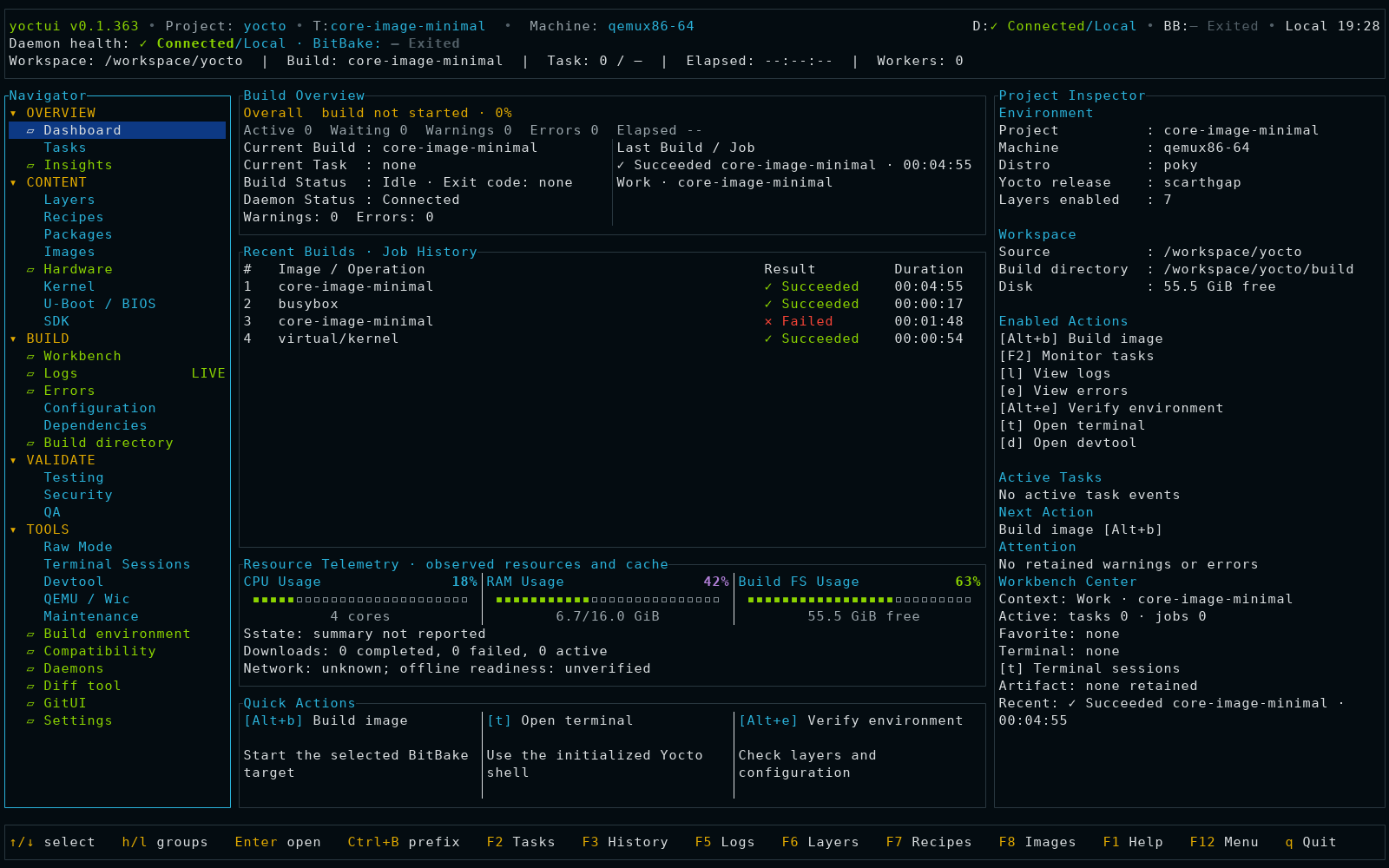
Static dashboard ·
Capture details
- Set up a workspace: create or import
bitbake-setupenvironments, manage configuration fragments, and review source/configuration updates. - Build and diagnose: dashboard and insights, live BitBake tasks, logs, warnings, errors, and saved build history.
- Develop: browse layers and recipes, use devtool and devshell, edit text with syntax highlighting, compare files in a built-in two-pane diff tool, and open GitUI in persistent terminal sessions.
- Inspect images: artifacts, rootfs package composition with a pie chart and list, navigable files with permissions and ownership, systemd services, D-Bus, and udev rules.
- Bring up hardware: organize project documents and requirements, and record progress through bootloader, kernel, device tree, drivers, and rootfs.
- Debug: kernel and U-Boot menuconfig, DTS/DTB tools, QEMU boot, SSH access, and remote kernel debugging with GDB.
Available actions depend on your Yocto build, generated artifacts, and installed tools. See the screenshots and workflows for a closer look.
Linux, an 80×24+ terminal, Python 3, a C compiler/linker, and stable Rust/Cargo are required. Install the prerequisites on Ubuntu/Debian (use equivalent packages on other Linux distributions):
sudo apt update
sudo apt install -y build-essential pkg-config curl ca-certificates python3 git
Install Rust and Cargo using rustup, then make Cargo available in the current shell:
curl --proto '=https' --tlsv1.2 -sSf https://sh.rustup.rs | sh
export PATH="${CARGO_HOME:-$HOME/.cargo}/bin:$PATH"
rustc --version
cargo --version
Install the official Yoctui release:
cargo install yoctui --locked -j 2
yoctui --version
For source builds, follow Build from source. QEMU, GDB, GitUI, and document viewers are optional tools needed for their respective workflows. Live builds also need your Yocto release's host dependencies; see workspace setup.
The UI and daemon use the same yoctui binary and release version;
yoctui --version reports the installed binary. Upgrading it does not replace
an already-running daemon: restart that daemon only after its jobs and terminal
sessions have finished.
cargo install does not install or enable a systemd service. For an optional
user service, with no other Yoctui daemon running:
yoctui daemon service install
systemctl --user enable --now yoctui.service
yoctui daemon service status
The unit is installed at ${XDG_CONFIG_HOME:-$HOME/.config}/systemd/user/yoctui.service
and starts at login when enabled. It does not inherit your current shell's Yocto
environment; use Tools → Daemons → c to review/configure its build and source
directories. Without systemd, yoctui daemon start runs a detached daemon directly.
From an existing Poky checkout, initialize a build directory (adjust the paths):
export POKY_DIR="$HOME/src/poky"
export BUILDDIR="$POKY_DIR/build-yoctui"
source "$POKY_DIR/oe-init-build-env" "$BUILDDIR"
yoctui daemon status
Check conf/local.conf for your desired MACHINE, such as qemux86-64.
See workspace setup
for Yocto host dependencies and other source layouts.
If no daemon is running, start one from this initialized shell:
yoctui daemon startConnect to the new daemon, or reconnect to one already using this build:
yoctui attachIf an existing daemon uses a different build, review switching it through Tools → Daemons → c after its jobs and terminal sessions finish.
Yoctui opens in your current terminal, including over SSH or on a text console; no graphical desktop or separate terminal window is required.
To build a Poky image inside Yoctui:
- Press
F8to open Images, then1for the Artifacts tab. - Press
ito choose an image, selectcore-image-minimal, and pressEnter. - Press
bto review the build. Check the target, then pressEnterto confirm and start building;Esccancels the review. - Follow progress in Tasks (
F2), build output in Logs (F5), and failures in Errors.
Use Tab to focus the workspace if the Navigator has focus. These i and b
shortcuts belong to Images; editors and terminal sessions have their own keys.
Alt+b opens additional build options, F1 opens Help, and F12 opens the menu.
Opening Yoctui does not start a build; exiting leaves daemon-owned work running.
For a modern source layout, install the separate upstream bitbake-setup tool
in a Python virtual environment (Ubuntu/Debian example):
sudo apt install -y python3-venv
python3 -m venv "$HOME/.venvs/bitbake-setup"
"$HOME/.venvs/bitbake-setup/bin/pip" install bitbake-setup
"$HOME/.venvs/bitbake-setup/bin/bitbake-setup" \
  --setting default top-dir-prefix "$HOME" \
  --setting default top-dir-name bitbake-builds \
  init --setup-dir-name yoctui-demo
Choose a Poky configuration, distro/poky and machine/qemux86-64 when offered.
Use only trusted templates: setup downloads sources and may execute scripts.
Then initialize the generated build and, if no daemon is running, start it:
source "$HOME/bitbake-builds/yoctui-demo/build/init-build-env"
yoctui daemon start
yoctui attach
Use Images → i → core-image-minimal, then b to review/start the build.
For an existing daemon, use the reviewed switch described above instead of
starting another one. See the upstream setup guide
for host requirements and template options.
Alternatively, open Build Environment → w to create a setup inside Yoctui.
Set the tool path above, top directory
$HOME/bitbake-builds (enter its absolute path), and setup name yoctui-demo;
review with s and confirm with Enter. Afterwards, 2 Setups → r discovers it;
Enter imports the profile for review. Use f/3 for fragments, s for status
or u for a reviewed update. Updates default to prompting about configuration
changes and aborting on rebase conflicts. See the
setup workflow
for verification and safe daemon switching.
User guide · Keyboard shortcuts · Screenshots · All documentation
Build from source · Flamegraph and renderer results · Issues · Third-party notices
Contributions are welcome. Share a bug report, suggest a workflow improvement, help with documentation, or contribute tests and code. Feedback from different boards and Yocto releases helps improve Yoctui for everyone.
Open an issue with reproduction steps and your Yocto/build environment, or send a focused pull request. For larger changes, please discuss the approach in an issue first. The development guide covers source builds and verification.
Yoctui is licensed under the MIT License. Copyright © 2026 Roy Cohen. Third-party components retain their own licenses; see third-party notices.