 SUSTech-CS305-Fall22
[Update0106]Comprehensive testing script and example released #56
TANSixu
announced in
Announcements

Replies: 0 comments
Sign up for free
to join this conversation on GitHub.
Already have an account?
Sign in to comment

Uh oh!
There was an error while loading. Please reload this page.
Uh oh!
There was an error while loading. Please reload this page.
Update 0106
We just received a bug report regarding our advance_test.py script regarding timeout argument. Please pull the latest version of advance.py by
For code changes please refer to #61
Previously we used the following code to add peer:
However, this will set a timeout out of 60 seconds (-t 60) by default.
Now we modified this to
We sincerely apologize for this mistake and any inconvenience incurred by this.
More info will come when you finish your exams. Good luck on your final!Hope you all did great in your finals. Your comprehensive tests will be graded with hidden tests after you submit your code. We provide an example of the comprehensive test, and you are encouraged to design your own task to test your code!
Run the following to update your code:
Or refer to PR #55 for code update
Build your own comprehensive test
Configure networks
topo.map
topo.map defines the topology of the network. The topology consists of nodes and edges, nodes are routers, and edges are undirected links connecting routers. Nodes may or may not connect to peers. Each line in the topo.map specifies an edge, for instance:
means that there are nodes1,2,3, and there are links between nodes1,2 and nodes1,3. The total delay from node1 to node2 will be$\frac{pktsize}{1000000}+0.1$ . The max queue size is 15, which means that packet loss may happen if more than 15 packets await here.
nodes.map
nodes.map defines which nodes in the network are connected to peers. For example,
means that node1 in the network is connected to a peer that has IP 127.0.0.1, and port 48001.
Visualize your network
net-visual.py
You can use net-visual.py to visualize your network.
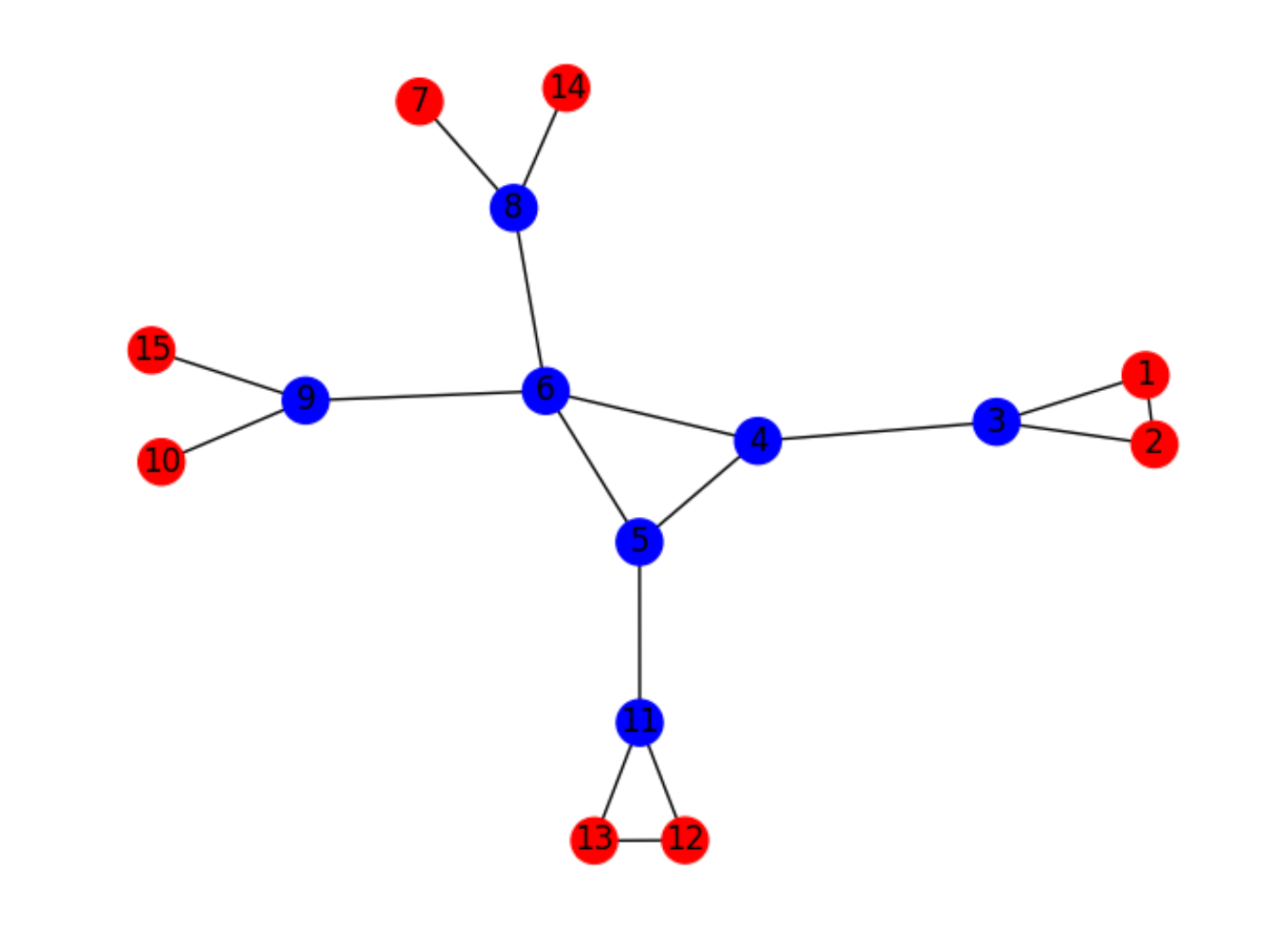
Nodes connected to peers will be in red, others will be in blue.
Visualization Example
The test/tmp5/topo5.map and test/tmp5/nodes5.map will generate:
Generate your task
The procedure will be similar to the example in the project README.
Prepare fragments
You can use any file to be your original file to make chunks. The test/tmp5/file.tar is actually a research paper. Use the util/make_data.py to generate fragments:
As in the example in the project README:
This means to generate 4 chunks, and to select chunk1,2 into data1.fragment. It will also generate a master.chunkhash that has all 4 hashes.
Prepare tasks(targets)
You can select some chunkhashes from master.chunkhash for each downloading targets. You can either use sed command or simply copy&paste.
Start the simulator and run your peers
Same as in the Project README example.
Use advance_test.py to run your tasks
Starting all peers in terminals may be tedious, especially when you want to run multiple tasks for several times. A advance_test.py script is provided to help you run your task more easily.
Grading session
This will start the simulator and peers, specify your topo.map and nodes.map as
Spiffy=True means to activate the simulator.
add peer
You may add peers to each session by passing the nodeid, fragment file etc.:
check_target_result
You can check your downloading result with this function by passing your target.chunkhash and the downloaded file name
Example of comprehensive test
Bonus test topology example
Bonus tests may be running in networks like this

All reactions