A browser on the iii engine bus: one shared
Chromium with tabs, a persistent profile (cookies, logins, storage) under
data/browser, tabs that survive restarts, and incognito tabs that save
nothing. Agents open a tab (a session), read the page as an
accessibility-tree outline, click and type against element refs, and read the
page's own console and network history back as data. The single most
important thing it gives you: "why is my dev server page blank?" becomes
answerable, because the page's console errors are one
browser::console::read away. The console
worker adds the human window: a Chrome-style tab strip over a streaming
viewport (Chromium-pushed screencast frames), an address bar, developer tools
behind the menu, and click-to-pick elements into chat.
It also carries a native Rust scraping surface, browser::*: HTTP
and browser fetching, screenshots, persistent sessions and BFS crawling, plus
CSS/XPath/regex queries, element search and HTML→Markdown that run over any
HTML string with no browser at all. See
Scraping and HTML parsing below.
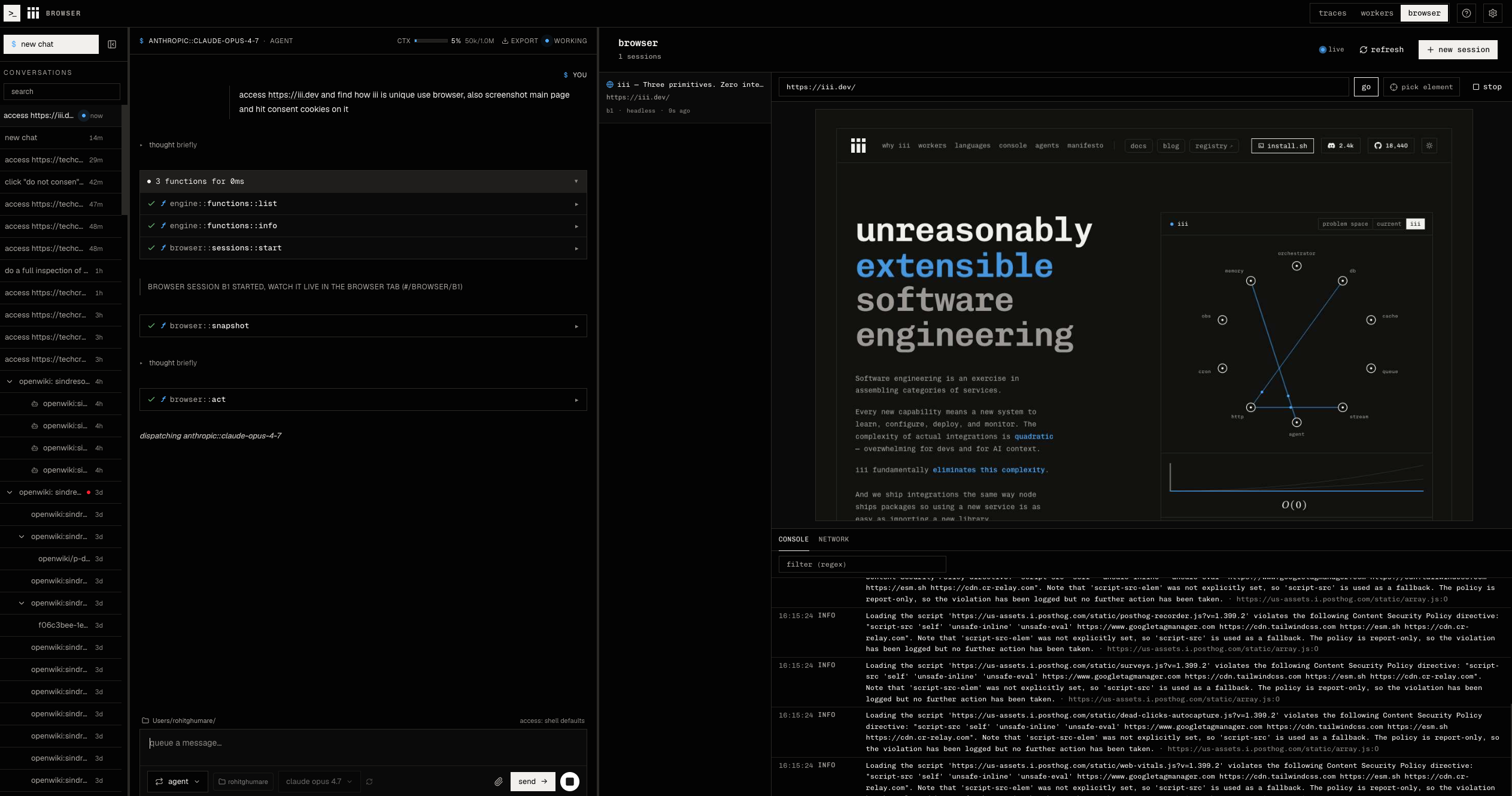
An agent reads a page as an accessibility outline (browser::snapshot) while
you watch the live viewport and console feed:
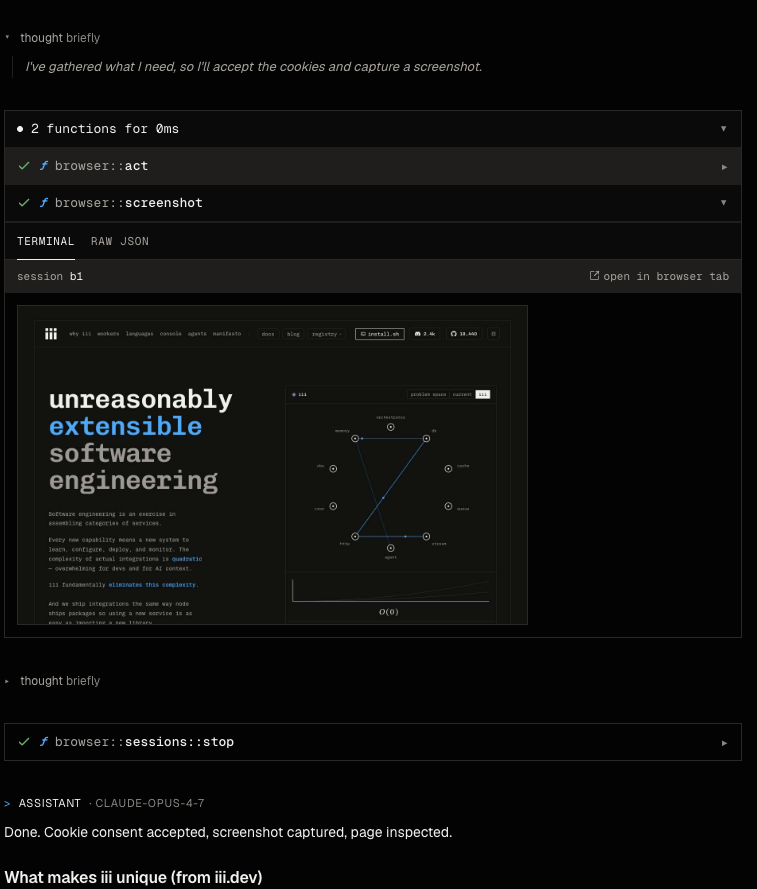
browser::screenshot renders the captured image inline in the chat card:
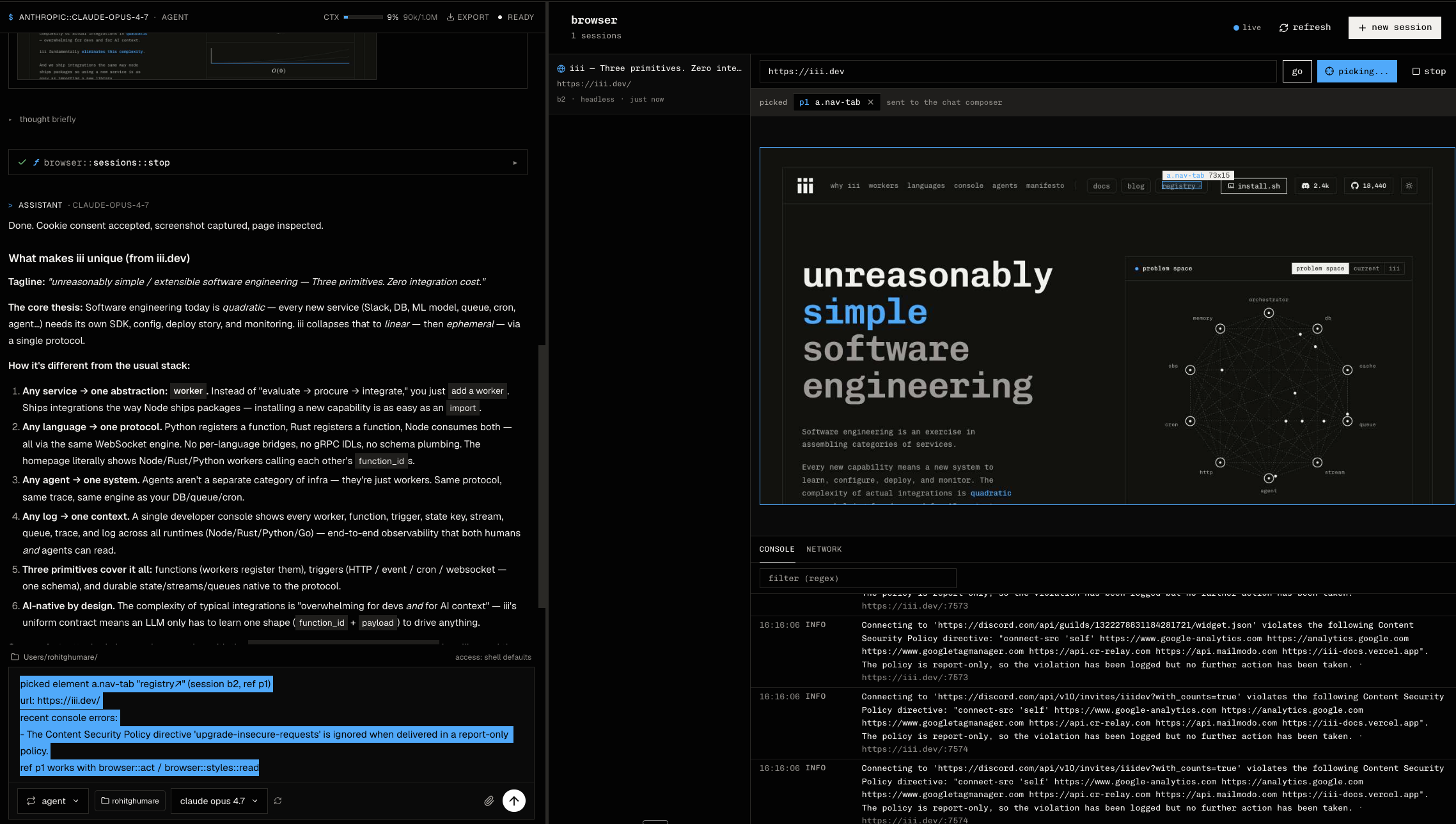
Pick mode highlights the element under the cursor and drops it into the chat composer as an actionable ref:
A session is a tab in the worker's browser. Tabs share one Chromium process
and one profile, so a login in one tab is a login in all of them, exactly as
in a browser. Regular tabs are saved to <data_dir>/tabs.json (url, title,
visited pages, back/forward stack) and come back after a worker restart.
- Lifetime. A tab stays open until
browser::sessions::stop, or until the optionalttl_msit was opened with elapses. The console opens tabs with no lifetime. - Sleep. A tab nobody watches (no console viewer, no recording) or calls
for
inactive_after_ms(30 minutes by default) goes to sleep: its page is closed, the tab is kept and still listed (active: false). Any call on it, or selecting it in the console, opens the page again at the url it remembered; back/forward keep working from the tab's own stack. When the last live tab sleeps, Chromium quits and its profile is flushed to disk; the next tab launches it again.max_sessionscaps live tabs: opening one more puts the least recently used unwatched tab to sleep first. - Incognito.
browser::sessions::startwithincognito: trueopens a PRIVATE tab in its own throwaway browser context: no shared cookies or logins, nothing written underdata_dir, no history kept, not restored after a restart, and inactivity closes it for good instead of putting it to sleep. The console shows it in Chrome's dark private-window palette. - Clearing data.
browser::clear-dataclears the site a tab is on (its cookies, its storage, the shared cache) — the ⋮ menu's "Clear cookies and site data".browser::clear-browser-data(Settings → Clear browser data) closes every page, quits Chromium, and deletes the whole profile and downloads; tabs stay and reopen signed out. - Loading like a browser. A page that fails to load (a network error, an
empty HTTP error response such as x.com's 400 to unknown clients) leaves
Chromium's error page in the tab and is reported in
navigate'sok/error, not thrown. Anhttps://url on localhost,*.localhost, or a loopback/private address whose TLS handshake fails (a plain dev server) is retried overhttp://, like an address bar does; public hosts never downgrade. Pages see a plain Chrome user agent, neverHeadlessChrome. - Live view. Every tab renders in its own headless window (a window shows only its active tab, so tabs sharing one would freeze), and the console gets frames at up to 30 fps, latest frame first, whatever the bus latency.
iii trigger compose::add worker=browseriii trigger compose::add resolves the worker and its dependencies, writes
exact declarations to worker-compose.yaml, and reconciles the Compose
project. By default the worker drives a Chromium/Chrome already installed on
the machine; point executable at a specific binary if auto-detection picks
the wrong one.
Interactive sessions run on one of two engines, both driven over the Chrome
DevTools Protocol, so the browser::* functions are the same code path:
engine |
What it needs | What you get |
|---|---|---|
chromium (default) |
Chrome, Chromium, or Edge installed | Everything: live view, real screenshots, pick mode, styles, downloads, headless: false |
lightpanda |
The Lightpanda binary (lightpanda on PATH, or executable) |
DOM + JavaScript without rendering: navigate, snapshot, act, evaluate/execute, console and network capture, cookies, history, dom::read |
Lightpanda is a headless browser written in Zig (V8 for JavaScript, its own
DOM, libcurl for HTTP) that drops the rendering engine on purpose: a single
binary, sub-100 ms start, around a tenth of Chrome's memory. The worker
spawns lightpanda serve on a loopback port the first time a tab needs a
page and ends it when the last live tab sleeps, the same lifecycle as the
Chromium process; cookies persist through data_dir/lightpanda/cookies.json
(written when the process exits). Element geometry is synthetic but
consistent, so clicking by ref works, and the accessibility tree names
controls from their contents.
What it cannot do, because nothing is laid out or painted: there is no
screencast, so the console's live viewport and the corner preview stay on a
single browser::screenshot frame (Lightpanda renders that as a text-only
PNG); pick mode (Overlay), browser::styles::read (CSS), clear-data's
per-origin storage wipe, and recording are unavailable; file:// pages are
refused ("UnsupportedProtocol"); headful: true and
browser::sessions::attach are Chromium only. browser::doctor reports the
configured engine and the binary it resolved.
brew install lightpanda-io/browser/lightpanda
# or the nightly binary: https://github.com/lightpanda-io/browser/releases/tag/nightly
Then set engine: lightpanda in the browser configuration (Settings →
browser → Launch).
Start a session, read the page, act on it, then read the console:
use iii_sdk::protocol::TriggerRequest;
use iii_sdk::{register_worker, InitOptions};
use serde_json::json;

#[tokio::main]
async fn main() -> anyhow::Result<()> {
    let iii = register_worker("ws://localhost:49134", InitOptions::default());

    let started = iii.trigger(TriggerRequest {
        function_id: "browser::sessions::start".into(),
        payload: json!({ "url": "http://localhost:3000" }),
        action: None,
        timeout_ms: Some(30_000),
    }).await?;
    let session_id = started["session_id"].as_str().unwrap();

    // The page as text: an a11y outline with [ref=eN] handles.
    let snapshot = iii.trigger(TriggerRequest {
        function_id: "browser::snapshot".into(),
        payload: json!({ "session_id": session_id }),
        action: None,
        timeout_ms: Some(15_000),
    }).await?;
    println!("{}", snapshot["tree"].as_str().unwrap());

    // What did the page log? Errors only, no dump.
    let console = iii.trigger(TriggerRequest {
        function_id: "browser::console::read".into(),
        payload: json!({ "session_id": session_id, "level": "error" }),
        action: None,
        timeout_ms: Some(10_000),
    }).await?;
    println!("{console:#}");
    Ok(())
}
The rest of the surface: browser::act (click/hover/type/press/scroll by
ref or coordinates, left/right/middle and double-click), browser::evaluate
(JS expression), browser::screenshot (viewable JPEG), browser::history
(back/forward/reload, surviving sleep and restarts), browser::history::list
(visited pages for a history panel), browser::find-in-page (find bar:
highlight matches, step next/previous), browser::zoom (page zoom
50-200 %), browser::pdf (print the page to a PDF), browser::downloads::list
/ browser::download / browser::download::remove (files the tab
downloaded), browser::clear-data (this site's cookies, storage, and the
cache), browser::clear-browser-data (the whole profile), browser::resize
(live viewport size / device presets), browser::cookies::list / set /
clear (import a cookie file; clear is per site), browser::network::read
(requests + failures), browser::dom::read (DOM tree with refs),
browser::styles::read / browser::styles::write (computed styles + live
inline edits, the design panel backing), and browser::sessions::list /
browser::sessions::stop. Function ids and schemas live in the code and
iii worker info browser.
File transfer functions:
| Function | Purpose |
|---|---|
browser::downloads::list |
List files the session downloaded |
browser::download |
Read one recorded download as base64 |
browser::download::remove |
Delete and forget one recorded download |
browser::upload |
Attach up to eight base64 files to exactly one input[type=file] selected by CSS |
Beyond single actions: browser::execute runs a multi-step async script in
the page — top-level await, log(...), sleep(ms), waitFor(selector), and
a state object that persists across execute calls for the session — so one
call replaces a chain of act/evaluate round-trips. browser::snapshot
accepts diff: true to return only what changed since the previous
snapshot, and reports the document generation its refs belong to (ref
names are unique per snapshot and fail closed when stale, never resolving to
a different element). browser::sessions::start accepts read_only: true
for inspection-only sessions where act/evaluate/execute/styles::write are
rejected. browser::doctor reports the environment — detected Chromium,
version, capacity — with an enable_how string for anything degraded.
browser::sessions::attach binds a session to an already-running browser
over CDP (start Chrome with --remote-debugging-port) instead of launching
one, so it reaches the real profile with its logins and extensions. It opens
a fresh tab the session owns, or adopts an existing tab by URL substring and
releases it untouched on stop; browser::tabs::list enumerates a running
browser's tabs. Attach reaches logged-in state, so it is off unless
allow_attach is set in config, and adoption is exclusive per tab.
browser::handoff pauses a session for a step only a human can do (CAPTCHA,
2FA, payment): it mounts an in-page continue banner and blocks the call until
the human clicks it, a browser::handoff::confirm call resolves it, or the
timeout elapses, emitting browser::handoff-requested for the console to
surface. Human acknowledgment is not proof, so the caller verifies the
expected page state after it returns.
browser::recording::start / browser::recording::stop capture a session's
live viewport to a webm or mp4 file by piping the screencast through ffmpeg
(turning screencast on if needed); stop returns the path, duration, and
frame count. While screencast is active a human watching the viewport also
sees a ghost cursor following the agent's clicks and a session-status badge;
both are fixed-position in-page overlays that never touch page content.
browser::doctor reports whether ffmpeg (recording) and attach mode are
available.
The worker also ships a native Rust port of the Scrapling surface: 19 functions covering HTTP and browser fetching, screenshots, persistent sessions, crawling, and — the part that needs no browser at all — parsing HTML you already have.
Start with the parse functions: they work on any HTML string with no browser or network. Adaptive CSS/XPath/extract calls are the exception to statelessness: they persist relocation identities in the configured SQLite database. They pair naturally with the session functions above (navigate, read the page, then parse it), but they don't need one.
iii trigger browser::css --payload '{
  "html": "<ul><li><a class=\"product\" href=\"/sku/1\">Widget</a></li><li><a class=\"product\" href=\"/sku/2\">Gadget</a></li></ul>",
  "query": "a.product",
  "attr": "href",
  "first": true
}'
# → { "result": "/sku/1" }
first defaults to false, in which case result is an array of every match
instead of just the first.
iii trigger browser::extract --payload '{
  "html": "<div class=\"card\"><h3>Widget</h3><span class=\"price\">$19.99</span><a href=\"/sku/1\">buy</a></div>",
  "selectors": [
    { "name": "title", "css": "h3" },
    { "name": "price", "css": ".price" },
    { "name": "url", "css": "a", "attr": "href" }
  ]
}'
# → { "extracted": { "title": "Widget", "price": "$19.99", "url": "/sku/1" } }
The 10 parse functions: extract, css, xpath, regex, find,
find-by-text, find-by-regex, find-similar, describe, to-markdown.
Non-adaptive parsing has no operator-tunable defaults. The fixed limit,
find / find-by-text / find-by-regex capping
at 100 items per call (limit clamps to [0, 100]), mirrors the python
worker's hardcoded cap.
Nine more functions go out to the network. They share one response envelope —
{status, url, headers, cookies, encoding} plus, on request, extracted
(from selectors), content+format (markdown/text) and html — so the
parse layer above is reachable inline, without a second call.
Three fetch tiers, cheapest first; escalate only when the cheaper one fails:
| engine | use when | |
|---|---|---|
fetch |
safe: reqwest/rustls; compat: frozen curl-impersonate | static pages, APIs — no browser, fastest |
dynamic-fetch |
frozen Chrome over raw CDP | the page needs JavaScript to render |
stealthy-fetch |
frozen Chrome with the Patchright command/launch sequence | the site sniffs for automation |
iii trigger browser::fetch --json '{
  "url": "https://example.com/",
  "selectors": [{ "name": "title", "css": "h1" }],
  "format": "text"
}'
# → { "status": 200, "url": "...", "extracted": { "title": "Example Domain" }, ... }
All three take a single url or a bulk urls list (bulk returns
{results: [...]}, where a failed URL contributes {url, error} instead of
sinking the batch). dynamic-fetch and stealthy-fetch additionally accept
wait_selector (+ wait_selector_state), network_idle, and wait.
browser::screenshot-url captures a page as image content blocks the console renders
inline — downscaled to 1024px wide and split into at most six 1536px tiles,
with the caption saying so when a page is taller than that.
session-open / session-fetch / session-close / session-list keep state
in a private Scrapling registry. HTTP sessions retain one cookie jar/transport;
dynamic and stealthy sessions retain one browser process and context. All use
UUID4 hex ids and serialize requests FIFO per session. They never appear in
browser::sessions::list, and interactive ids are not accepted. One-shot
browser calls get a fresh process/profile; retries get a fresh page in that
process. Compat mode supports request proxies, remote cdp_url, and
solve_cloudflare on stealthy calls.
crawl walks links breadth-first from start_urls, extracting per page. It
stays on the seed domain by default (www. folded), strips URL fragments when
deduping, and stops at max_pages (20) or max_depth (2). Every page is
emitted on a stream; the RPC response carries only a ≤10-item sample plus the
stream name and group id to read the rest with stream::on.
These functions take a caller-supplied URL, so they are an SSRF surface.
Safe mode rejects caller proxies and checks every connection against private,
loopback, link-local (including cloud metadata), CGNAT, multicast and reserved
ranges. Set browser.scrapling.allow_loopback: true to scrape a local dev
server; every other private range stays blocked. Compat mode intentionally
reproduces the Python wrapper's unrestricted network behavior and should be
enabled only for trusted calls. All nine functions remain at the
needs_approval default in iii-permissions.yaml, unlike the ten parse
functions.
The guarantee differs by tier, and the difference is worth knowing:
fetch(HTTP) — checked before every hop. Redirects are followed by hand precisely so each hop is validated before the request is made, and each connection is pinned to the address that was validated, closing the DNS rebinding window between check and connect.AuthorizationandCookieare dropped on a cross-origin redirect, as curl has done since CVE-2018-1000007.- Browser tiers — checked at the socket boundary. Safe-mode Chrome is forced through an in-process HTTP/CONNECT gate. The gate resolves, checks, and pins every destination before dialing, including redirect destinations; direct bypass, QUIC and WebRTC are disabled.
Two more safe-mode limits worth stating: response bodies are bounded at 32 MiB
whether or not the server declares a content length, and a fetch call is
capped at three times its timeout in total. Compat mode preserves the frozen
worker's unbounded response and retry/redirect quirks.
Request/response schemas are golden-pinned to the Python wrapper this
surface replaced. Every call is browser::<leaf>: the wrapper's
scrapling::screenshot is browser::screenshot-url here, while
browser::screenshot is the interactive session screenshot, and crawl
streams default to browser::crawl.
security_mode: safe is the default. It keeps SSRF checks and resource
ceilings, refuses network options the safe engine cannot enforce, rejects
verify: false, and bounds adaptive storage. security_mode: compat is only
eligible on Tier-1 Linux x86_64/aarch64 builds produced with the certified
curl-impersonate and Chromium artifacts. Other targets reject compat instead
of silently degrading. Eligibility is not a claim that an arbitrary local
build is certified: builds without the frozen artifacts return a capability
error, and callers should keep using safe mode.
The parser/query core, CSS-to-XPath translation, XPath 1.0 evaluation, Python
regex behavior, Markdown conversion, selector generation, and adaptive
relocation are repository-owned compatibility implementations covered by
exact differential fixtures. Adaptive queries persist element identities in
SQLite at adaptive_storage_path; parse functions remain auto-allowed, so
operators should treat that path as durable worker state. Safe mode enforces
adaptive_max_bytes (256 MiB by default) and rolls back a write that would
exceed it. Compat mode keeps the frozen worker's unbounded behavior.
Safe HTTP uses the bounded native engine. Compat HTTP is linked to the frozen curl-impersonate archive; compat browser calls use the certified Chrome build through raw pipe/WebSocket CDP and reproduce the frozen Playwright/Patchright sequences. Persistent browser sessions, proxy rotation, remote CDP, Cloudflare handling and screenshot transforms use that same private runtime. Certified builds fail when pinned artifacts are absent or mismatched; there is no silent fallback from compat to safe.
The standalone scrapling worker was the oracle and the production
fallback during rollout. It has been removed, and with it the Python
differentials that compared the two implementations call by call.
tests/golden/schemas/browser.*.json and tests/golden/behavior/** are the
frozen record of what the Python implementation answered, captured while both
ran side by side. They are no longer regenerable — the generator ran against
that implementation — so they are now ordinary regression fixtures: a test
failure means this worker's behavior moved, and the fixture is only ever
updated by hand, deliberately, with the change explained.
Stored in the configuration worker under the browser key. data_dir is
read at startup; engine, executable, headless, and the viewport apply
the next time the browser process launches (the first live tab after boot,
or after every tab went to sleep). Scrapling settings live in an isolated nested
block: bulk/default policy can be read per call, while the session cap, idle
timeout, and adaptive database path are snapshotted at worker startup.
Restart after changing a startup-snapshotted value.
browser:
  engine: chromium          # chromium | lightpanda (see Engines above)
  executable: ''            # empty = auto-detect Chrome/Chromium/Edge, or `lightpanda` on PATH
  data_dir: ./data/browser  # profile/ (cookies, logins), downloads/, tabs.json; startup setting
  headless: true            # false shows a real window locally
  max_sessions: 4           # tabs with a page open at once; the LRU unwatched tab sleeps past it
  console_buffer: 500       # per-session console ring buffer (entries)
  network_buffer: 500       # per-session network ring buffer (entries)
  viewport_width: 1280
  viewport_height: 800
  default_timeout_ms: 30000 # navigation/act/evaluate default
  max_timeout_ms: 120000    # ceiling; caller timeout_ms clamped DOWN to this
  inactive_after_ms: 1800000 # unused, unwatched tabs sleep after this (incognito closes); 0 disables
  screenshot_quality: 60    # JPEG quality 1-100
  allowed_schemes: [http, https, file]  # `file` lets a local document be rendered; see below
  max_snapshot_nodes: 2000  # a11y outline size cap
  default_origin_policy:    # omitted fields default to allow
    access: allow
    downloads: allow
    uploads: allow
    scripting: allow
  origin_policies:
    'https://app.example.com:8443':
      uploads: deny
    app.example.com:
      scripting: deny
  allow_history_access: true
  allow_cookie_import: true
  allow_attach: false       # true = allow sessions::attach into a running browser's real profile

  scrapling:
    security_mode: safe        # safe | compat; compat is Tier-1 certified builds only
    chromium_executable: ''    # certified Chrome path; empty = discovery
    allow_loopback: false      # true = permit 127.0.0.1 / ::1 in outbound calls

    defaults:
      impersonate: chrome
      headless: true
      network_idle: false
      proxy: ''
      include_html: false

    max_bulk_concurrency: 5
    max_sessions: 8
    session_idle_timeout_s: 900
    adaptive_storage_path: data/scrapling/elements.db # relative to III_COMPOSE_DIR
    adaptive_max_bytes: 268435456 # safe only; compat preserves the unbounded wrapper behavior
file is on the default scheme list so a local document can be opened and
rendered, which is how document::ocr gets pixels out of a scanned PDF. It is
worth knowing what that permits: navigation is not checked against a session's
filesystem scope the way the workers that read files directly are, so anything
that can reach browser::navigate can open any file this process can read.
Narrow the list on a shared machine.
Origin policy keys do not accept wildcards. An exact origin, including its
scheme and non-default port, wins over a bare host; a bare host matches any
scheme or port. Origin keys are URL-normalized before matching, including
lowercased hosts and removal of explicit default ports; bare-host keys match
case-insensitively. URLs with no matching key use default_origin_policy.
Each policy field defaults to allow when omitted.
Sessions started while any origin policy is configured reload the policy on every top-document request, so edits apply to their later navigations. A session started with no origin policy does not enable interception; adding the first policy later applies the navigation gate to new sessions.
The compatibility fields are part of the stable configuration surface. Non-Tier-1 or artifact-free builds retain safe mode and reject compat explicitly instead of approximating it.
The declared production envelope is 4 GiB memory and 2 CPUs. Tier-1 release validation budgets for five concurrent browser processes; that is a release test envelope, not permission to exceed configured session caps.
Sibling workers (and the console UI) can subscribe to session activity. All
bindings accept an optional { "session_id": "..." } filter.
| Trigger type | Fires when | Payload to subscribers |
|---|---|---|
browser::session-started |
A tab opened and is ready | { session_id, url, headless, timestamp } |
browser::session-stopped |
A tab closed for good | { session_id, reason: "stopped" | "idle" | "expired" | "crashed", timestamp } |
browser::session-updated |
A tab woke (active: true) or went to sleep (active: false) |
{ session_id, active, url, title, timestamp } |
browser::navigated |
The page committed a navigation | { session_id, url, timestamp } |
browser::console-event |
A console/log/exception entry was captured | { session_id, entry } |
browser::picked |
The human picked an element in inspect mode | { session_id, element, timestamp } |
browser::handoff-requested |
A session paused for a human step (CAPTCHA, 2FA, payment) | { session_id, handoff_id, instructions, timestamp } |
browser::frame-event |
Internal: a live screencast frame of a watched tab (console viewport plumbing) | { session_id, frame, width, height, frame_seq, timestamp } |
browser::console-event is high-volume; bind it with a session_id filter
and treat browser::console::read as the durable record. browser::picked
elements carry a ref that browser::act accepts directly, so a human pick
flows straight into agent action.
browser::pick::start puts the page in DevTools inspect mode (native hover
highlight); the human's click resolves to tag, attributes, outer HTML, text,
bounds, and recent console errors, emitted as browser::picked. The pick,
hint, screencast, and frame functions are internal: console-UI plumbing, not
agent surface, and they stay out of agent tool lists.